SETUP GUIDEHow to set it up8 sections. Choose a role to highlight what matters to you.
Everyone
1What it is and why
What it is
A setup page where you keep a list of the ships or other vessels that transport goods on voyages, so that a vessel can be selected when a voyage is created.
What you do here
Use this page to record the vessels you use often, so that users pick a vessel from a list instead of typing its name or number on every new voyage.
Example
For example, if the same ships carry your imports every month, create a vessel record for each one so the voyage creator only has to select it.
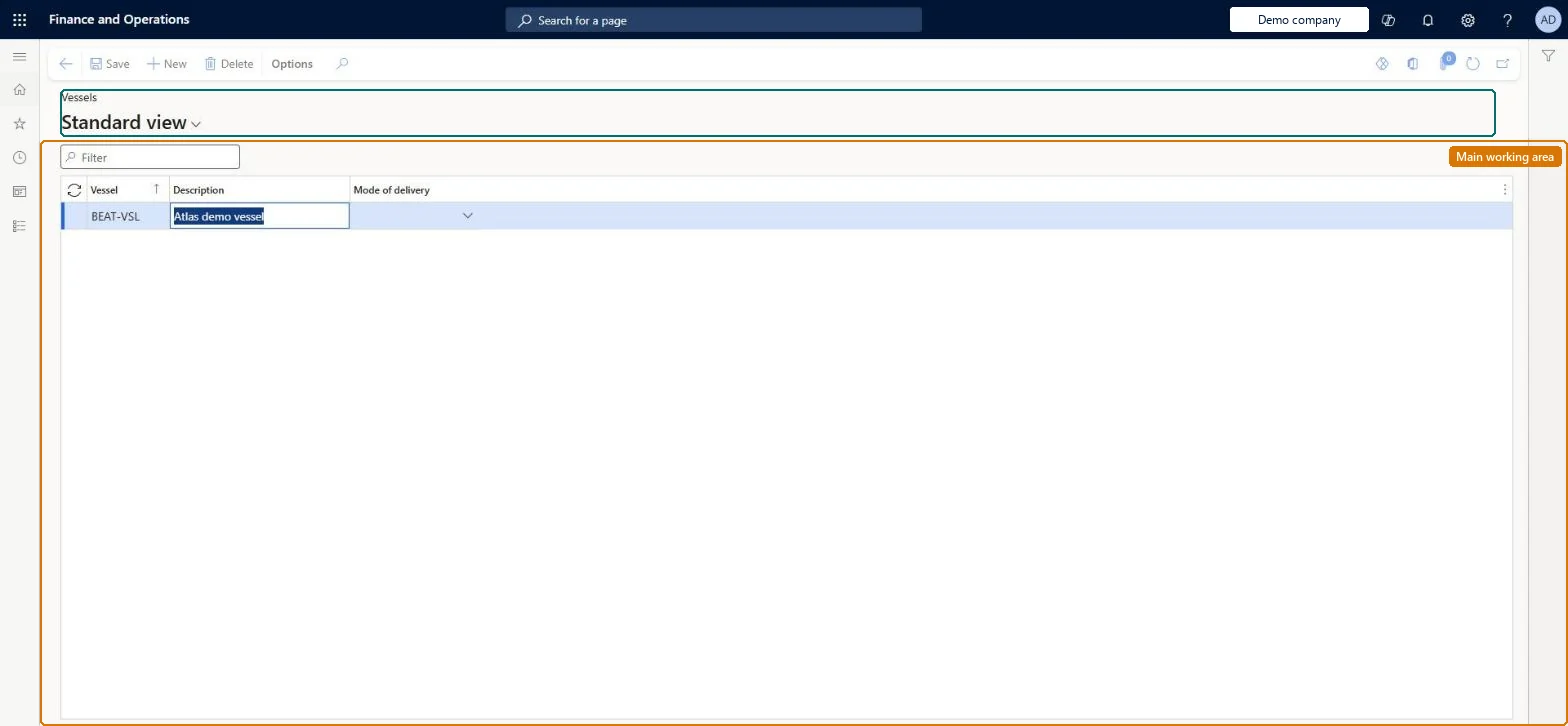
The page in Dynamics 365. page title tab to open what to set or check
About the examples: Examples and screenshots in this guide use BEAT, a demo company in a Dynamics 365 test environment. Use your own company's codes and values instead of copying them.
Setup steps on this page
Set up Vessels
Use this page to record the vessels you use often, so that users pick a vessel from a list instead of typing its name or number on every new voyage.
How to use it
Go to Landed cost > Shipping information setup > Vessels.
Use the Filter box to find a vessel.
Select New and enter the Vessel code and its Description.
Select the Mode of delivery the vessel uses.
Select Save, or select a vessel and choose Delete to remove it.
A vessel record for each vessel you use often, with its Mode of deliveryEvery voyage needs a vessel; records let users pick it from a list instead of typing it each time.
Typing a vessel ID as free text on the container. The main table isn't updated, so the vessel can't be picked from the list later.
Solution architect
5Design impact
Can it be undone
Reversible: Records can be created and deleted at any time.
Technical architect
6Technical
Menu item
ITMVesselTableChecked in Dynamics 365
Form
ITMVesselTableChecked in Dynamics 365
Table
ITMVesselTableShown as “VESSELS” in Record infoKey field: ShipVesselIdChecked in Dynamics 365
Data entities
ITMVesselTableEntityVessels Checked in Dynamics 365
To set it up or change itLanded cost manager ITMManagerGive people one of these roles. On this system, 1 role can open this page.Checked in Dynamics 365
Developer
7Developer
Open it by URL
https://<your-environment>/?mi=ITMVesselTable
Integrate with
ITMVesselTableEntity data entity Checked in Dynamics 365