Compensation and benefits manager, Human resource manager, Payroll administrator
Business process
Develop people strategy
Menu item
HRMInjurySetup
Main table
HRMInjuryType
Data entity
HcmInjuryBodyPartEntity
Setup steps
1 on this page
Show what matters for
SETUP GUIDEHow to set it up8 sections. Choose a role to highlight what matters to you.
Everyone
1What it is and why
What it is
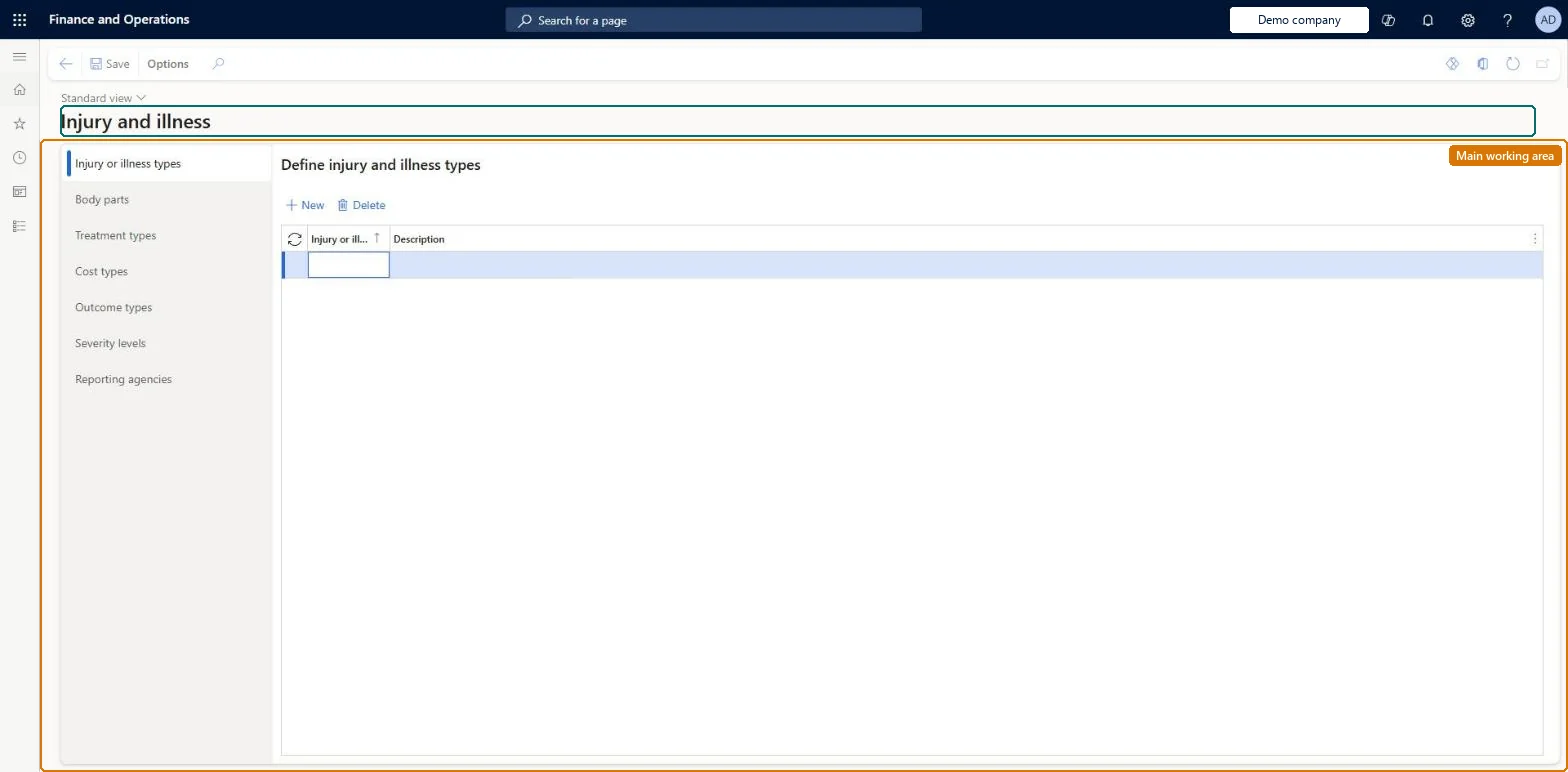
A setup page for injury and illness reference data: injury or illness types, body parts, treatment types, cost types, outcome types, severity levels, and reporting agencies.
What you do here
Use this page to set up the values that are selected when workplace injury or illness incidents are recorded and reported.
Example
For example, BEAT sets up 6 injury types such as Fracture, 12 body parts such as Wrist, treatment Splint, cost type X-rays, outcome Therapy, severity levels 1 to 3, and OSHA as the Default reporting agency for its US site.
The page in Dynamics 365. page title tab to open what to set or check
About the examples: Examples and screenshots in this guide use BEAT, a demo company in a Dynamics 365 test environment. Use your own company's codes and values instead of copying them.
Setup steps on this page
Set up Injury and illness setup
Use this page to set up the values that are selected when workplace injury or illness incidents are recorded and reported.
Steps from Microsoft
Go to Human resources > Workers > Injury and illness > Injury and illness setup.
Select New and enter an injury or illness type and description.
On the Body parts tab, select New and enter a body part.
Add treatment types, cost types, and outcome types on their tabs.
On the Severity levels tab, create severity levels.
On the Reporting agencies tab, add agencies and mark the default.
Fill every tab before the first case: injury or illness types, body parts, treatment types, cost types, outcome types, a severity scale (for example 1 minor to 3 severe) and the reporting agencies, with one agency marked Default.Learn says to complete this setup before recording cases, because incidents select these values. The Default reporting agency is the agency injuries and illnesses must be reported to.
Human resource manager, Compensation and benefits manager and Payroll administrator have access. No Feature management feature is needed for this page.
Shared: Data management lists the injury and illness types, body parts, treatment types, cost types, outcome types, severity levels and reporting agencies entities as shared, so every legal entity uses the same values. Checked in Dynamics 365
Can it be undone
Reversible: These are lookup values chosen on incidents. Add or change them at any time; review open cases before renaming or removing a value that cases already use.
If you change it later
Incidents select these values, and the reports filter and total on them; a value renamed or removed affects every case that uses it. Microsoft Learn
Technical architect
6Technical
Menu item
HRMInjurySetupChecked in Dynamics 365
Form
HRMInjurySetupChecked in Dynamics 365
Table
HRMInjuryTypeShown as “INJURY AND ILLNESS TYPES” in Record infoKey field: InjuryTypeIdChecked in Dynamics 365
Data entities
HcmInjuryBodyPartEntityInjury and illness body parts Checked in Dynamics 365HcmInjuryCostTypeEntityInjury and illness cost types Checked in Dynamics 365HcmInjuryOutcomeTypeEntityInjury and illness outcome types Checked in Dynamics 365HcmInjurySeverityLevelEntityInjury and illness severity levels Checked in Dynamics 365HcmInjuryTreatmentTypeEntityInjury and illness treatment types Checked in Dynamics 365HcmInjuryTypeEntityInjury and illness types Checked in Dynamics 365HcmInjuryReportingAgencyEntityReporting agencies Checked in Dynamics 365
Who can open it
PrivilegesMaintain injuries and illnesses HRMInjurySetupMaintainView injuries and illnesses setup HRMInjurySetupViewDutiesInquire into benefits process HcmBenefitInquireEnable benefits process HcmBenefitProcessEnable3 security rolesCompensation and benefits manager HcmCompensationAndBenefitsManagerHuman resource manager HcmHumanResourceManagerPayroll administrator HcmPayrollAdministratorChecked in Dynamics 365
Roles to set it up and use it
To set it up or change itCompensation and benefits manager HcmCompensationAndBenefitsManagerPayroll administrator HcmPayrollAdministratorTo use itHuman resource manager HcmHumanResourceManagerGive people one of these roles. On this system, 3 roles can open this page.Checked in Dynamics 365
Developer
7Developer
Open it by URL
https://<your-environment>/?mi=HRMInjurySetup
Integrate with
HcmInjuryBodyPartEntity data entity Checked in Dynamics 365
Data migration
HcmInjuryTypeEntity Injury and illness types. Shared.HcmInjuryBodyPartEntity Body parts. Shared.HcmInjuryTreatmentTypeEntity Treatment types. Shared.HcmInjuryCostTypeEntity Cost types. Shared.HcmInjuryOutcomeTypeEntity Outcome types. Shared.HcmInjurySeverityLevelEntity Severity levels. Shared.HcmInjuryReportingAgencyEntity Reporting agencies. Shared.Load order: Load with the Case management template before Injury or illness incidents.Microsoft Learn