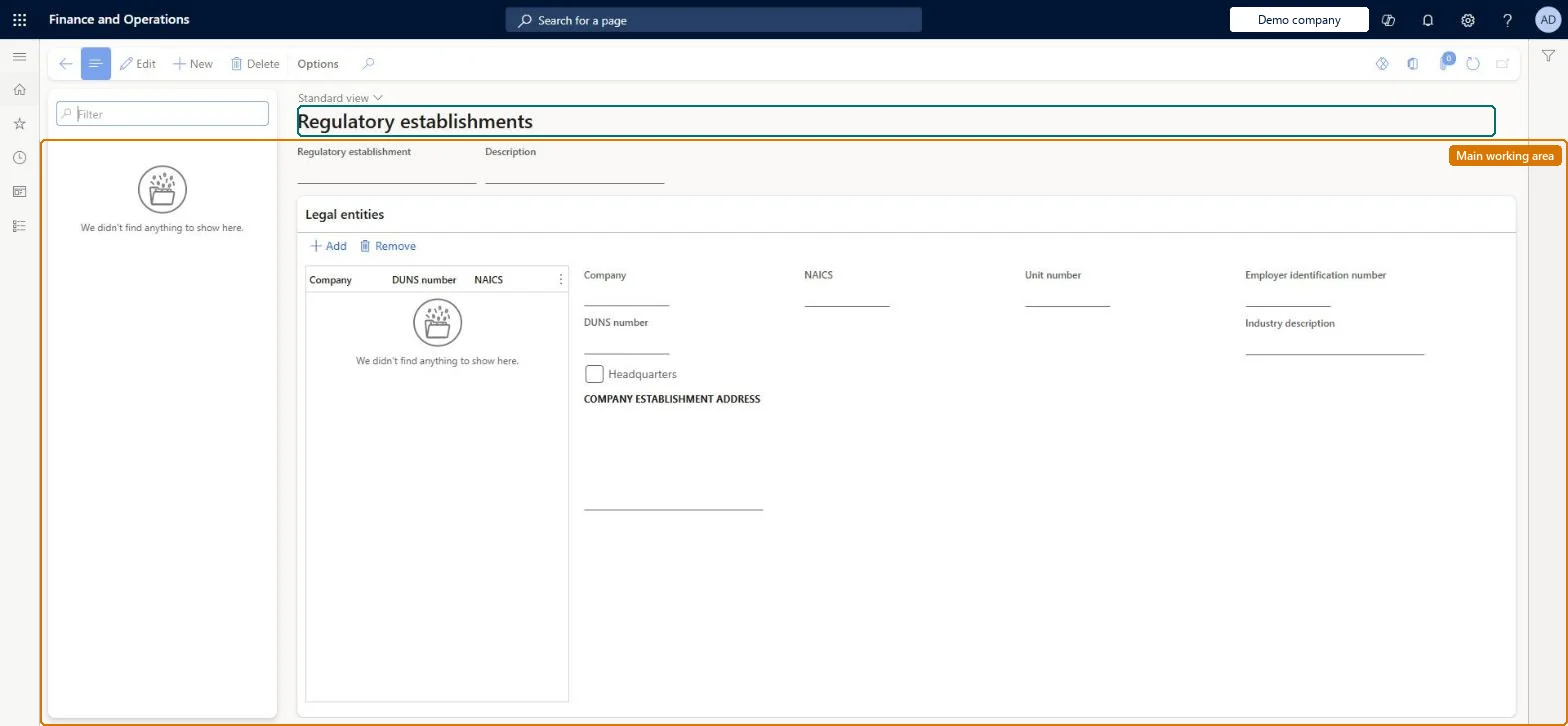
A US setup page for EEO reporting establishments: each establishment lists the legal entities at that site with their DUNS number, NAICS code, unit number, employer identification number and address, and one establishment per company is marked as headquarters.
Compensation and benefits manager, Human resource assistant, Human resource manager and 3 more roles
Business process
Develop people strategy
Menu item
HcmEEOEstablishmentSetup
Main table
HcmEEOEstablishment
Data entity
HcmRegulatoryEstablishmentEntity
Setup steps
1 on this page
Show what matters for
PAGE GUIDEWhat the page does and how to use it8 sections. Choose a role to highlight what matters to you.
Everyone
1What it is and why
What it is
A US setup page for EEO reporting establishments: each establishment lists the legal entities at that site with their DUNS number, NAICS code, unit number, employer identification number and address, and one establishment per company is marked as headquarters.
What you do here
Use this page in US legal entities to record the establishments employees are reported under in the EEO-1 report, so each employment can carry its regulatory establishment.
Example
For example, BEAT sets up the establishments BEAT-HQ (Chicago, Headquarters = Yes) and BEAT-TX (Dallas) for its US company, with DUNS number 123456789, NAICS 541512 and EIN 12-3456789; the 38 Chicago and 22 Dallas employees carry their establishment on their employment, and the EEO prep report counts them per site.
The page in Dynamics 365. page title tab to open what to set or check
About the examples: Examples and screenshots in this guide use BEAT, a demo company in a Dynamics 365 test environment. Use your own company's codes and values instead of copying them.
Setup steps on this page
Set up Regulatory establishments
Steps from Microsoft
Go to Human resources > Setup > Regulatory establishments.
Use the Filter box to find an establishment.
Select New and enter the Regulatory establishment and Description.
Under Legal entities, select Add and pick the Company, then enter its DUNS number, NAICS, Unit number, Employer identification number, Industry description, Headquarters and establishment address.
The code of the reporting establishment.Checked in Dynamics 365
BEAT-HQ
Description
The name of the establishment.Checked in Dynamics 365
Chicago headquarters
Company
A legal entity that has employees at this establishment.Checked in Dynamics 365
BEAT
DUNS number
The nine-digit Dun & Bradstreet number that identifies the company.Microsoft Learn
123456789
NAICS
The North American Industry Classification System code of the establishment.Checked in Dynamics 365
541512
Unit number
The reporting unit number of the establishment.Checked in Dynamics 365
U0001
Employer identification number
The US federal employer identification number (EIN) of the company.Checked in Dynamics 365
12-3456789
Headquarters
Marks the establishment that is the headquarters of the company.Checked in Dynamics 365
Yes
Common errors and fixes
Message
What to do
An employee is missing from the establishment counts
The employee's employment has no regulatory establishment. Set it on the employment, and check the establishment lists the employee's legal entity. Microsoft data model
Test checklist
Create an establishment and add the US legal entity with DUNS number, NAICS, unit number and EIN; set Headquarters on one establishment.
Set the establishment on two employees' employment.
Run the EEO prep report for the legal entity and check both employees are counted under the establishment.
US only: one establishment per US reporting site, each with its legal entity lines (DUNS number, NAICS, unit number, EIN, address) and one marked Headquarters per company, set up before employments are loadedEmployments point to the regulatory establishment, and US EEO reporting counts employees by establishment; the identifiers on the legal entity lines describe the employer at that site.
US only: used for the EEO-1 compliance reporting of US legal entities. Human resource assistant maintains the list; Human resource manager, Compensation and benefits manager, Recruiter, Payroll administrator and Payroll manager view it. No Feature management feature is needed for this page.
Shared: regulatory establishments are not per company; each establishment lists the legal entities it covers. Data management lists the Regulatory establishments and Regulatory establishment details entities as shared. Checked in Dynamics 365
If you change it later
Employment records carry the regulatory establishment (RegulatoryEstablishment and RegulatoryEstablishmentId on the Employment entity), so renaming or removing an establishment reaches every employment that points to it. Microsoft data model
Technical architect
6Technical
Menu item
HcmEEOEstablishmentSetupChecked in Dynamics 365
Form
HcmEEOEstablishmentSetupChecked in Dynamics 365
Table
HcmEEOEstablishmentShown as “REGULATORY ESTABLISHMENTS” in Record infoKey field: EEOEstablishmentChecked in Dynamics 365
Data entities
HcmRegulatoryEstablishmentEntityRegulatory establishments HcmRegulatoryEstablishmentDetailEntityRegulatory establishment details (The legal entity lines of an establishment.) HcmCompanyHeadquartersEstablishmentEntityHeadquarters establishment for company (Which establishment is the headquarters of each company.)
Who can open it
PrivilegesCreate, edit, and delete regulatory establishments HcmEEOEstablishmentMaintainInquire into the setup of regulatory establishments HcmEEOEstablishmentViewDutiesEnable workforce management process HcmWorkforceProcessEnableInquire into workforce management process HcmWorkforceProcessInquire6 security rolesCompensation and benefits manager HcmCompensationAndBenefitsManagerHuman resource assistant HcmHumanResourceAssistantHuman resource manager HcmHumanResourceManagerPayroll administrator HcmPayrollAdministratorPayroll manager HcmPayrollManagerRecruiter HcmRecruiterChecked in Dynamics 365
Roles to set it up and use it
To set it up or change itHuman resource assistant HcmHumanResourceAssistantTo use itHuman resource manager HcmHumanResourceManagerCompensation and benefits manager HcmCompensationAndBenefitsManagerRecruiter HcmRecruiterPayroll administrator HcmPayrollAdministratorPayroll manager HcmPayrollManagerGive people one of these roles. On this system, 6 roles can open this page.Checked in Dynamics 365
HcmRegulatoryEstablishmentEntity Regulatory establishments. Shared by all companies.HcmRegulatoryEstablishmentDetailEntity Regulatory establishment details: the legal entity lines.HcmCompanyHeadquartersEstablishmentEntity Headquarters establishment for company.Load order: Load with the Personnel management setup template: Regulatory establishments first, then Regulatory establishment details and Headquarters establishment for company. Load them before employments that point to an establishment.Microsoft Learn