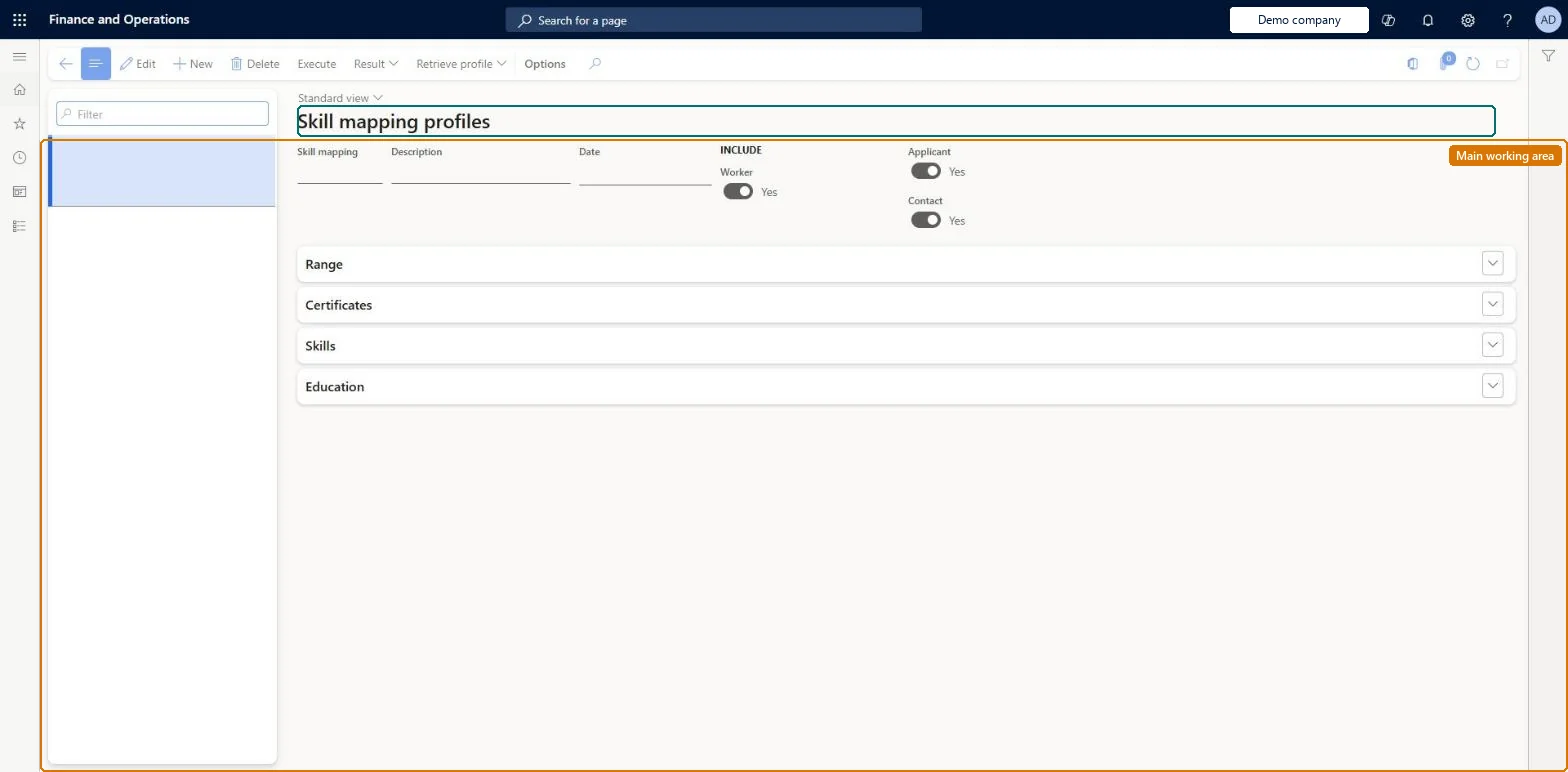
Setup step on the Skill mapping profiles page · Human resources
Set up Skill mapping profiles
Use this page to define a profile or retrieve one from a person, job or course, mark criteria as optional with an importance, run the search, and view the best matches and gaps.
Human resource assistant, Human resource manager, Recruiter and 1 more role
Business process
Develop people strategy
Menu item
HcmSkillMapping
Main table
HcmSkillMappingHeader
Data entity
HcmSkillMappingHeaderEntity
Setup steps
2 on this page
Show what matters for
SETUP GUIDEHow to set it up8 sections. Choose a role to highlight what matters to you.
Everyone
1What it is and why
What it is
A page where you create and save skill mapping profiles, which are sets of skill, education, certificate and range criteria used to search for workers, applicants or contacts with matching qualifications.
What you do here
Use this page to define a profile or retrieve one from a person, job or course, mark criteria as optional with an importance, run the search, and view the best matches and gaps.
Example
For example, for the opening Senior accountant the recruiter creates the profile SrAccountant-2026, retrieves the profile of the Senior accountant job (CPA, Excel at Expert, a Bachelor's degree), limits the range to the Finance department, marks Excel Optional with Importance High, and the result lists 2 applicants and 1 employee, with the best match at the top of the report.
The page in Dynamics 365. page title tab to open what to set or check
About the examples: Examples and screenshots in this guide use BEAT, a demo company in a Dynamics 365 test environment. Use your own company's codes and values instead of copying them.
Setup steps on this page
Set up Skill mapping profiles
Use this page to define a profile or retrieve one from a person, job or course, mark criteria as optional with an importance, run the search, and view the best matches and gaps.
Find candidates for an opening with a profile
Build a search profile from the job of the opening and run it over applicants and workers.
Steps from Microsoft
Go to Human resources > Recruitment > Skill analysis > Skill mapping profiles.
Select New, name the profile after the opening, and enter the Description and Date.
Select Retrieve profile > Job, select the job of the opening, and select OK.
On the Range FastTab, add limits such as the department; review the Certificates, Skills and Education FastTabs.
Mark nice-to-have criteria Optional and set their Importance.
Select Execute, then Result; open Resume for a person to see their certificates, skills and experience.
Select Report to see the best matches first and the gap for each criterion, then Save the profile.
Start each profile with Retrieve profile from the job (or from a person whose skills you want to match), then mark the nice-to-have criteria Optional with an Importance.Retrieve profile pulls in the certificate, skill and education data of the selected person, job or course as the basis of the search; you then add or remove criteria, mark them optional and rank their importance.
One profile per opening, retrieved from the job, with the range limited where it matters and nice-to-have criteria marked Optional with an Importance; run it with Applicant and Worker both included.Retrieve profile pulls the job's certificates, skills and education as the search basis; the report ranks the best matches and shows the gap between the profile level and the person's level.
Recruiters, HR staff and training managers use it: the live security grants it to the Recruiter, Human resource manager, Human resource assistant and Training manager roles. No Feature management feature is needed for this page.
Shared: skill mapping profiles are not per company. Data management lists the Skill-mapping - main entity as shared, so every legal entity sees the same records. Checked in Dynamics 365
Can it be undone
Reversible: A profile is a saved set of search criteria; you can edit it and run Execute again at any time.
If you change it later
Only people marked Include in skill mapping appear in the results. Microsoft Learn
Technical architect
6Technical
Menu item
HcmSkillMappingChecked in Dynamics 365
Form
HcmSkillMappingChecked in Dynamics 365
Table
HcmSkillMappingHeaderShown as “SKILL-MAPPING - MAIN” in Record infoKey field: SkillMappingHeaderIdChecked in Dynamics 365
Data entities
HcmSkillMappingHeaderEntitySkill-mapping - main Checked in Dynamics 365HcmSkillMappingSkillEntitySkill-mapping - skills (The skill criteria of a profile.) HcmSkillMappingCertificateEntitySkill-mapping - certificates (The certificate criteria of a profile.) HcmSkillMappingEducationEntitySkill-mapping - education (The education criteria of a profile.) HcmSkillMappingRangeEntitySkill-mapping - criteria (The range criteria of a profile, such as department.)
Who can open it
PrivilegesMaintain skill mapping profiles HcmSkillMappingProfileMaintainView skill mapping profiles HcmSkillMappingProfileViewDutiesInquire into skills data HcmSkillInquireMaintain skills HcmSkillMaintainInquire into training process HcmTrainingProcessInquire4 security rolesHuman resource assistant HcmHumanResourceAssistantHuman resource manager HcmHumanResourceManagerRecruiter HcmRecruiterTraining manager HcmTrainingManagerChecked in Dynamics 365
Roles to set it up and use it
To set it up or change itHuman resource assistant HcmHumanResourceAssistantRecruiter HcmRecruiterTo use itHuman resource manager HcmHumanResourceManagerTraining manager HcmTrainingManagerGive people one of these roles. On this system, 4 roles can open this page.Checked in Dynamics 365
Actions on the page
(Action Pane without tabs): Execute, Result, Retrieve profileChecked in Dynamics 365
Developer
7Developer
Open it by URL
https://<your-environment>/?mi=HcmSkillMapping
Integrate with
HcmSkillMappingHeaderEntity data entity Checked in Dynamics 365
Data migration
HcmSkillMappingHeaderEntity Skill-mapping - main: the profile header. Shared by all companies.HcmSkillMappingSkillEntity Skill-mapping - skills.HcmSkillMappingCertificateEntity Skill-mapping - certificates.HcmSkillMappingEducationEntity Skill-mapping - education.HcmSkillMappingRangeEntity Skill-mapping - criteria.Load order: Skill mapping is in the Employee development template: load skills, certificate types and education disciplines first, then the profile header, then its criteria lines.Load first: HcmSkillEntity, HcmCertificateTypeEntity, HcmEducationDisciplineEntityMicrosoft Learn