Compensation and benefits manager, Human resource assistant, Human resource manager and 1 more role
Business process
Develop people strategy
Menu item
HRMAbsenceCode
Main table
HRMAbsenceCode
Data entity
HcmAbsenceCodeEntity
Setup steps
1 on this page
Show what matters for
SETUP GUIDEHow to set it up8 sections. Choose a role to highlight what matters to you.
Everyone
1What it is and why
What it is
A setup page where you define absence codes that give the reasons for workers' absences, with optional validation rules.
What you do here
Use this page to create absence codes, assign them to absence groups and set limits that are checked when absences are recorded.
Example
For example, BEAT creates the code Doctor Visit in the group Personal, with red text on a yellow background and an active Max. in series rule of 3 consecutive days in 2 months; a worker who registers 4 consecutive days is listed in those colors on the Absence administration page.
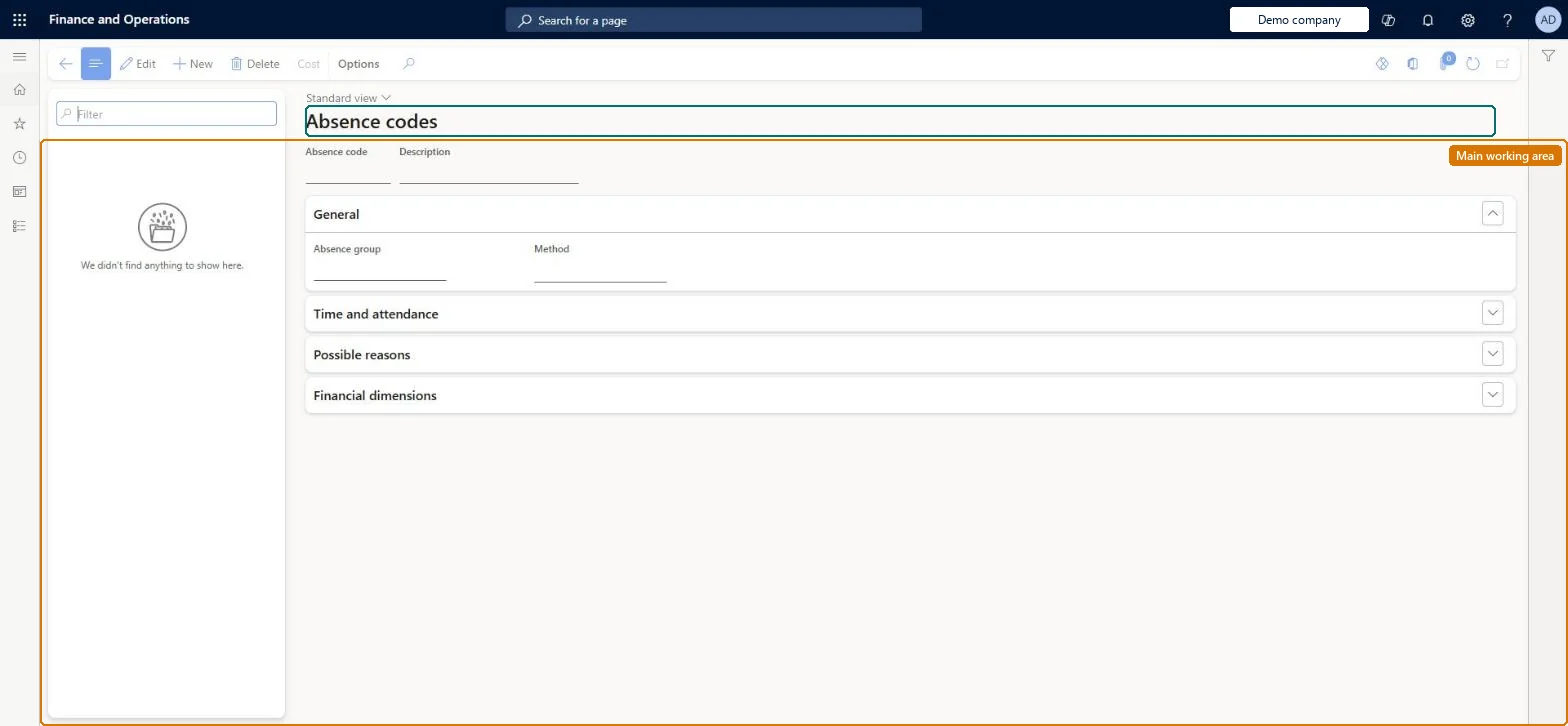
The page in Dynamics 365. page title tab to open what to set or check
About the examples: Examples and screenshots in this guide use BEAT, a demo company in a Dynamics 365 test environment. Use your own company's codes and values instead of copying them.
Setup steps on this page
Set up Absence codes
Use this page to create absence codes, assign them to absence groups and set limits that are checked when absences are recorded.
Steps from Microsoft
Go to Human resources > Absence > Absence codes.
Use the Filter box to find a code.
Select New and enter the Absence code and Description, then under General pick the Absence group and Method.
Expand Time and attendance, Possible reasons and Financial dimensions for the code's other settings.
Select Save; select Delete to remove a selected code.
One absence code per absence reason, each in an absence group; add validation rules (Max. in series, Max. days in a period, Max. series in a period) only where policy limits the absenceAbsence codes give the reason for an absence, and validation rules set how often a worker can be absent for the same reason in a period, for example two doctor visits per month.
On BEAT the page is maintained by Human resource assistant and Compensation and benefits manager; viewed by Human resource manager and Payroll administrator; the full list is under the page's security roles. No Feature management feature is needed for this page.
Per company: absence codes and groups belong to the legal entity you are signed in to. Data management lists the Absence codes and Absence groups entities as not shared. Checked in Dynamics 365
Can it be undone
Reversible: Each validation rule can be switched on or off with its Active check box.
If you change it later
A validation rule counts only while its Active check box is selected; workers who break it are listed on the Absence administration page in the code's text and background colors. Moving a code to another group changes whether workers can register it, through the group's Registration setting. Microsoft Learn
Technical architect
6Technical
Menu item
HRMAbsenceCodeChecked in Dynamics 365
Form
HRMAbsenceCodeChecked in Dynamics 365
Table
HRMAbsenceCodeShown as “ABSENCE CODES” in Record infoChecked in Dynamics 365
Data entities
HcmAbsenceCodeEntityAbsence codes
Who can open it
PrivilegesMaintain absence codes HRMAbsenceCodeMaintainView absence codes HRMAbsenceCodeViewMaintain absence codes JmgAbsenceCodeMaintainView absence codes JmgAbsenceCodeViewDutiesEnable absence process HcmAbsenceEnableInquire into absence process HcmAbsenceProcessInquireInquire into time and attendance policies JmgTimeAttendancePoliciesInquire4 security rolesCompensation and benefits manager HcmCompensationAndBenefitsManagerHuman resource assistant HcmHumanResourceAssistantHuman resource manager HcmHumanResourceManagerPayroll administrator HcmPayrollAdministratorChecked in Dynamics 365
Roles to set it up and use it
To set it up or change itHuman resource assistant HcmHumanResourceAssistantCompensation and benefits manager HcmCompensationAndBenefitsManagerTo use itHuman resource manager HcmHumanResourceManagerPayroll administrator HcmPayrollAdministratorGive people one of these roles. On this system, 4 roles can open this page.Checked in Dynamics 365
Actions on the page
(Action Pane without tabs): CostChecked in Dynamics 365
Developer
7Developer
Open it by URL
https://<your-environment>/?mi=HRMAbsenceCode
Integrate with
HcmAbsenceCodeEntity data entity
Data migration
HcmAbsenceCodeEntity Absence codes. Per company.Load order: Load Absence groups before Absence codes, because each code names its absence group.Load first: HcmAbsenceCodeGroupEntityMicrosoft Learn