Setup step on the Intercompany accounting page · General ledger
Set up Intercompany accounting
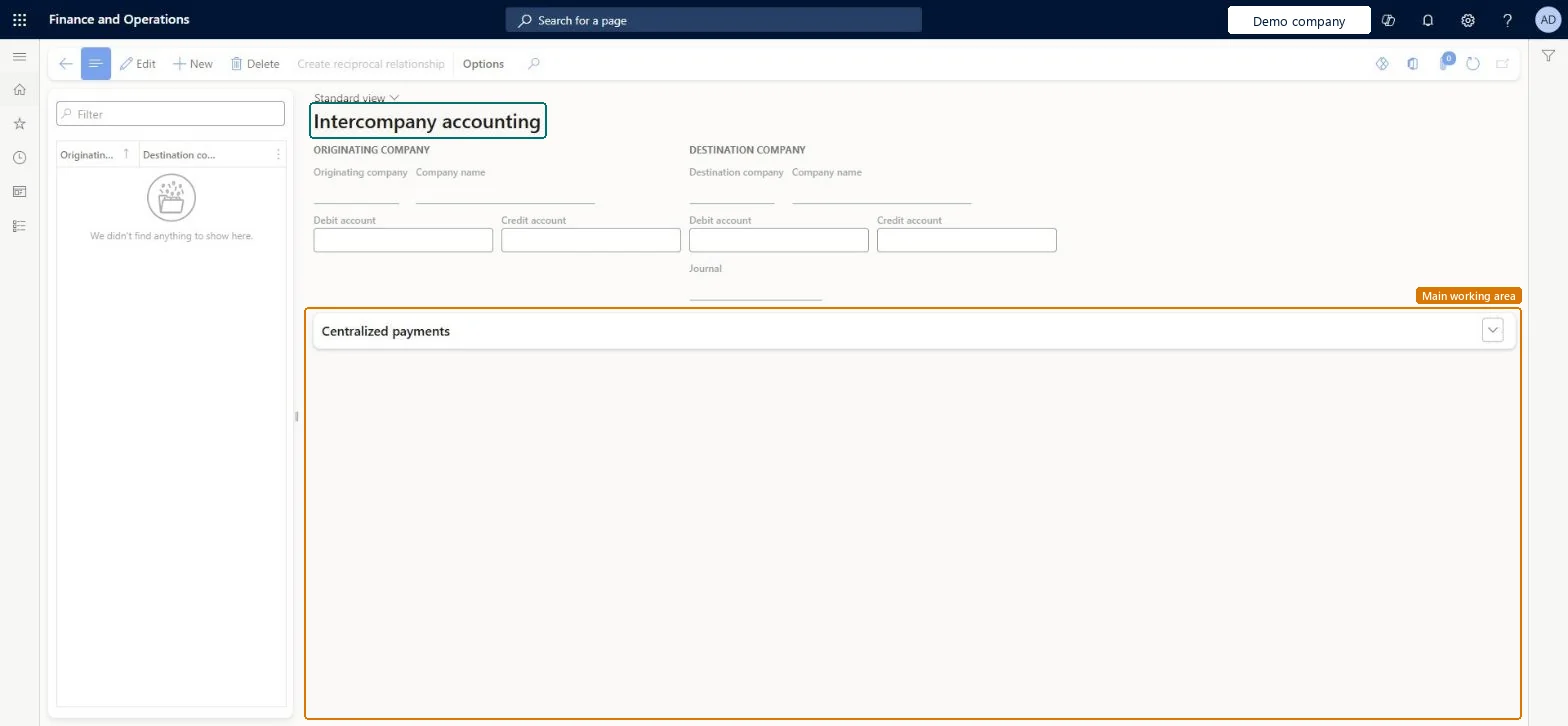
Used to set the Due from and Due to accounts for the originating and destination legal entities, the destination journal name, and which entity receives supporting amounts.
- Used by
- Accountant, Accounting manager, Accounting supervisor and 6 more roles
- Business process
- Configure intercompany relationships in Dynamics 365 Finance
- Menu item
LedgerInterCompany- Main table
LedgerInterCompany- Data entity
LedgerInterCompanyAccountEntity- Setup steps
- 1 on this page
Everyone
1What it is and why
| What it is | The shared setup of pairs of legal entities that can transact with each other. |
|---|---|
| What you do here | Used to set the Due from and Due to accounts for the originating and destination legal entities, the destination journal name, and which entity receives supporting amounts. |
| Example | Set up USMF as the originating and USSI as the destination legal entity, then use Create reciprocal relationship so that USSI can originate transactions too. |
Functional consultant · Solution architect
2Where it fits
| Business process | Define accounting policies › Develop company structure › Configure intercompany relationships in Dynamics 365 Finance |
|---|---|
| Menu path | General ledger › Posting setup › Intercompany accounting |
| Set up first | Main accounts Microsoft Learn ↗Journal names Microsoft Learn ↗ |
| Used next by | General journals Microsoft Learn ↗ |
| Related pages | — |
| In this process | — |
End user · Functional consultant
3How to do it
Setup steps on this page
Set up Intercompany accountingNo screenshots yet
Used to set the Due from and Due to accounts for the originating and destination legal entities, the destination journal name, and which entity receives supporting amounts.
Microsoft's steps
- Go to General ledger > Posting setup > Intercompany accounting.
- Create a pair of legal entities, noting which is the originating company and which is the destination.
- Select the Debit account (Due from) and Credit account (Due to) for both companies.
- Select the Journal name to use when the transaction is created in the destination company.
- Select which legal entity receives supporting amounts, such as cash discounts or realized gains and losses for centralized payments.
- Optionally, select Create reciprocal relationship to set up the reverse pair.
Source: Microsoft Learn ↗
Field guide
| Field | What it means | Worked example | Table column |
|---|---|---|---|
| Debit account (Due from) | The main account for amounts due from the other company, set for both companies in the pair.Microsoft Learn ↗ | — | — |
| Credit account (Due to) | The main account for amounts due to the other company, set for both companies in the pair.Microsoft Learn ↗ | — | — |
| Journal name | The journal used to create the transaction in the destination company.Microsoft Learn ↗ | — | JournalName |
| Create reciprocal relationship | Creates the reverse pair by copying the destination company's setup to the originating company and the other way round.Microsoft Learn ↗ | — | — |
Functional consultant
4Setup decisions
| Setup step | Recommended value and why | Decision · common mistake · test |
|---|---|---|
| Set up Intercompany accounting | — | — |
Solution architect
5Design impact
| Shared or per company | — |
|---|---|
| Can it be undone | — |
| Feature or country | — |
| If you change it later | The intercompany setup is shared, so every legal entity sees and uses the same pairs. Each pair works from its originating company, so the reverse direction needs its own reciprocal pair. Microsoft Learn ↗ |
Technical architect
6Technical
| Menu item | LedgerInterCompany Checked in Dynamics 365 |
|---|---|
| Form | LedgerInterCompany Checked in Dynamics 365 |
| Table | LedgerInterCompanyShown as “Intercompany accounting” in Record infoChecked in Dynamics 365 |
| Data entities | LedgerInterCompanyAccountEntityIntercompany accounting Microsoft data model ↗ |
| Who can open it | PrivilegesMaintain intercompany accounting definition LedgerInterCompanyMaintainView intercompany accounting definition LedgerInterCompanyViewDutiesEnable general ledger process LedgerGeneralLedgerProcessEnableInquire into general ledger reference data LedgerGeneralLedgerReferenceDataInquireEnable general ledger process RentalLedgerGeneralLedgerProcessEnable9 security rolesBudget managerBudgetBudgetManagerChief financial officer CompanyChiefFinancialOfficerAccountant LedgerAccountantAccounting manager LedgerAccountingManagerAccounting supervisor LedgerAccountingSupervisorFinancial controller LedgerFinancialControllerRental manager RentalManagerRental purchasing manager RentalPurchasingManagerRental sales manager RentalSalesManager |
| Actions on the page | Buttons: Create reciprocal relationshipChecked in Dynamics 365 |
Developer
7Developer
| Open it directly | https://<your-environment>/?mi=LedgerInterCompany |
|---|---|
| Integrate with | LedgerInterCompanyAccountEntity data entity Microsoft data model ↗ |
| Table definition | LedgerInterCompany columns and relations Microsoft data model ↗ |
Everyone
8Sources and checks
- learn.microsoft.com/dynamics365/finance/general-ledger/intercompany-accounting-setup
- learn.microsoft.com/dynamics365/finance/general-ledger/intercompany-accounting-setup
- Checked in a working Dynamics 365 system, version 10.0.49: the menu item, form, table and security, the page.
GL-POSTING-020 — Set up Intercompany accounting. Beyond ERP Atlas Hub, snapshot 2026-10-16, partly verified. https://www.beyonderp.cloud/atlas/step/GL-POSTING-020