Setup step on the Financial dimensions page · General ledger
Set up Financial dimensions
Used to create custom or entity-backed dimensions to use as account segments, maintain dimension values, and set legal entity overrides.
- Used by
- Accountant, Accounting manager, Accounting supervisor and 8 more roles
- Business process
- Develop chart of accounts strategy
- Menu item
DimensionDetails- Main table
DimensionAttribute- Data entity
DimensionAttributeActivationEntity- Setup steps
- 1 on this page
Show what matters for
Everyone
1What it is and why
| What it is | Financial dimensions further categorize financial transactions; their values become segments within the ledger account. |
|---|---|
| What you do here | Used to create custom or entity-backed dimensions to use as account segments, maintain dimension values, and set legal entity overrides. |
| Example | Suspend Department 300 for legal entity DEMF with a legal entity override, while USMF and USSI keep departments 100, 200, and 300. |
Functional consultant · Solution architect
2Where it fits
| Business process | Define accounting policies › Develop chart of accounts strategy |
|---|---|
| Menu path | General ledger › Chart of accounts › Dimensions › Financial dimensions |
| Set up first | — |
| Used next by | Configure account structures Microsoft Learn ↗Financial dimension sets Microsoft Learn ↗Dimension data validation Microsoft Learn ↗ |
| Related pages | Financial tags Microsoft Learn ↗ |
| In this process | ← Set up Treasurer's fund accounts · Set up Associate financial hierarchies → |
End user · Functional consultant
3How to do it
Setup steps on this page
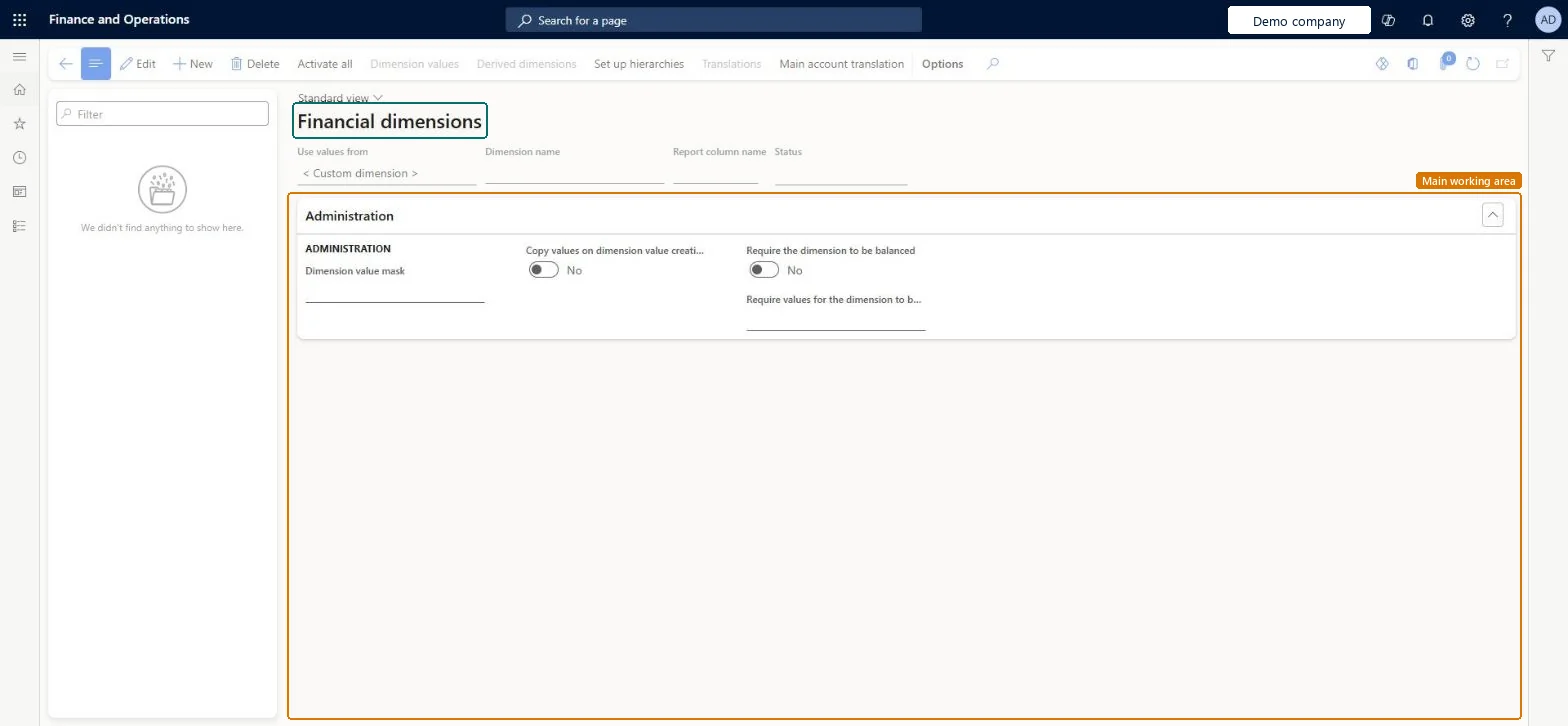
Set up Financial dimensionsNo screenshots yet
Used to create custom or entity-backed dimensions to use as account segments, maintain dimension values, and set legal entity overrides.
Microsoft's steps
- Go to General ledger > Chart of accounts > Dimensions > Financial dimensions.
- Select New.
- In the Use values from field, select the entity the dimension is based on, or select Custom dimension.
- In the Dimension name field, enter a name that follows the naming rules.
- For a custom dimension, enter a format mask if you want to control what users can enter.
- Select Activate, or schedule the activation to run as a batch job.
- Select Dimension values to review the values, and for a custom dimension select New to add each value and its description.
Source: Microsoft Learn ↗
Field guide
| Field | What it means | Worked example | Table column |
|---|---|---|---|
| Use values from | The source of the dimension's values: an existing entity, such as customers or projects, or a custom list.Microsoft Learn ↗ | — | — |
| Dimension name | The name of the dimension; it must start with a letter or underscore and can't contain spaces or special characters.Microsoft Learn ↗ | — | Name |
| Dimension value | A single value of the dimension, up to 30 characters long.Microsoft Learn ↗ | — | — |
| Legal entity overrides | Lists the companies where a dimension value is suspended, its owner, and the period when it is active.Microsoft Learn ↗ | — | — |
| Suspended | Stops a dimension value from being used on new transactions while keeping it for history.Microsoft Learn ↗ | — | — |
Functional consultant
4Setup decisions
| Setup step | Recommended value and why | Decision · common mistake · test |
|---|---|---|
| Set up Financial dimensions | — | — |
Solution architect
5Design impact
| Shared or per company | Shared: the same records are used by every legal entity. Microsoft data model ↗ |
|---|---|
| Can it be undone | — |
| Feature or country | — |
| If you change it later | Once a dimension is used in an account structure, a dimension set, a default dimension or the financial reporting setup, or has any values, it can't be deleted, even if the reference is removed later. Rename or suspend it instead. Microsoft Learn ↗ |
Technical architect
6Technical
| Menu item | DimensionDetails Checked in Dynamics 365 |
|---|---|
| Form | DimensionDetails Checked in Dynamics 365 |
| Table | DimensionAttributeShown as “Dimension” in Record infoKey field: RecIdChecked in Dynamics 365 |
| Data entities | DimensionAttributeActivationEntityDimension attribute activation Microsoft data model ↗DimensionAttributeEntityFinancial dimensions Microsoft data model ↗ |
| Who can open it | PrivilegesMaintain financial dimensions DimensionDetailsMaintainView financial dimensions DimensionDetailsViewDutiesMaintain dimensions master DimensionsMaintainView dimensions master DimensionsViewInquire into chart of account master LedgerChartOfAccountsInquireMaintain chart of accounts master LedgerChartOfAccountsMaintain11 security rolesBudget clerkBudgetBudgetClerkBudget contributor BudgetBudgetContributorBudget manager BudgetBudgetManagerChief executive officer CompanyChiefExecutiveOfficerChief financial officer CompanyChiefFinancialOfficerAccounts receivable manager CustInvoiceAccountsReceivableManagerAccountant LedgerAccountantAccounting manager LedgerAccountingManagerAccounting supervisor LedgerAccountingSupervisorFinancial controller LedgerFinancialControllerAccounts payable manager VendInvoiceAccountsPayableManager |
| Actions on the page | Options: Personalize, Page options, ShareChecked in Dynamics 365 |
Developer
7Developer
| Open it directly | https://<your-environment>/?mi=DimensionDetails |
|---|---|
| Integrate with | DimensionAttributeActivationEntity data entity Microsoft data model ↗ |
| Table definition | DimensionAttribute columns and relations Microsoft data model ↗ |
Everyone
8Sources and checks
- learn.microsoft.com/dynamics365/finance/general-ledger/financial-dimensions
- learn.microsoft.com/dynamics365/finance/general-ledger/tasks/define-financial-dimensions
- learn.microsoft.com/common-data-model/schema/core/operationscommon/tables/finance/financialdimensions/reference/dimensionattribute
- learn.microsoft.com/dynamics365/finance/general-ledger/modifying-deleting-financial-dimensions
- learn.microsoft.com/dynamics365/finance/general-ledger/financial-dimensions
- learn.microsoft.com/dynamics365/finance/general-ledger/financial-dimension-sets
- Checked in a working Dynamics 365 system, version 10.0.49: the menu item, form, table and security, the page.
GL-COA-100 — Set up Financial dimensions. Beyond ERP Atlas Hub, snapshot 2026-10-16, partly verified. https://www.beyonderp.cloud/atlas/step/GL-COA-100