Accounts payable manager, Auditor, Budget manager and 4 more roles
Business process
Manage active assets
Menu item
AssetWorkspace
Setup steps
1 on this page
Show what matters for
SETUP GUIDEHow to set it up8 sections. Choose a role to highlight what matters to you.
Everyone
1What it is and why
What it is
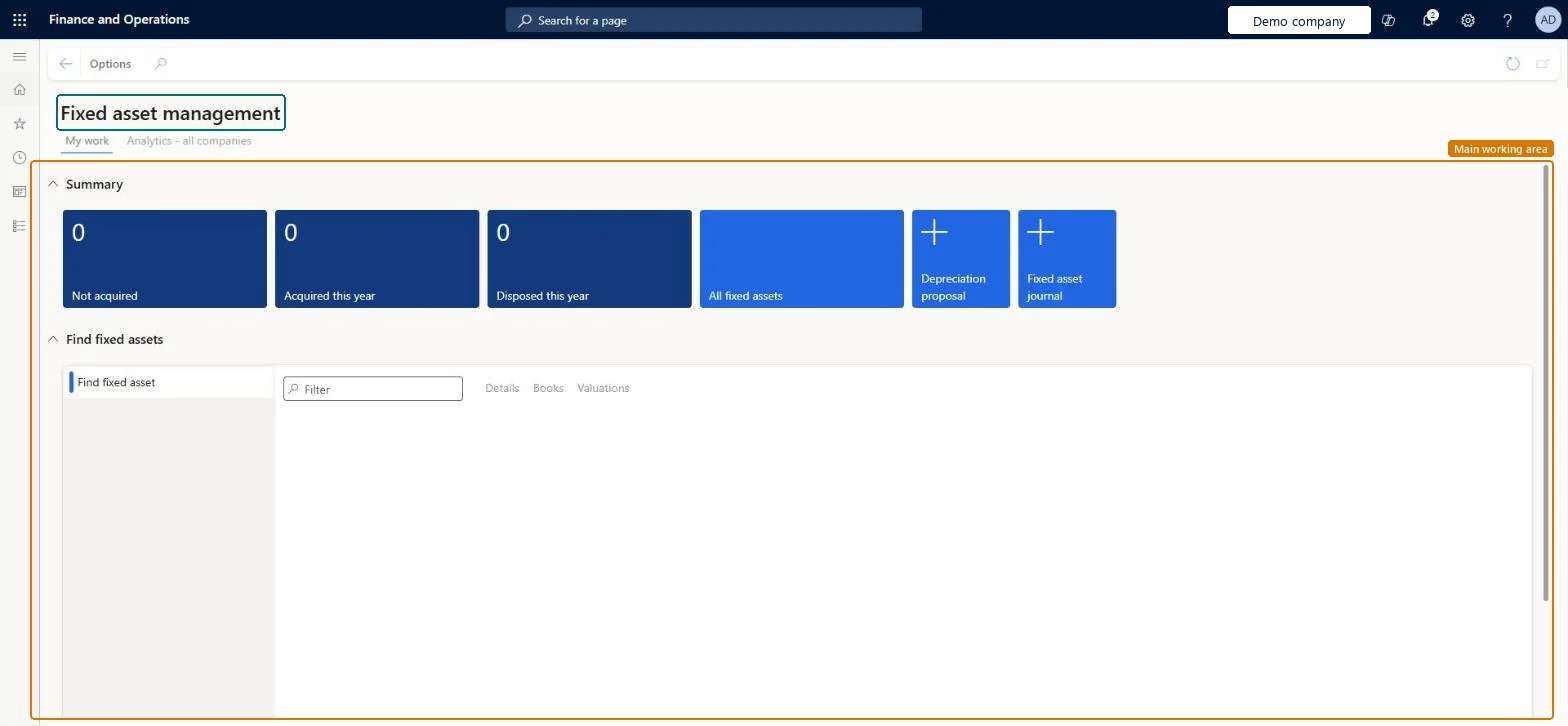
A workspace that shows summary tiles, a search list and analytics for the fixed assets in the current company.
What you do here
Use this workspace to review key fixed asset figures, find assets quickly and jump to the fixed asset list, the batch depreciation proposal and the Fixed assets journal.
Example
For example, you can search for an asset by its number, group, name, location or responsible person, and then open its Fixed asset valuations page to see the balances and depreciation schedule for each book.
The page in Dynamics 365. page title tab to open what to set or check
About the examples: Examples and screenshots in this guide use BEAT, a demo company in a Dynamics 365 test environment. Use your own company's codes and values instead of copying them.
Setup steps on this page
Use the Fixed asset management workspace
Find assets, check their valuations and start the period's depreciation from one place.
Steps from Microsoft
Go to Fixed assets > Workspaces > Fixed asset management.
On the My work tab, read the Summary tiles: Not acquired, Acquired this year and Disposed this year.
Select the All fixed assets tile to open the full list of fixed assets.
Select the Depreciation proposal tile or the Fixed asset journal tile to start those tasks.
In Find fixed assets, type in the Filter box to search, then use the Details, Books and Valuations tabs.
Select the Analytics - all companies tab to see the analytics.
Give fixed asset accountants the workspace as their start page and refresh AssetTransactionMeasure on a schedule so the analytics are current.The Summary tiles show not yet acquired, acquired and disposed assets, Find fixed assets searches by number, group, name, location or responsible person, and the analytics need the entity store refresh.
Fixed assets is part of Dynamics 365 Finance. Fixed asset accountants and managers use the workspace day to day. On this system the roles that open the page include Accountant, Accounting supervisor, Accounting manager, Auditor. No Feature management feature needs to be turned on for this page.
Checked in Dynamics 365
Solution architect
5Design impact
Shared or per company
Per company for My work; the Analytics - all companies tab shows every legal entity to users with the View fixed asset analytics for all company's privilege. Microsoft Learn
Can it be undone
Reversible: The workspace changes no data.
If you change it later
The workspace only shows data and opens other pages. The analytics show data only after the AssetTransactionMeasure aggregate measurement is refreshed on the Entity Store page. Microsoft Learn
To set it up or change itAccountant LedgerAccountantAccounting supervisor LedgerAccountingSupervisorTo use itAccounting manager LedgerAccountingManagerAuditor AuditPolicyManagerChief financial officer CompanyChiefFinancialOfficerBudget manager BudgetBudgetManagerAccounts payable manager VendInvoiceAccountsPayableManagerGive people one of these roles. On this system, 7 roles can open this page.Checked in Dynamics 365
Actions on the page
Options: Personalize, Page options, ShareChecked in Dynamics 365
Developer
7Developer
Open it by URL
https://<your-environment>/?mi=AssetWorkspace
Data migration
Load order: The workspace has no data entity in Data management, so it can't be loaded from a file or a configuration template. It shows the fixed assets and transactions of the company; migrate those and refresh the entity store.Microsoft Learn
Checked in a working Dynamics 365 system, version 10.0.49: the menu item, form, table and security, the page.
To cite this step: FA-WS-010, Use the Fixed asset management workspace. Beyond ERP Atlas Hub, 2026-11-11. https://www.beyonderp.cloud/atlas/step/FA-WS-010