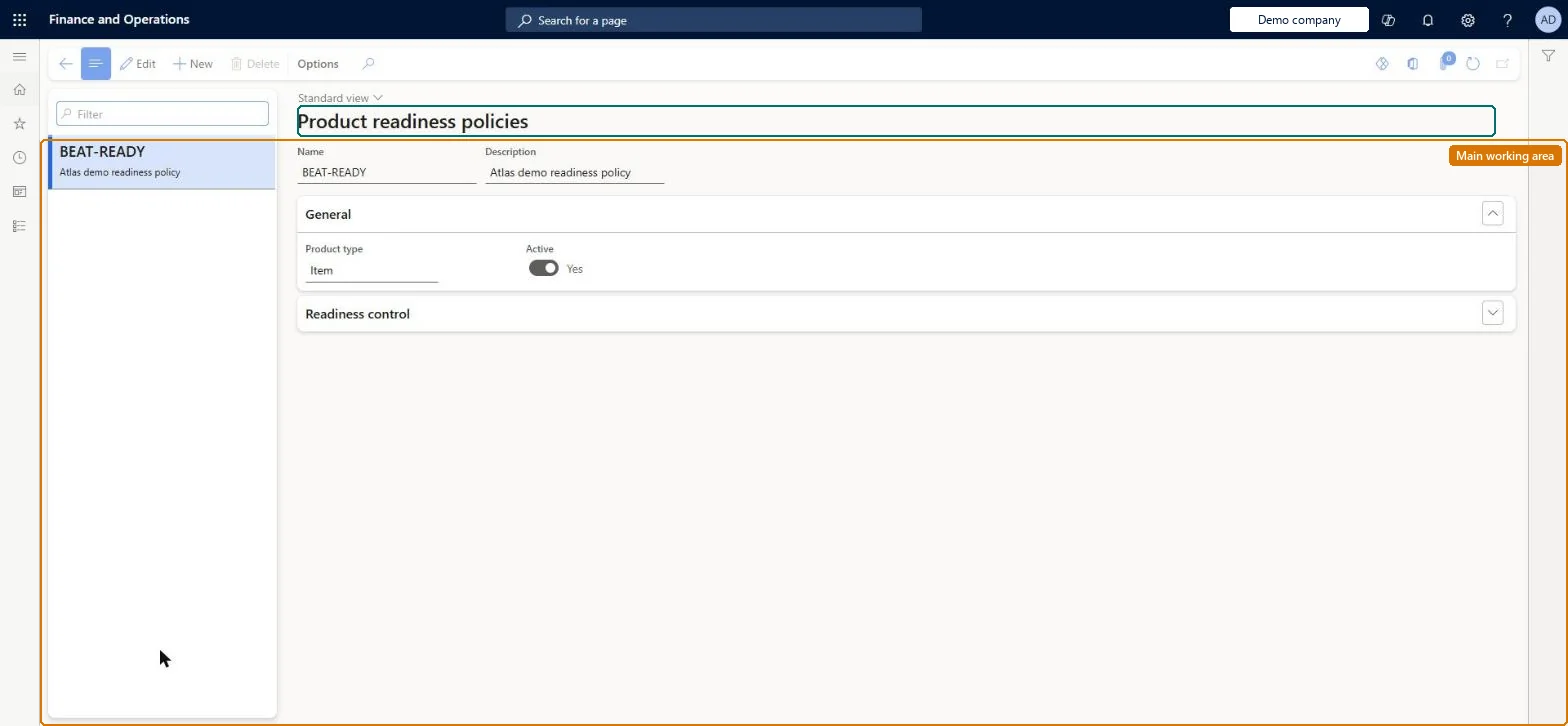
Setup step on the Product readiness policies page · Engineering change management
Set up Product readiness policies
Use this page to define which product data must be verified, by whom (a person or team), in which company, and whether each check is mandatory or needs explicit approval. Assign the policy to an engineering product category or shared product so its checks are created for every related product.
SETUP GUIDEHow to set it up8 sections. Choose a role to highlight what matters to you.
Everyone
1What it is and why
What it is
A setup page where you define readiness policies, each a set of system checks, manual checks and checklists that must be processed before a new product, variant or engineering version becomes active.
What you do here
Use this page to define which product data must be verified, by whom (a person or team), in which company, and whether each check is mandatory or needs explicit approval. Assign the policy to an engineering product category or shared product so its checks are created for every related product.
Example
For example, a checklist readiness check can be used to confirm that marketing materials or product documentation are completed before the product is activated.
The page in Dynamics 365. page title tab to open what to set or check
About the examples: Examples and screenshots in this guide use BEAT, a demo company in a Dynamics 365 test environment. Use your own company's codes and values instead of copying them.
Setup steps on this page
Set up Product readiness policies
Use this page to define which product data must be verified, by whom (a person or team), in which company, and whether each check is mandatory or needs explicit approval. Assign the policy to an engineering product category or shared product so its checks are created for every related product.
Steps from Microsoft
Go to Engineering change management > Setup > Product readiness policies.
Select New on the Action Pane and enter a Name and Description.
On the General FastTab, set Product type and set Active to Yes.
On the Readiness control FastTab, select Add check to add a standard check, or Add existing questionnaire to add a checklist.
For each row, set Apply checks on, Execute in, Owner type, Owner, Automatic approval and Mandatory.
Assign the policy to an engineering product category (Product readiness policy FastTab) or to a shared product.
Expecting readiness checks to block standard products. Standard products can be used in transactions before all checks are done; use a blocking lifecycle state until the checks are complete.
One-way: Warning: Product type can't be changed after the policy is saved, and a policy assigned to an engineering product category or shared product can't be deactivated.
If you change it later
A readiness policy assigned to an engineering product category or a shared product cannot be deactivated, and only inactive policies can be deleted; when a policy applies, new products, variants and versions are set to inactive until their checks are processed. Microsoft Learn
Technical architect
6Technical
Menu item
EngChgProductReadinessPolicyChecked in Dynamics 365
Form
EngChgProductReadinessPolicyChecked in Dynamics 365
Table
EngChgProductReadinessPoShown as “PRODUCT READINESS POLICIES” in Record infoKey field: NameChecked in Dynamics 365
Data entities
EngChgProductReadinessPolicyEntityProduct readiness policies Checked in Dynamics 365
Who can open it
PrivilegesEngChgProductReadinessPolicyMaintainProduct readiness policies EngChgProductReadinessPolicyViewDutiesInquire into engineering change management policies EngChgEngineeringChangeManagementPoliciesInquireEnable the engineering change management process EngChgEngineeringChangeManagementProcessEnableEnable the product readiness process EngChgProductReadinessProcessEnable2 security rolesProduct engineer EngChgProductEngineerProduct engineering manager EngChgProductEngineeringManagerChecked in Dynamics 365
Roles to set it up and use it
To set it up or change itProduct engineering manager EngChgProductEngineeringManagerTo use itProduct engineer EngChgProductEngineerGive people one of these roles. On this system, 2 roles can open this page.Checked in Dynamics 365
Checked in a working Dynamics 365 system, version 10.0.49: the menu item, form, table and security, the page.
To cite this step: EC-SETUP-070, Set up Product readiness policies. Beyond ERP Atlas Hub, 2026-11-11. https://www.beyonderp.cloud/atlas/step/EC-SETUP-070