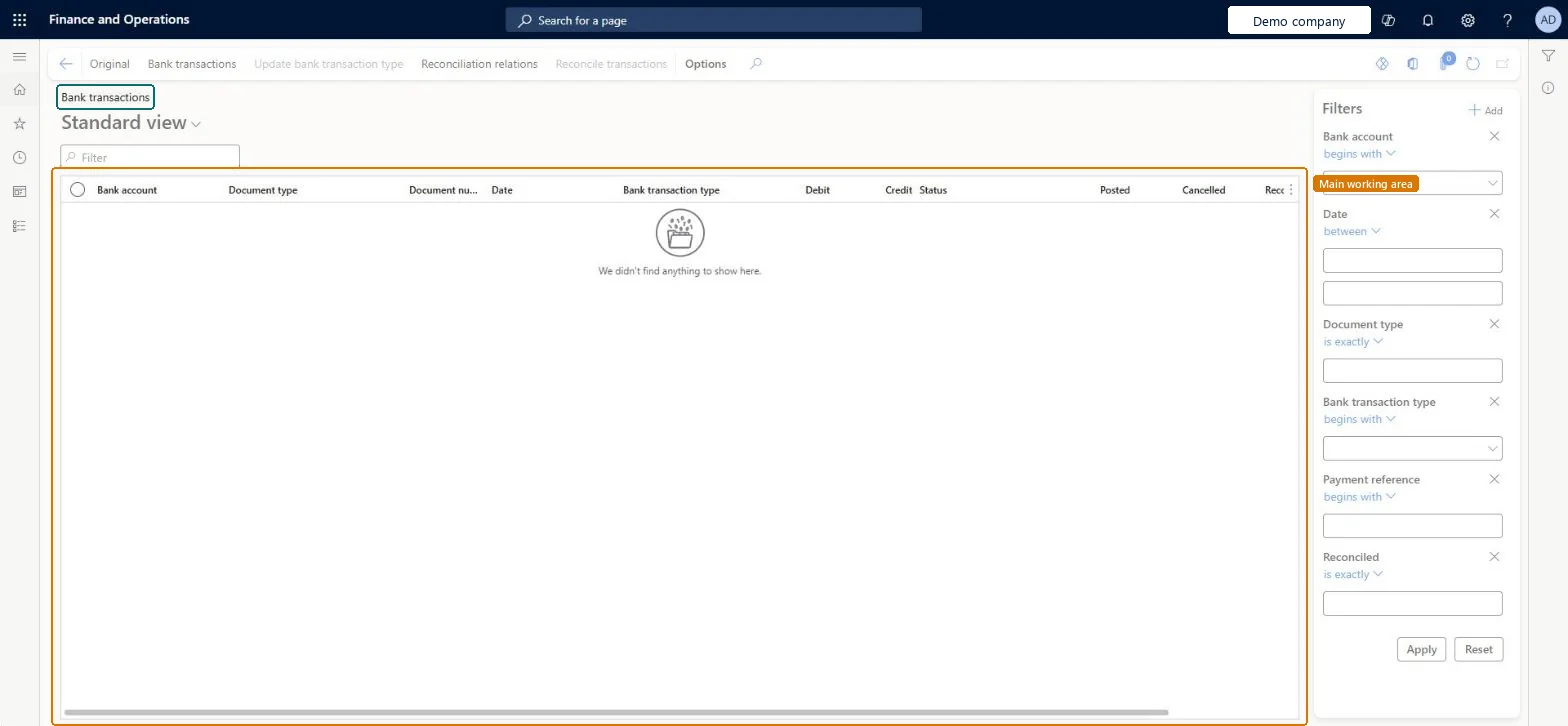
Reconcile reversed bank transactions with each other
Cash and bank managementBank statement reconciliation
BankDocumentTableListPage
Used by
Accounts payable manager, Auditor, Chief executive officer and 7 more roles
Business process
Perform advanced bank reconciliation in Dynamics 365 Finance
Menu item
BankDocumentTableListPage
Main table
BankDocumentTableView
Setup steps
1 on this page
Show what matters for
SETUP GUIDEHow to set it up8 sections. Choose a role to highlight what matters to you.
Everyone
1What it is and why
What it is
A list page of the bank transactions recorded in Finance for advanced bank reconciliation, where reversed transactions can be reconciled with each other.
What you do here
Use this page to reconcile two opposite bank transactions, such as a payment and its reversal, so that they don't appear on the reconciliation worksheet.
Example
For example, BEAT voided check 10045 for 3,200.00 and posted its reversal: the check and its reversal have the same bank account, document type and payment reference, so they are reconciled together here and don't appear on the next reconciliation worksheet.
The page in Dynamics 365. page title tab to open what to set or check
About the examples: Examples and screenshots in this guide use BEAT, a demo company in a Dynamics 365 test environment. Use your own company's codes and values instead of copying them.
Setup steps on this page
Reconcile reversed bank transactions with each other
Clear reversed payments and canceled checks before the reconciliation worksheet.
Steps from Microsoft
Go to Cash and bank management > Bank statement reconciliation > Bank transactions.
Filter on the bank account, the date range, Document type and Reconciled = No.
Select the transaction and its reversal: they must have the same bank account, document type and payment reference and opposite amounts.
Select Reconcile transactions, or select a single canceled check and reconcile it on its own.
Use Reconciliation relations to see which transactions were reconciled together.
Reconcile reversal pairs and canceled checks here before each reconciliation, filtered on Reconciled = No.Reversed company transactions must be reconciled on this page, otherwise both stay open on the worksheet with no statement line to match.
In this system 10 roles can open this page, among them Auditor, Chief executive officer, Chief financial officer and Accounts receivable manager.
Checked in Dynamics 365
Solution architect
5Design impact
Shared or per company
Per company: the bank transactions belong to the bank accounts of the current legal entity. Microsoft Learn
Can it be undone
Hard to reverse: Check the pair before you reconcile it.
If you change it later
Reconciled pairs and single canceled checks no longer appear on the reconciliation worksheet, so they don't need a bank statement line. Microsoft Learn
Technical architect
6Technical
Menu item
BankDocumentTableListPageChecked in Dynamics 365
Form
BankDocumentTableListPageChecked in Dynamics 365
Table
BankDocumentTableViewShown as “Bank document table view” in Record infoChecked in Dynamics 365
Who can open it
PrivilegesView bank documents BankDocumentBookViewDutiesInquire into bank account reconciliation status BankBankAcctReconStatusInquireEnable bank management process BankBankManagementProcessEnableReview bank management process performance BankBankManagementProcessPerfReview10 security rolesAuditor AuditPolicyManagerChief executive officer CompanyChiefExecutiveOfficerChief financial officer CompanyChiefFinancialOfficerAccounts receivable manager CustInvoiceAccountsReceivableManagerAccountant LedgerAccountantAccounting manager LedgerAccountingManagerAccounting supervisor LedgerAccountingSupervisorFinancial controller LedgerFinancialControllerTreasurer PaymTreasurerAccounts payable manager VendInvoiceAccountsPayableManagerChecked in Dynamics 365
Roles to set it up and use it
To use itTreasurer PaymTreasurerChief financial officer CompanyChiefFinancialOfficerAccounting manager LedgerAccountingManagerFinancial controller LedgerFinancialControllerAccountant LedgerAccountantGive people one of these roles. On this system, 10 roles can open this page.Checked in Dynamics 365
Actions on the page
Options: Personalize, Page options, ShareChecked in Dynamics 365
Load order: Bank transactions reconciliation has no data entity in Data management, so it can't be loaded from a file or a configuration template. Bank transactions come from posted journals; reconcile reversed pairs in each environment.Checked in Dynamics 365
Checked in a working Dynamics 365 system, version 10.0.49: the menu item, form, table and security, the page.
To cite this step: CB-REC-030, Reconcile reversed bank transactions with each other. Beyond ERP Atlas Hub, 2026-11-11. https://www.beyonderp.cloud/atlas/step/CB-REC-030