Use netting agreements to settle customer balances with vendor balances in Dynamics 365 Finance
Menu item
Action:CustVendNettingProposalBatch
Setup steps
1 on this page
Show what matters for
SETUP GUIDEHow to set it up8 sections. Choose a role to highlight what matters to you.
Everyone
1What it is and why
What it is
A periodic job that automatically nets open customer and vendor balances by using netting rules.
What you do here
Use this periodic task to run netting as a one-time or batch job under the selected netting agreements and criteria.
Example
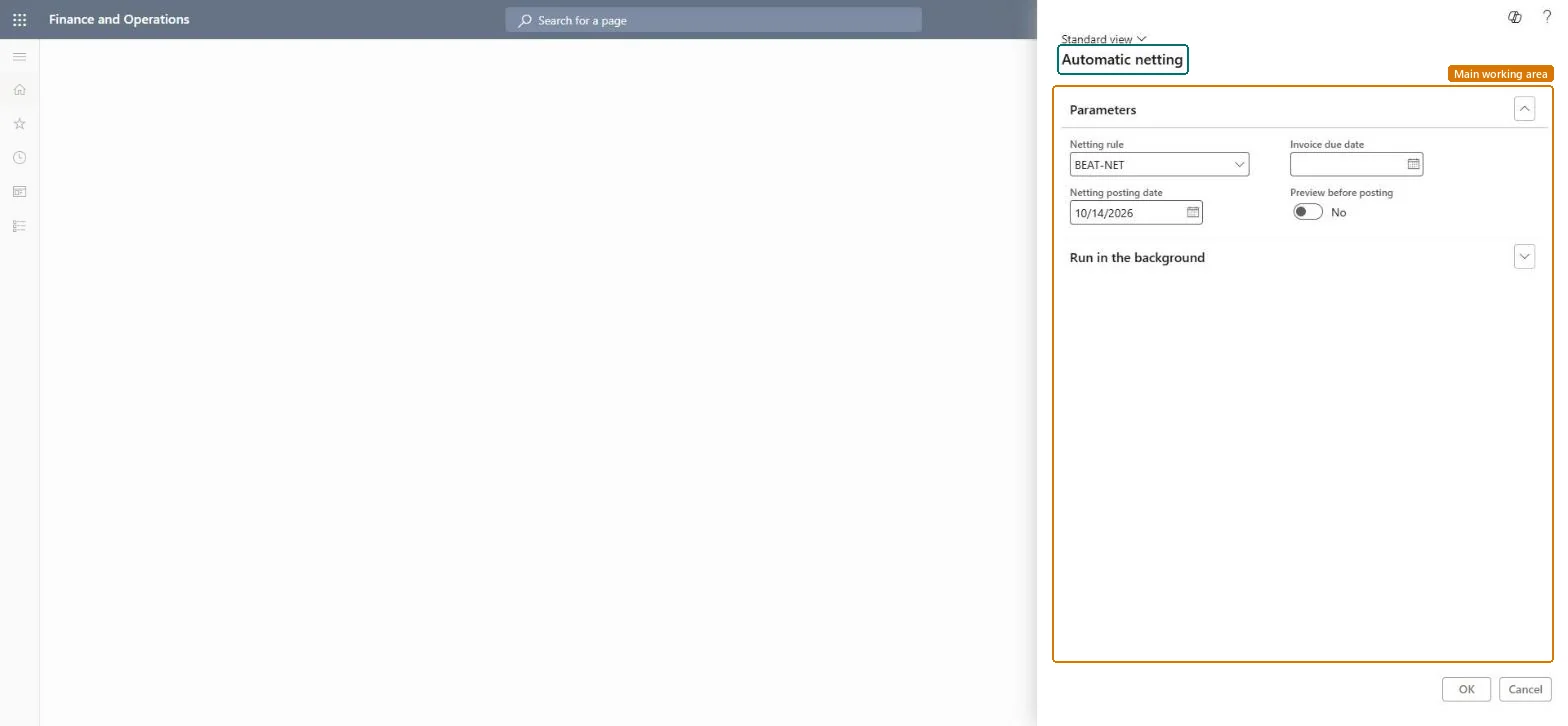
For example, the payments clerk runs automatic netting with the BEAT-NET rule in the background each Thursday before the Friday vendor payment proposal, so the 100.00 customer and vendor pair is netted and only the remaining balances reach the payment journal.
The page in Dynamics 365. page title tab to open what to set or check
About the examples: Examples and screenshots in this guide use BEAT, a demo company in a Dynamics 365 test environment. Use your own company's codes and values instead of copying them.
When to run it
When to run it
As part of the payment cycle, after invoices are posted and before payment journals are created for the same customers and vendors.
How often
Before each payment run; for a fixed schedule, use Process automation on the Netting menu.
Batch settings
Run it in the background when the netting rule covers many netting agreements, so the netting journals are posted without blocking your session.
What the output shows
Netting journals posted for each pair covered by the rule, visible in Netting history with the netted invoices. Open balances that stay higher than expected usually mean the rule's netting criteria left out an account or currency, or the invoices were already in a payment journal.
Use this periodic task to run a netting rule once or in the background as part of the payment cycle.
Steps from Microsoft
Go to Cash and bank management > Periodic tasks > Automatic netting.
Choose the Netting rule whose netting agreements and netting criteria (customer accounts, vendor accounts or invoice currency) should be netted in this run.
Set the Netting posting date for the netting journals, and the Invoice due date for the open invoices to include.
Switch Preview before posting to Yes when you want to see the result first; leave it at No and use Run in the background to let the run post without you.
After the run, open Netting history and use Print netting advice to send the result to the customer or vendor.
The due date limit for the invoices this run nets.Microsoft Learn
Preview before posting
Shows the result before posting. Leave it at No when the job runs in the background.Microsoft Learn
No
Common errors and fixes
Message
What to do
Nothing is netted
Check that the rule and its agreements are active and that open invoices fall on or before the invoice due date you entered. Microsoft Learn
An invoice you expected to net isn't offered for netting
Transactions already included in a payment journal aren't part of netting. Run netting before you create the payment journal, and use Accounts payable > Periodic tasks > All marked transaction details to see which transactions are already marked for settlement. Microsoft Learn
Test checklist
Run the job once with Preview before posting = Yes and post the preview.
Run it again in the background with Preview before posting = No.
Open Netting history and check both runs, with their netting amounts.
Check that invoices already in a payment journal were left open.
Run it in the background, without preview, after invoices are posted and before payment journals are created; use Process automations for a fixed schedule.Learn lists a one-time run from the Netting menu and periodic runs through process automation; netting must come before the payment journal.
Per company: the job nets the netting agreements of the legal entity it runs in, through the selected rule. Microsoft Learn
Can it be undone
Reversible: Each posted netting can be undone with Reverse netting on Netting history.
If you change it later
Transactions already in a payment journal are left out of netting, so run netting before you create payment journals. Microsoft Learn
Technical architect
6Technical
Menu item
Action:CustVendNettingProposalBatchChecked in Dynamics 365
Form
CustVendNettingProposalDialogChecked in Dynamics 365
Roles to set it up and use it
To use itAccounts receivable payments clerk PaymAccountsReceivablePaymentsClerkAccounts payable payments clerk PaymAccountsPayablePaymentsClerkGive people one of these roles. On this system, 2 roles can run this page.Checked in Dynamics 365
Load order: Automatic netting has no data entity in Data management, so it can't be loaded from a file or a configuration template. It posts netting journals from open invoices; nothing is migrated. Run it in the new environment after agreements, rules and open invoices are loaded.Microsoft Learn
Checked in a working Dynamics 365 system, version 10.0.49: the menu item, form, table and security, the page.
To cite this step: CB-NET-060, Run automatic netting as a periodic task. Beyond ERP Atlas Hub, 2026-11-11. https://www.beyonderp.cloud/atlas/step/CB-NET-060