Cash and bank managementInquiries and reportsNetting
CustVendNettingHistory
Used by
Accounts payable clerk, Accounts payable manager, Auditor and 13 more roles
Business process
Use netting agreements to settle customer balances with vendor balances in Dynamics 365 Finance
Menu item
CustVendNettingHistory
Main table
CustVendNettingHistoryTmp
Setup steps
1 on this page
Show what matters for
SETUP GUIDEHow to set it up8 sections. Choose a role to highlight what matters to you.
Everyone
1What it is and why
What it is
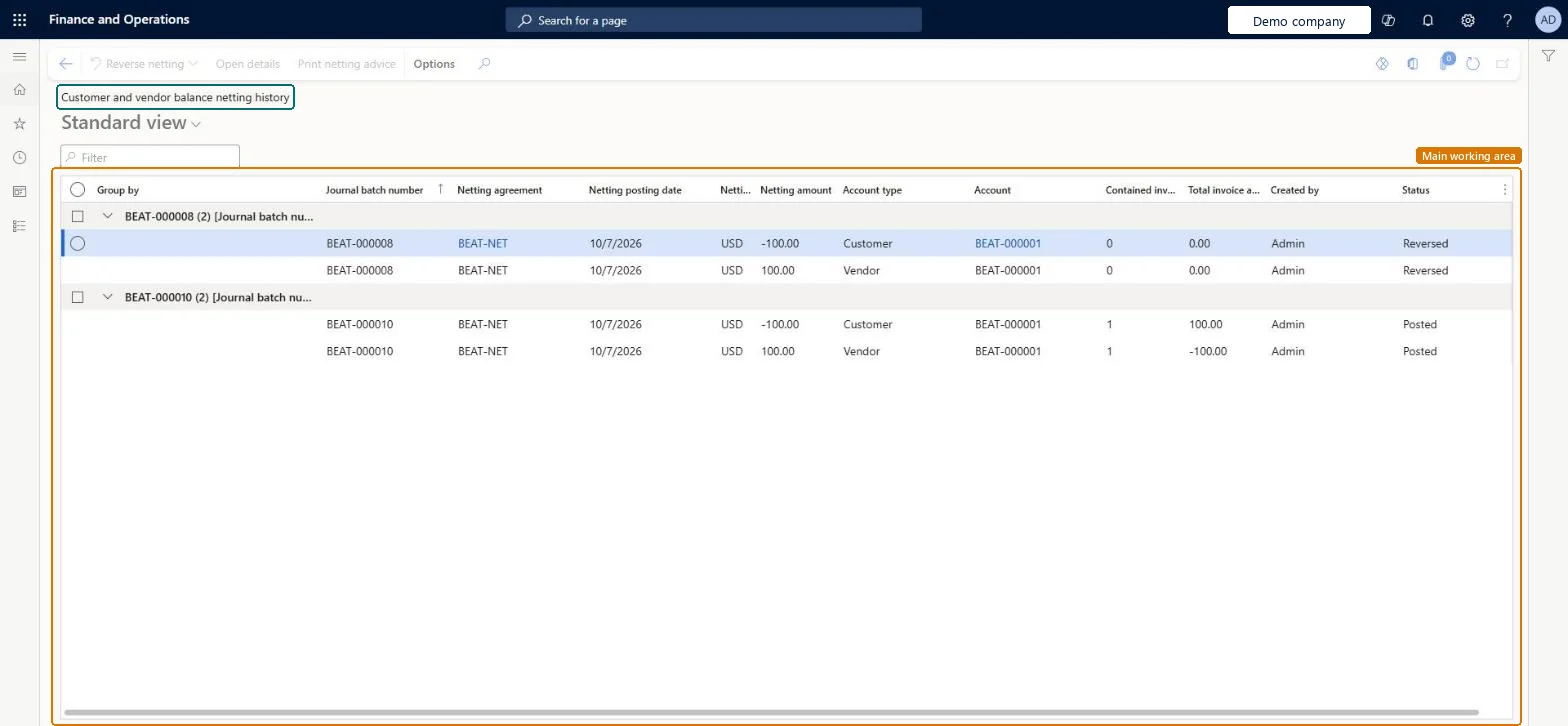
An inquiry page that shows the netted transactions between customer and vendor pairs.
What you do here
Use this page to review the netting pairs cleared by manual and automatic netting for a netting agreement.
Example
For example, BEAT's netting history shows journal batch BEAT-000008 under agreement BEAT-NET dated 10/7/2026: customer BEAT-000001 with netting -100.00 and one invoice, vendor BEAT-000001 with netting +100.00 and one invoice, both Posted. After Reverse netting both lines show Reversed with 0 invoices.
The page in Dynamics 365. page title tab to open what to set or check
About the examples: Examples and screenshots in this guide use BEAT, a demo company in a Dynamics 365 test environment. Use your own company's codes and values instead of copying them.
Setup steps on this page
Review and reverse netting
Use this inquiry to check every posted netting by agreement, send netting advice and reverse a wrong netting.
Steps from Microsoft
Go to Cash and bank management > Inquiries and reports > Netting > Netting history.
Filter on the netting agreement or the posting date to find the netting.
Read the customer line and the vendor line: netting amount, number of invoices, total invoice amount and status.
Select Print netting advice to send the customer or vendor a notice, or Reverse netting to unsettle the invoices and reverse the journal.
The agreement the netting was posted under.Checked in Dynamics 365
BEAT-NET
Journal batch number
The netting journal that posted the netting.Checked in Dynamics 365
BEAT-000008
Netting amount
The amount netted on the customer line (negative) and the vendor line (positive).Checked in Dynamics 365
-100.00 / 100.00
Status
Posted, or Reversed after Reverse netting.Checked in Dynamics 365
Posted
Common errors and fixes
Message
What to do
A netting can't be found
Netting history shows the netting of the agreements of the current legal entity. For an intercompany netting, look in the legal entity that holds the agreement. Microsoft Learn
Test checklist
Post a netting for a pair.
Open Netting history and find the netting by agreement.
Select Reverse netting.
Check that both lines show Reversed and the invoices are open again.
Filter on the netting agreement first, then on the posting date of the run.Each agreement has its own netting; filtering by agreement shows both sides of one party together.
Netting history is kept per netting agreement, and agreements are kept per legal entity. For an intercompany agreement, each posting creates two vouchers in the legal entity that holds the agreement and one in the counterparty legal entity. Microsoft Learn
Can it be undone
Reversible: The inquiry changes no data; Reverse netting reverses the selected netting.
If you change it later
Reversing a netting unsettles the customer and vendor invoices and reverses the posted netting journal. Microsoft Learn
Technical architect
6Technical
Menu item
CustVendNettingHistoryChecked in Dynamics 365
Form
CustVendNettingHistoryChecked in Dynamics 365
Table
CustVendNettingHistoryTmpShown as “Netting history working table” in Record infoChecked in Dynamics 365
Who can open it
PrivilegesView customer and vendor netting CustVendNettingTransViewDutiesInquire into invoice and cash policies CustInvoiceInvoiceAndCashPoliciesInquirInquire into customer payments status PaymCustomerPaymentsStatusInquireInquire into vendor payment status PaymVendorPaymentStatusInquireInquire into invoice and payment policies VendInvoiceInvoicePaymentPoliciesInquir16 security rolesAuditor AuditPolicyManagerCollections agent CollectionLetterCollectionsAgentCollections manager CollectionLetterCollectionsManagerChief financial officer CompanyChiefFinancialOfficerAccounts receivable clerk CustInvoiceAccountsReceivableClerkAccounts receivable manager CustInvoiceAccountsReceivableManagerAccountant LedgerAccountantAccounting manager LedgerAccountingManagerAccounting supervisor LedgerAccountingSupervisorFinancial controller LedgerFinancialControllerAccounts payable centralized payments clerk PaymAccountsPayableCentralPaymClerkAccounts payable payments clerk PaymAccountsPayablePaymentsClerkAccounts receivable centralized payments clerk PaymAccountsReceivableCentralPaymClerkAccounts receivable payments clerk PaymAccountsReceivablePaymentsClerkAccounts payable clerk VendInvoiceAccountsPayableClerkAccounts payable manager VendInvoiceAccountsPayableManagerChecked in Dynamics 365
Roles to set it up and use it
To use itChief financial officer CompanyChiefFinancialOfficerAccounting manager LedgerAccountingManagerFinancial controller LedgerFinancialControllerAccountant LedgerAccountantAccounting supervisor LedgerAccountingSupervisorGive people one of these roles. On this system, 16 roles can open this page.Checked in Dynamics 365
Actions on the page
Options: Personalize, Page options, ShareChecked in Dynamics 365
Load order: Netting history has no data entity in Data management, so it can't be loaded from a file or a configuration template. It shows netting posted in this environment; past netting stays in the old system and isn't migrated.Microsoft Learn