SETUP GUIDEHow to set it up8 sections. Choose a role to highlight what matters to you.
Everyone
1What it is and why
What it is
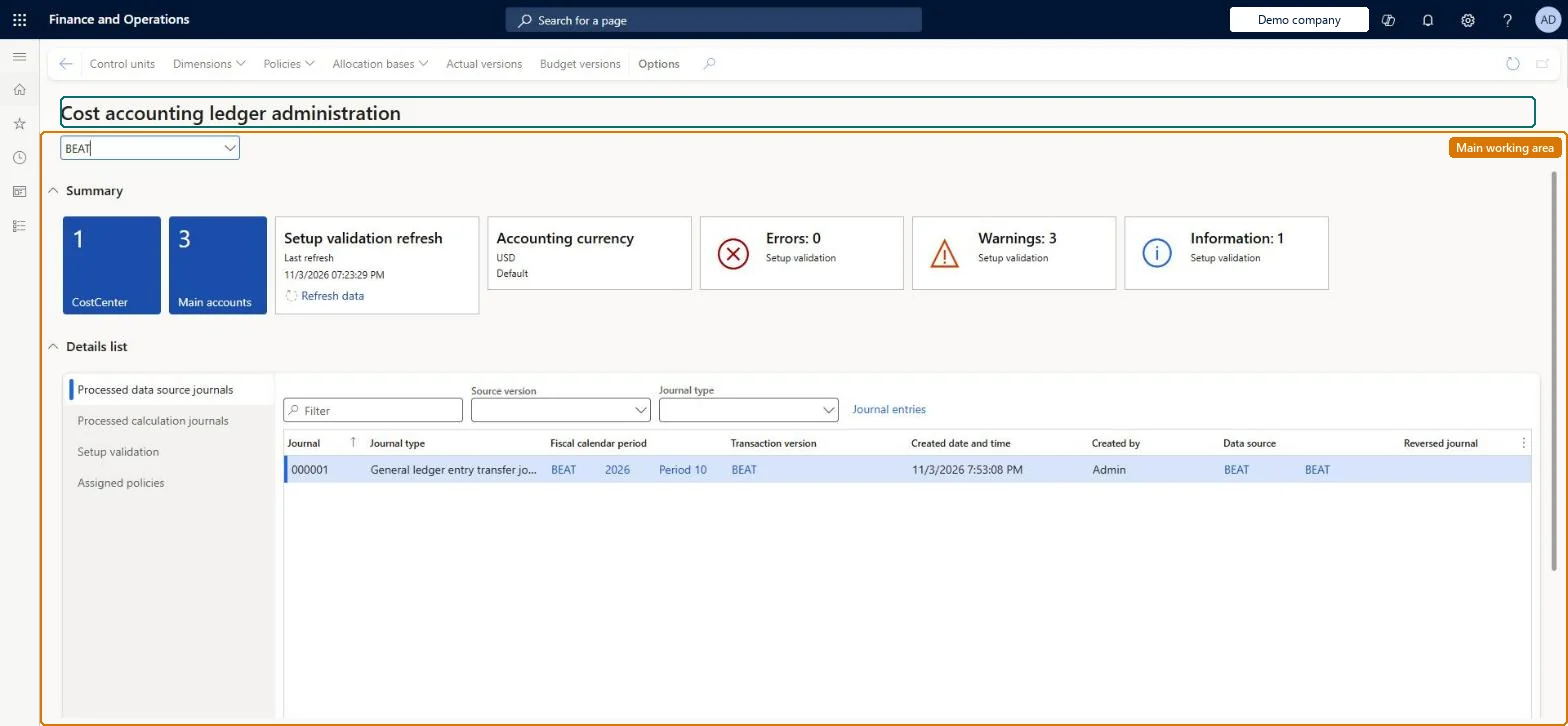
A workspace where cost accountants manage a cost accounting ledger day to day: they review the data import history, import more data, and read setup validation messages.
What you do here
Use this page to manage the ongoing data of the cost environment and to review validation messages that point out problems in the Cost accounting setup so you can correct them.
Example
For example, the workspace shows a message that a dimension value is missing from a classification hierarchy, so you add the value to the hierarchy.
The page in Dynamics 365. page title tab to open what to set or check
About the examples: Examples and screenshots in this guide use BEAT, a demo company in a Dynamics 365 test environment. Use your own company's codes and values instead of copying them.
Setup steps on this page
Clear the setup validation messages
Use the workspace to find and fix setup problems before data is processed.
Steps from Microsoft
Go to Cost accounting > Workspaces > Cost accounting ledger administration.
Review the validation messages and correct the setup they point to.
To be able to refresh the messages, go to System administration > Setup > Data cache > Data set cache configuration.
Select CAMCostAccountingLedgerSetupValidationCacheDataSet in the Consumer column.
Select the Manual refresh enabled checkbox.
Back in the workspace, select Refresh data on the Setup validation refresh tile.
Re-runs the setup validation so the messages reflect the current configuration; the link only works after manual refresh is enabled for the data set cache.Microsoft Learn
Refresh data
Validation messages
A list of setup problems found in the cost accounting configuration, such as a missing value in a classification hierarchy.Microsoft Learn
Common errors and fixes
Message
What to do
A validation message says a dimension member is missing from a classification hierarchy
Add the member to a node of the hierarchy. A classification hierarchy must hold every member of its dimension. Microsoft Learn
The Setup validation refresh tile has no Refresh data link
Go to System administration > Setup > Data cache > Data set cache configuration, select CAMCostAccountingLedgerSetupValidationCacheDataSet and select Manual refresh enabled. Microsoft Learn
A number sequence has not been set up for the reference Journal
Go to Cost accounting > Setup > Parameters > Number sequences and set a number sequence for the Journal reference, then run the processing again. Checked in Dynamics 365
Test checklist
Turn on Manual refresh enabled for CAMCostAccountingLedgerSetupValidationCacheDataSet.
Open the workspace and select Refresh data on the Setup validation refresh tile.
Fix each validation message, for example add a missing member to its classification hierarchy, and refresh again.
Check that no validation messages remain before you run the first source data processing.
Turn on manual refresh for the setup validation data set, and clear every validation message before the first source data processing and after each setup change.The messages point at setup that makes processing or policies give wrong results, such as a member missing from a classification hierarchy. Without manual refresh the list only updates on the cache schedule.
Cost accounting has four roles: Cost accounting manager (Activity licence), Cost accountant and Cost accountant clerk (Operations licence), and Cost object controller (Team members licence). Cost accountants and cost accountant clerks (Operations licence) run this workspace. No Feature management feature needs to be turned on for this page.
Shared: Cost accounting setup isn't kept per legal entity. It is the same from every company, and one cost accounting ledger can collect data from several legal entities. Checked in Dynamics 365
Can it be undone
Reversible: Refreshing validation changes no data.
If you change it later
The workspace starts imports and shows setup validation messages. An import adds new journals and entries to the ledger; it doesn't change the general ledger, and corrected source data needs a new import. Microsoft Learn
Technical architect
6Technical
Menu item
CAMCostAccountingLedgerAdminWorkspaceChecked in Dynamics 365
Form
CAMCostAccountingLedgerAdminWorkspaceChecked in Dynamics 365
Who can open it
3 security roles. Select a role to see its duties and privileges.
RoleCost accountantCAMCostAccountant
DutyMaintain the cost accounting ledger administration workspaceCAMCostAccountingLedgerAdminWorkspaceMaintain
To set it up or change itMaintain the cost accounting ledger administration workspace CAMCostAccountingLedgerAdminWorkspaceMaintainTo use itView the cost accounting ledger administration workspace CAMCostAccountingLedgerAdminWorkspaceInquireGive people a role that holds these duties. On this system, 3 roles give access to this page.Checked in Dynamics 365
Actions on the page
(Action Pane without tabs): Control units, Dimensions, Policies, Allocation bases, Actual versions, Budget versionsChecked in Dynamics 365
Load order: The workspace has no data entity in Data management, so it can't be loaded from a file or a configuration template. It shows the ledger set up in Cost accounting ledgers; set the ledger up in each environment.Microsoft Learn