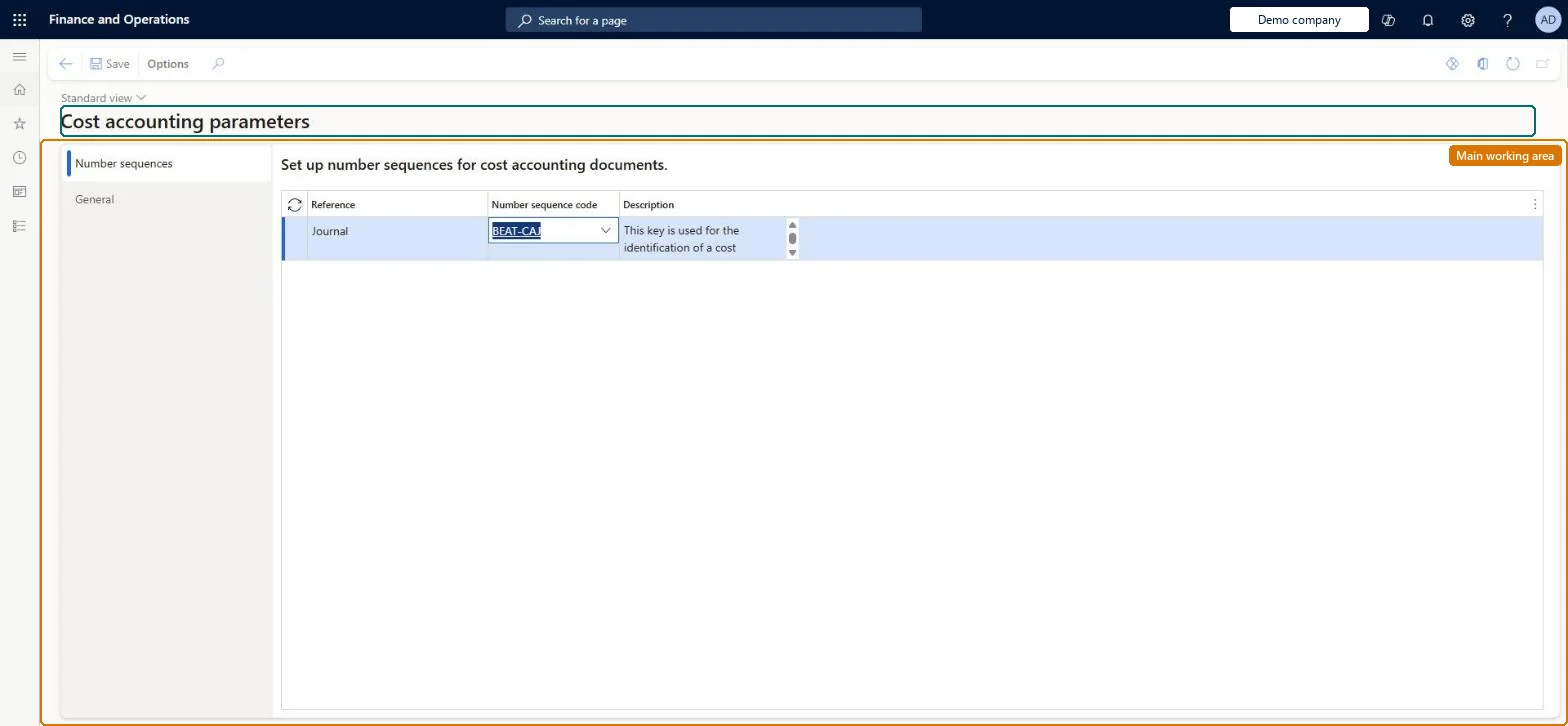
Setup step on the Parameters page · Cost accounting
Set up Parameters
Use this page to enable view access control for cost object dimension members so that the access list hierarchy limits which cost objects each user can see in the Cost control workspace and in Power BI.
SETUP GUIDEHow to set it up8 sections. Choose a role to highlight what matters to you.
Everyone
1What it is and why
What it is
A setup page that holds module-wide settings for Cost accounting, including the switch that turns on access-list security for cost object dimension members.
What you do here
Use this page to enable view access control for cost object dimension members so that the access list hierarchy limits which cost objects each user can see in the Cost control workspace and in Power BI.
Example
For example, after you turn the parameter on, a cost center manager opening the Cost control workspace sees only the cost centers assigned to them in the access list hierarchy.
The page in Dynamics 365. page title tab to open what to set or check
About the examples: Examples and screenshots in this guide use BEAT, a demo company in a Dynamics 365 test environment. Use your own company's codes and values instead of copying them.
Setup steps on this page
Set up Parameters
Use this page to enable view access control for cost object dimension members so that the access list hierarchy limits which cost objects each user can see in the Cost control workspace and in Power BI.
Steps from Microsoft
Go to Cost accounting > Setup > Parameters.
Select the General tab.
Set Enable view access for cost object dimension members to Yes.
On the Number sequences tab, set the number sequence for the Journal reference.
Enable view access for cost object dimension members
When Yes, the users listed on the nodes of an access list hierarchy see only the cost objects under their nodes.Microsoft Learn
UseCostObjectDimensionMemberAccessList
Journal (Number sequences tab)
The number sequence that numbers Cost accounting journals, such as the general ledger entry transfer journal and the overhead calculation journals.Checked in Dynamics 365
A shared sequence with format ######
Common errors and fixes
Message
What to do
A number sequence has not been set up for the reference Journal
Go to Cost accounting > Setup > Parameters > Number sequences and set a number sequence for the Journal reference, then run the processing again. Checked in Dynamics 365
Power BI shows a manager every cost object
Pair the access list hierarchy with row-level security: add the manager to the Cost object controller role on PowerBI.com and update the entity store. Microsoft Learn
A manager sees cost objects outside their node in an Excel export
The access list hierarchy doesn't secure data exported to Excel. Limit who can export, and rely on the Cost control workspace and Power BI for secured views. Microsoft Learn
Test checklist
Create a dimension classification hierarchy on Cost centers with Access list hierarchy = Yes, and add a manager on one node with a range such as CC005 to CC005.
Assign the manager the Cost object controller role.
Set Enable view access for cost object dimension members to Yes.
Sign in as the manager, open the Cost control workspace, and check only CC005 data is shown.
Enable view access for cost object dimension members = Yes, once a cost object dimension hierarchy with Access list hierarchy = Yes has users on its nodes and cost accountants on the top nodeThe Cost object controller role doesn't limit which cost objects a manager sees; row-level security comes from the Access list hierarchy, and it only applies when this parameter is Yes. Cost accountants at the top node keep seeing all entries.
Numbers the journals that source data processing and the overhead calculation create. Processing is cancelled until it is set. Checked in Dynamics 365
Feature management and licence
Licence or add-in
Cost accounting has four roles: Cost accounting manager (Activity licence), Cost accountant and Cost accountant clerk (Operations licence), and Cost object controller (Team members licence). Cost accountants, cost accountant clerks and cost accounting managers can open the page. No Feature management feature needs to be turned on for this page.
Shared: the parameters apply to Cost accounting as a whole, not to one legal entity. Checked in Dynamics 365
Can it be undone
Reversible: The parameter controls which data is shown in the Cost control workspace and Power BI; it doesn't change Cost accounting data.
If you change it later
Turning the parameter on makes the access list hierarchy filter what users see in the Cost control workspace (client and mobile) and in Power BI, but it does not secure data exported to Excel. Microsoft Learn
Technical architect
6Technical
Menu item
CAMParametersChecked in Dynamics 365
Form
CAMParametersChecked in Dynamics 365
Table
CAMDataCostAccountingParametersChecked in Dynamics 365
Data entities
NumberSequencesReferenceEntityNumber sequence references (only the Journal number sequence on the Number sequences tab; the Cost accounting parameters themselves have no data entity) Microsoft data model NumberSequencesReferenceV2EntityNumber sequence references V2 (only the Journal number sequence on the Number sequences tab; the Cost accounting parameters themselves have no data entity) Microsoft data model
Who can open it
3 security roles. Select a role to see its duties and privileges.
RoleCost accountantCAMCostAccountant
DutyInquire into cost accounting parametersCAMCostAccountingParametersInquire
To set it up or change itMaintain cost accounting parameters CAMCostAccountingParametersMaintainMaintain dimension hierarchy access lists CAMDimensionHierarchyAccessListsMaintainTo use itInquire into cost accounting parameters CAMCostAccountingParametersInquireGive people a role that holds these duties. On this system, 3 roles give access to this page.Checked in Dynamics 365
Developer
7Developer
Open it by URL
https://<your-environment>/?mi=CAMParameters
Data migration
NumberSequencesReferenceEntity (Number sequence references): loads only the Journal number sequence; shared by all companies, in Microsoft's default template 020 - GL Shared. Set Enable view access for cost object dimension members by hand: no data entity loads it.NumberSequencesReferenceV2Entity (Number sequence references V2): shared by all companies.Load order: Microsoft's default template 020 - GL Shared loads Number sequence references at execution unit 1, level 20, sequence 50. Lower levels load first, and entities at the same level load in sequence order.Load first: the default templates at lower levels (System setup to Global address book)Microsoft Learn