Cost accountant, Cost accountant clerk, Cost accounting manager and 1 more role
Business process
Use the cost control workspace to analyze cost accounting data in Dynamics 365 Finance
Menu item
CAMCostControlWorkspace
Data entity
CAMAggregatedCostEntryWithHierarchiesEntity
Setup steps
1 on this page
Show what matters for
PAGE GUIDEWhat the page does and how to use it8 sections. Choose a role to highlight what matters to you.
Everyone
1What it is and why
What it is
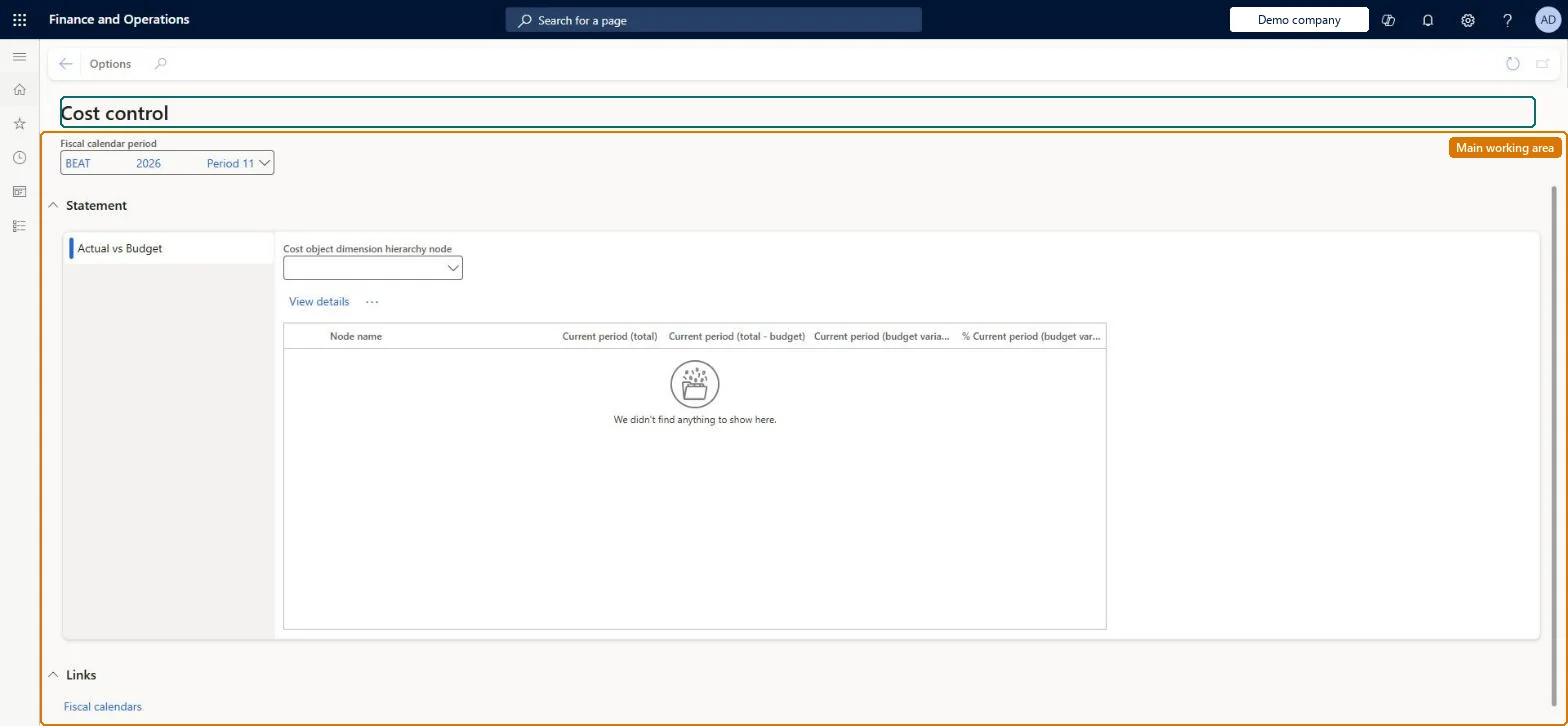
A workspace where managers who are responsible for one or more cost objects view the cost reports that cost accountants have configured for them.
What you do here
Use this page to see actual, budget and variance balances for the cost objects you are responsible for, pick the fiscal period to view, and drill down from a hierarchy node into the underlying cost entries.
Example
For example, a cost center manager drills down into the rent line to see how the rent expenditure was distributed to their cost center.
The page in Dynamics 365. page title tab to open what to set or check
About the examples: Examples and screenshots in this guide use BEAT, a demo company in a Dynamics 365 test environment. Use your own company's codes and values instead of copying them.
Setup steps on this page
Choose the report and period in Cost control
Pick the published report, fiscal period and cost object node that answer the manager's question.
Steps from Microsoft
Go to Cost accounting > Workspaces > Cost control.
In the Fiscal calendar period field, enter or select a value.
In the Cost object dimension hierarchy node field, enter or select a value.
Select a cost element dimension hierarchy node and then select View details.
Select Cost entries to drill down into the entry details.
On the Cost entries page, select Allocation base to see the allocation base and the statistical measures behind an allocated amount.
Process the source data for the fiscal period, run the overhead calculation, and assign that calculation to the period under Assign calculation records in Cost control workspace configuration. Microsoft Learn
Power BI shows a manager every cost object
Pair the access list hierarchy with row-level security: add the manager to the Cost object controller role on PowerBI.com and update the entity store. Microsoft Learn
A manager sees cost objects outside their node in an Excel export
The access list hierarchy doesn't secure data exported to Excel. Limit who can export, and rely on the Cost control workspace and Power BI for secured views. Microsoft Learn
Test checklist
Sign in as a user with only the Cost object controller role who is assigned to one node of the access list hierarchy.
Open the Cost control workspace and select a published report and the fiscal period.
Check that only the cost objects under that node appear, and that actual, budget and variance columns match the report configuration.
Drill from a cost element node into Cost entries and check the amounts add up to the statement line.
One published report per audience: a cost object report on the organization hierarchy for managers, with Current period and Year to date columns, and the calculation record for the period assigned.Managers see only published reports, and a report shows values only after the source data is processed and a calculation record is assigned to the period. Fixed, variable and total cost columns let the manager see which costs they can influence.
Cost accounting has four roles: Cost accounting manager (Activity licence), Cost accountant and Cost accountant clerk (Operations licence), and Cost object controller (Team members licence). A manager needs only the Cost object controller role (Team members licence) to use this workspace in the client and in the mobile app. No Feature management feature needs to be turned on for this page.
Shared: the workspace shows the same published reports from every company. What each manager sees is limited by the access list hierarchy, not by the company. Checked in Dynamics 365
Can it be undone
Reversible: Nothing is posted from the workspace, so there is nothing to undo. Microsoft Learn
If you change it later
The workspace only shows data. Its reports change when a cost accountant edits the report configuration, reprocesses source data or reruns the overhead calculation; a manager's personal column changes affect only their own view. Microsoft Learn
Technical architect
6Technical
Menu item
CAMCostControlWorkspaceChecked in Dynamics 365
Form
CAMCostControlWorkspaceChecked in Dynamics 365
Data entities
CAMAggregatedCostEntryWithHierarchiesEntityAggregated cost entries with dimension hierarchies Microsoft data model CAMAggregatedCostEntryWithDefaultCostObjectHierarchyEntityAggregated cost entries with the default cost object hierarchy Microsoft data model CAMAggregatedStatisticalEntryWithHierarchiesEntityAggregated statistical entries with dimension hierarchies Microsoft data model CAMAggregatedStatisticalEntryWithDefaultCostObjectHierarchyEntityAggregated statistical entries with the default cost object hierarchy Microsoft data model
Who can open it
4 security roles. Select a role to see its duties and privileges.
RoleCost accountantCAMCostAccountant
DutyView the cost control workspaceCAMWorkspaceInquire
PrivilegeView cost control workspaceCAMCostControlWorkspaceView
RoleCost accountant clerkCAMCostAccountantClerk
DutyView the cost control workspaceCAMWorkspaceInquire
PrivilegeView cost control workspaceCAMCostControlWorkspaceView
DutyView the cost control workspaceCAMWorkspaceInquire
PrivilegeView cost control workspaceCAMCostControlWorkspaceView
RoleCost object controllerCAMCostObjectController
DutyView the cost control workspaceCAMWorkspaceInquire
PrivilegeView cost control workspaceCAMCostControlWorkspaceView
Checked in Dynamics 365
Roles to set it up and use it
To use itView the cost control workspace CAMWorkspaceInquireGive people a role that holds these duties. On this system, 4 roles give access to this page.Checked in Dynamics 365
Load order: The workspace has no data entity in Data management, so it can't be loaded from a file or a configuration template. Its reports come from Cost control workspace configuration and the processed entries, so set those up and process the source data in each environment.Microsoft Learn