Setup step on the Payment services page · Accounts receivable
Set up Payment services
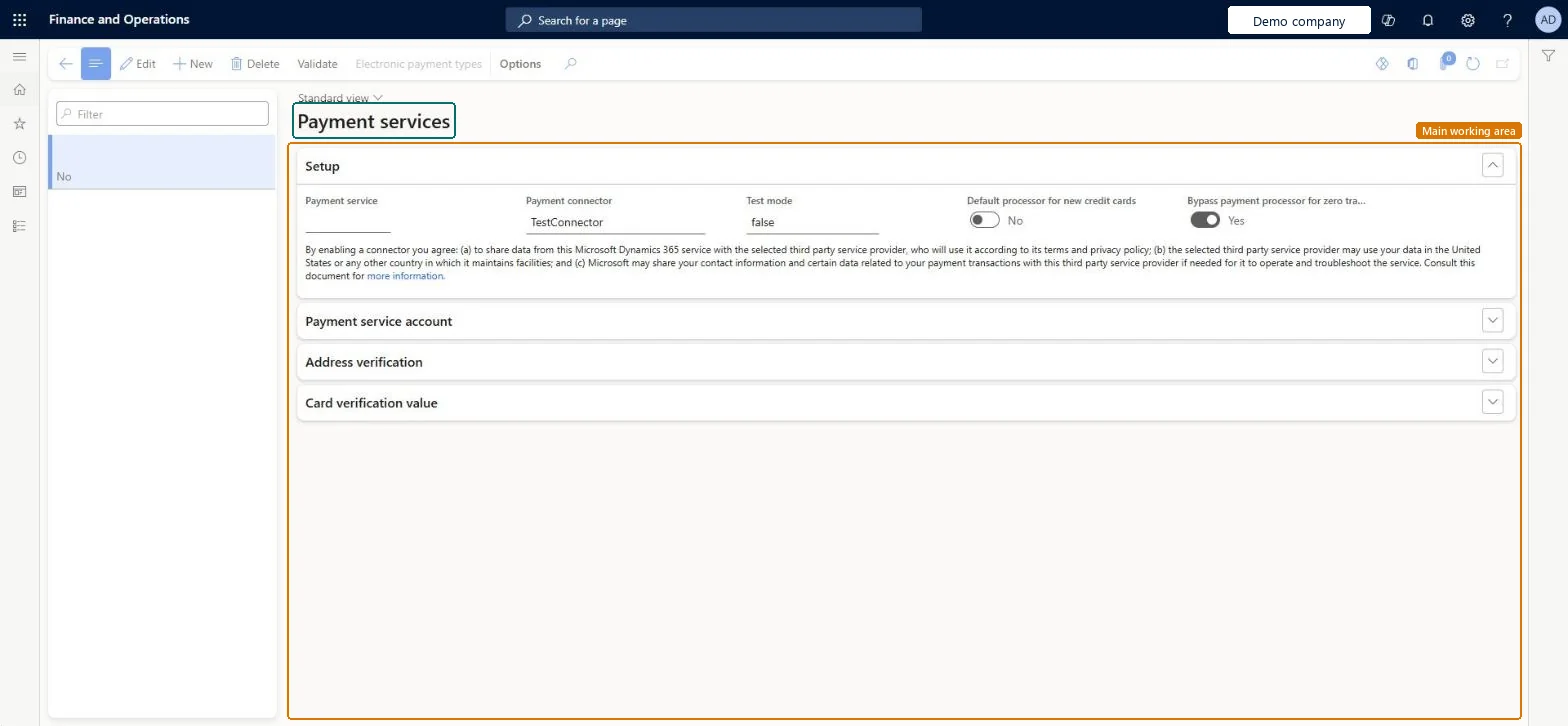
Use it to set up and activate a payment service with a credit card provider listed in the Payment connector field.
- Used by
- Accounts receivable manager, Accounting supervisor
- Business process
- Define customer payment processes in Dynamics 365 Finance
- Menu item
CreditCardProcessors- Main table
CreditCardProcessors- Data entity
- —
- Setup steps
- 1 on this page
Show what matters for
Everyone
1What it is and why
| What it is | A setup page for credit card payment services, which connect the legal entity to the bank that processes customers' credit card charges. |
|---|---|
| What you do here | Use it to set up and activate a payment service with a credit card provider listed in the Payment connector field. |
| Example | A company that wants to accept credit card payments on sales orders sets up and activates a payment service with a supported provider before authorizing customers' cards. |
Functional consultant · Solution architect
2Where it fits
| Business process | Develop sales policies › Define accounts receivable strategy › Define customer payment processes in Dynamics 365 Finance |
|---|---|
| Menu path | Accounts receivable › Payments setup › Payment services |
| Set up first | — |
| Used next by | Accounts receivable parameters Microsoft Learn ↗Terms of payment Microsoft Learn ↗Sales orders Microsoft Learn ↗ |
| Related pages | — |
| In this process | ← Set up Terms of payment · Set up Payment calendar → |
End user · Functional consultant
3How to do it
Setup steps on this page
Set up Payment servicesNo screenshots yet
Use it to set up and activate a payment service with a credit card provider listed in the Payment connector field.
Microsoft's steps
- Go to Accounts receivable > Payments setup > Payment services.
- Set up a payment service for a credit card provider that is listed in the Payment connector field and that you hold an account with.
- Set up the other options on the page and activate the provider as the default provider.
- On the Credit card types page, set up the card types you accept.
- On the Accounts receivable parameters page, set the parameters for credit card authorizations.
- On the Terms of payment page, set up credit card terms with Payment type set to Credit card.
- On the Customer credit cards page, enter the customers' card details.
Source: Microsoft Learn ↗
Field guide
| Field | What it means | Worked example | Table column |
|---|---|---|---|
| Payment connector | The credit card provider the service connects to; you need an account with that provider.Microsoft Learn ↗ | — | — |
Functional consultant
4Setup decisions
| Setup step | Recommended value and why | Decision · common mistake · test |
|---|---|---|
| Set up Payment services | — | — |
Solution architect
5Design impact
| Shared or per company | Per company: each legal entity has its own records. Microsoft data model ↗ |
|---|---|
| Can it be undone | — |
| Feature or country | — |
| If you change it later | — |
Technical architect
6Technical
| Menu item | CreditCardProcessors Checked in Dynamics 365 |
|---|---|
| Form | CreditCardProcessors Checked in Dynamics 365 |
| Table | CreditCardProcessorsShown as “Payment services” in Record infoKey field: RecIdChecked in Dynamics 365 |
| Data entities | — |
| Who can open it | PrivilegesMaintain customer payment services CreditCardProcessorsMaintainDutiesEnable credit cards CreditCardCreditCardEnableEnable credit cards process CreditCardCreditCardsProcessEnable2 security rolesAccounts receivable managerCustInvoiceAccountsReceivableManagerAccounting supervisor LedgerAccountingSupervisor |
| Actions on the page | Options: Personalize, Page options, ShareChecked in Dynamics 365 |
Developer
7Developer
| Open it directly | https://<your-environment>/?mi=CreditCardProcessors |
|---|---|
| Integrate with | — |
| Table definition | CreditCardProcessors columns and relations Microsoft data model ↗ |
Everyone
8Sources and checks
- learn.microsoft.com/training/modules/configure-accounts-receivable-dyn365-finance/6-credit-card-pay
- learn.microsoft.com/dynamics365/finance/accounts-receivable/credit-card-authorizations
- learn.microsoft.com/common-data-model/schema/core/operationscommon/tables/finance/accountsreceivable/group/creditcardprocessors
- Checked in a working Dynamics 365 system, version 10.0.49: the menu item, form, table and security, the page.
AR-PAYSETUP-090 — Set up Payment services. Beyond ERP Atlas Hub, snapshot 2026-10-16, partly verified. https://www.beyonderp.cloud/atlas/step/AR-PAYSETUP-090