Accounts receivable clerk, Accounts receivable manager, Auditor and 10 more roles
Business process
Define customer payment processes in Dynamics 365 Finance
Menu item
CustPaymTerm
Main table
PaymTerm
Data entity
PaymentTermEntity
Setup steps
1 on this page
Show what matters for
SETUP GUIDEHow to set it up8 sections. Choose a role to highlight what matters to you.
Everyone
1What it is and why
What it is
A setup page for terms of payment, which define how payment due dates are calculated.
What you do here
Use it to create terms with a payment method (such as Net or COD), payment day, months or days, payment schedule and payment calendar handling for non-workdays.
Example
Net terms are used when the due date is always a set number of months or days after the invoice date, while COD is used when payment is required upon invoice.
The page in Dynamics 365. page title tab to open what to set or check
About the examples: Examples and screenshots in this guide use BEAT, a demo company in a Dynamics 365 test environment. Use your own company's codes and values instead of copying them.
Step by step, with screenshots
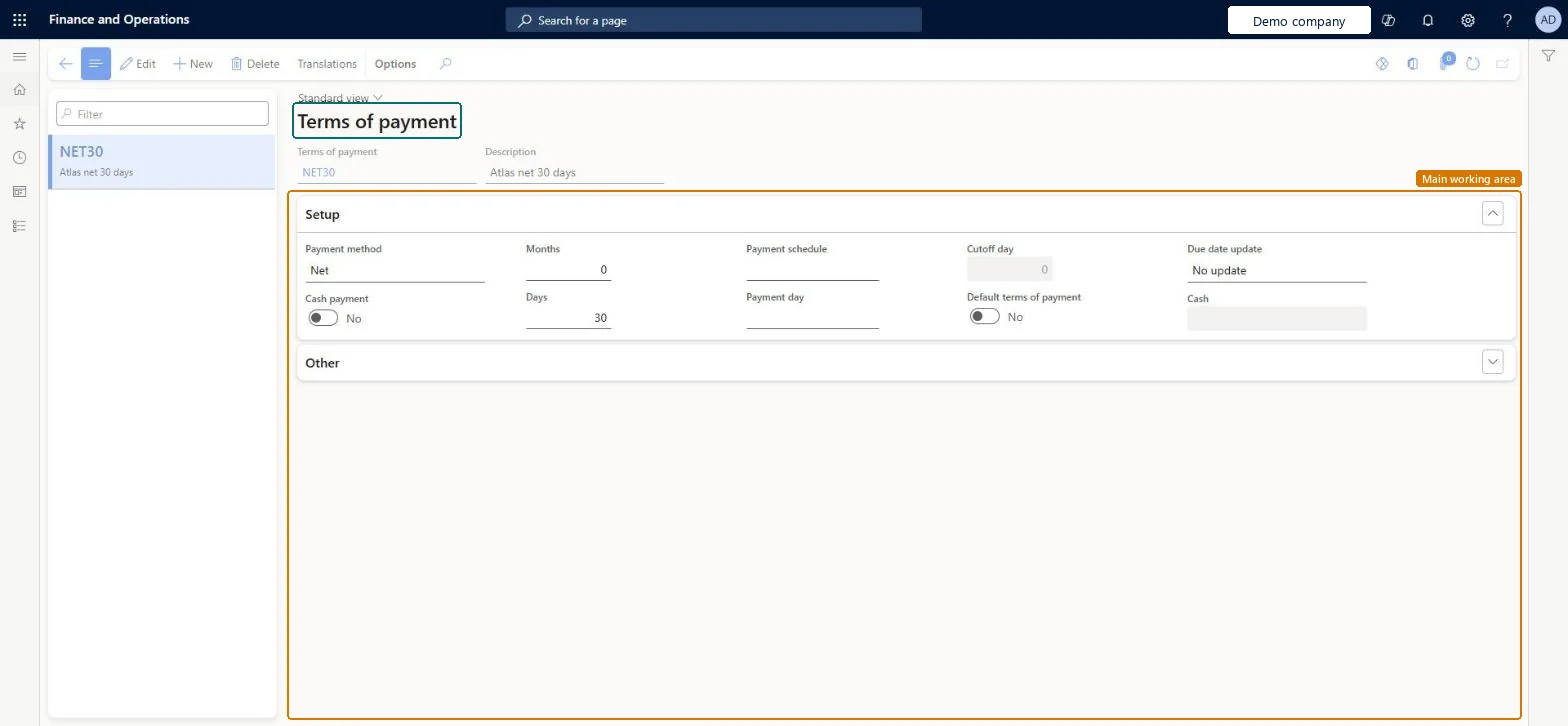
Set up Terms of payment1 screen
Define the terms of payment assigned to sales orders, purchase orders, customers and vendors, which determine due dates.
Screen 1
Create the terms of payment
Go to Accounts receivable > Payments setup > Terms of payment
Select New and enter the code and description
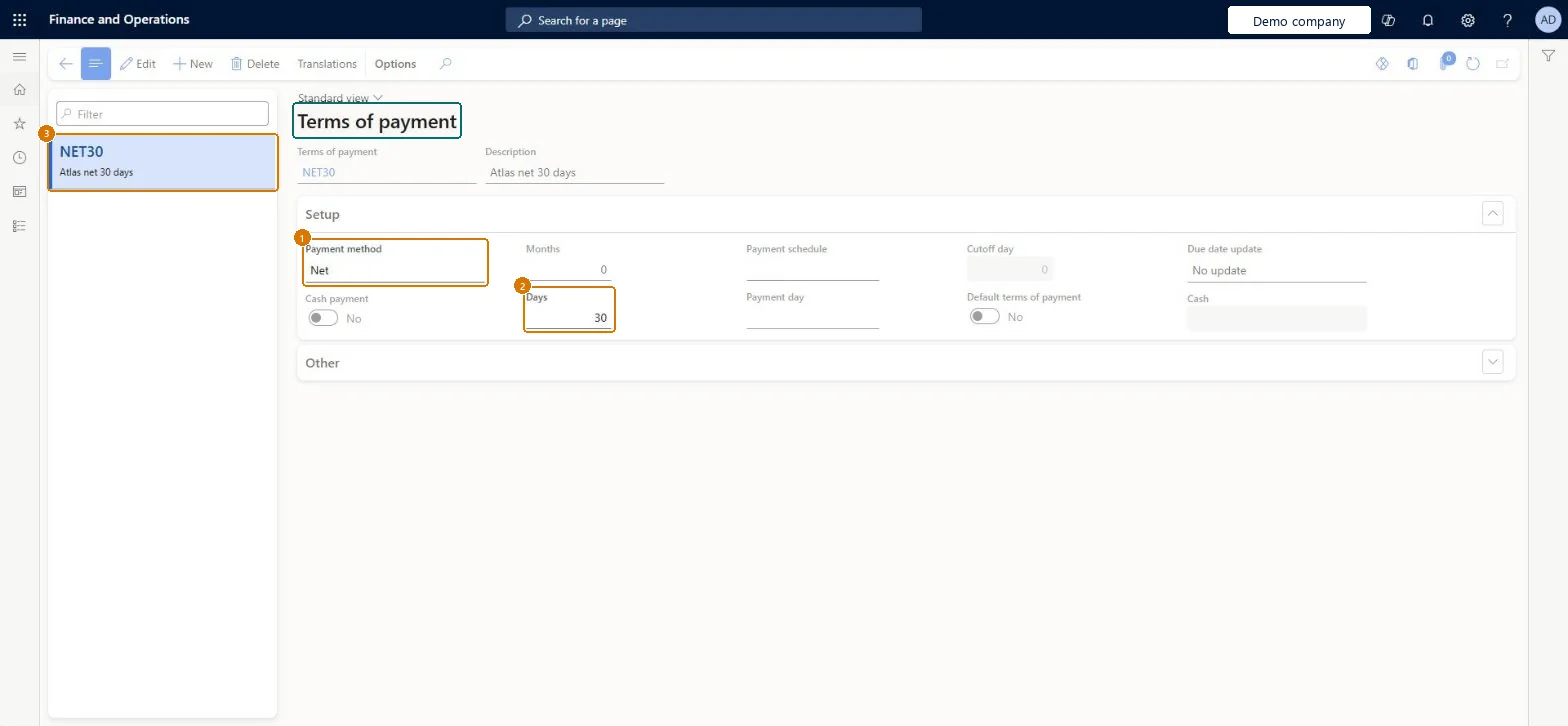
On the Setup FastTab, set Payment method and Days
1Payment method
Net
2Days
30
3Terms of payment
NET30
Description
Net 30 days
Months
0
Show the full screen page title tab to open what to set or check
Steps from Microsoft
Go to Accounts receivable > Payments setup > Terms of payment.
Select New.
In the Terms of payment field, enter an ID.
In the Description field, enter a description.
Select a Payment method, such as Net or COD.
Select a Payment day, or enter a number of Months or Days, or add a Payment schedule.
If you use a payment calendar, choose whether a due date that falls on a non-working day moves to the next or the previous working day.
Sets the starting point for the due date calculation, for example Net for a set number of days after the invoice date, or COD when payment is due on invoice.Microsoft Learn
Net
PaymMethod
Payment day
A set weekday or date in the month that is added to the due date calculation.Microsoft Learn
PaymDayId
Months
The number of months to add when calculating the due date, depending on the terms.Microsoft Learn
0
NumOfMonths
Days
The number of days to add when calculating the due date, depending on the terms.Microsoft Learn
30
NumOfDays
Payment schedule
An installment plan that can be added to the end of the payment method.Microsoft Learn
PaymSched
Cash payment
Must be set to No when the terms of payment is Cash.Microsoft Learn
Cash
Payment type
Set it to Credit card for terms that customers pay by credit card.Microsoft Learn
One code per due-date rule you offer (for example Net 30 with Payment method Net; COD where payment is due on invoice), with Payment day where customers pay on fixed daysTerms calculate due dates from the document date; Payment method sets where the calculation starts, Months/Days add to it, and Payment day rounds to a weekday or date.
Changing the terms on a sales order and expecting the customer default to change; Learn says document changes don't change the customer's default terms.
Reversible: Terms are shared by Accounts receivable and Accounts payable; changes affect documents created afterwards, not posted due dates.
If you change it later
Changing the terms on a single sales or purchase document does not change the default terms on the customer. Terms of payment are shared by Accounts receivable and Accounts payable. Microsoft Learn
Technical architect
6Technical
Menu item
CustPaymTermChecked in Dynamics 365
Form
PaymTermChecked in Dynamics 365
Table
PaymTermShown as “Terms of payment” in Record infoKey field: PaymTermIdChecked in Dynamics 365
PrivilegesMaintain customer terms of payment CustPaymTermMaintainView customer terms of payment CustPaymTermViewDutiesInquire into collections status CollectionLetterCollectionsStatusInquirInquire into collections policies CollectionLetterCollectPoliciesInquireInquire into invoice and cash policies CustInvoiceInvoiceAndCashPoliciesInquirEnable invoice and cash process CustInvoiceInvoiceAndCashProcessEnableInquire into invoice and cash policies RentalCustInvInvoiceAndCashPolInquirEnable invoice and cash process RentalCustInvoiceInvAndCashProcEnable13 security rolesAuditor AuditPolicyManagerCollections agent CollectionLetterCollectionsAgentCollections manager CollectionLetterCollectionsManagerAccounts receivable clerk CustInvoiceAccountsReceivableClerkAccounts receivable manager CustInvoiceAccountsReceivableManagerAccountant LedgerAccountantAccounting manager LedgerAccountingManagerAccounting supervisor LedgerAccountingSupervisorFinancial controller LedgerFinancialControllerAccounts receivable centralized payments clerk PaymAccountsReceivableCentralPaymClerkAccounts receivable payments clerk PaymAccountsReceivablePaymentsClerkRental coordinator agent RentalCoordinatorAgentRental manager RentalManagerChecked in Dynamics 365
Roles to set it up and use it
To set it up or change itRental manager RentalManagerAccounts receivable manager CustInvoiceAccountsReceivableManagerRental coordinator agent RentalCoordinatorAgentCollections manager CollectionLetterCollectionsManagerAccounting supervisor LedgerAccountingSupervisorTo use itAccounts receivable clerk CustInvoiceAccountsReceivableClerkAccounts receivable payments clerk PaymAccountsReceivablePaymentsClerkAccounts receivable centralized payments clerk PaymAccountsReceivableCentralPaymClerkFinancial controller LedgerFinancialControllerAccountant LedgerAccountantGive people one of these roles. On this system, 13 roles can open this page.Checked in Dynamics 365
Actions on the page
Options: Personalize, Page options, ShareChecked in Dynamics 365
PaymentTermEntity (Terms of payment): loaded for each company, in Microsoft's default template 120 - Accounts payable.CredManPaymTermRankEntity (Ranking of payment terms): loaded for each company.Load order: Microsoft's default template 120 - Accounts payable loads Terms of payment at execution unit 1, level 40, sequence 10. Lower levels load first, and entities at the same level load in sequence order.Load first: Payment day lines, Payment schedule, the default templates at lower levels (System setup to dependency bands 30 to 90)Microsoft Learn
Checked in a working Dynamics 365 system, version 10.0.49: the menu item, form, table and security, the page, the demo records and the values in the screenshots.
To cite this step: AR-PAYSETUP-080, Set up Terms of payment. Beyond ERP Atlas Hub, 2026-11-11. https://www.beyonderp.cloud/atlas/step/AR-PAYSETUP-080