BeyondERP.Newsletter
Menu

Setup step on the Condition assessment templates page · Asset management

Set up Condition assessment templates

Use this page to keep condition data consistent on similar assets by using the same template for each asset type.

Used by
Maintenance clerk, Maintenance manager
Business process
Classify assets
Menu item
EntAssetConditionTemplate
Main table
EntAssetConditionTemplate
Data entity
EntAssetMaintenanceConditionTemplateEntity
Setup steps
1 on this page
Show what matters for
SETUP GUIDEHow to set it up8 sections. Choose a role to highlight what matters to you.
Everyone

1What it is and why

What it isA setup page where you create condition assessment templates, with measurement lines, and link them to asset types.
What you do hereUse this page to keep condition data consistent on similar assets by using the same template for each asset type.
ExampleFor example, a template with vibration measurement lines for your machinery.
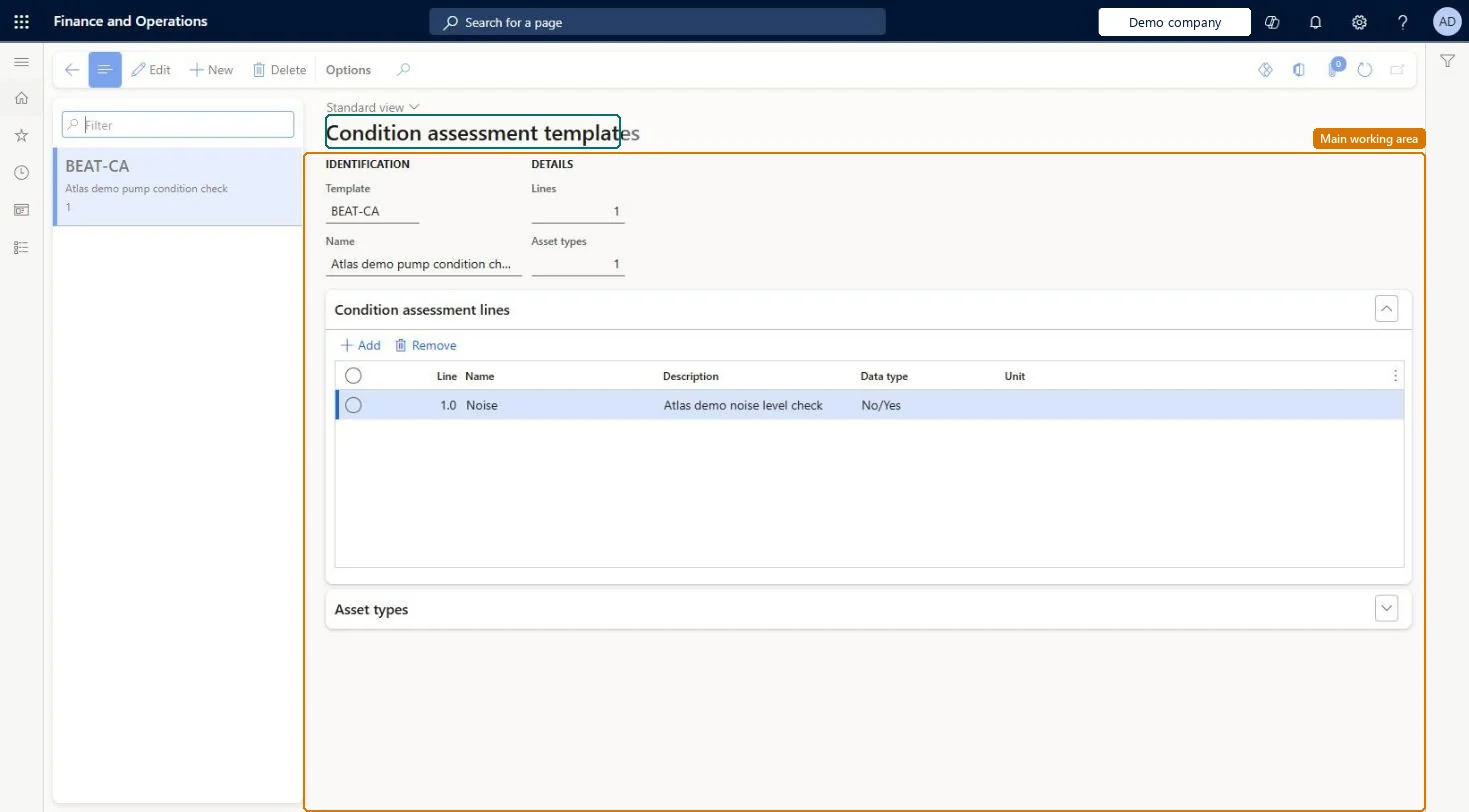
Condition assessment templates page in Dynamics 365
The page in Dynamics 365. page title tab to open what to set or check
Functional consultant · Solution architect

2Where it fits

Business processDefine asset strategy › Classify assets
Menu pathAsset management › Setup › Asset types › Condition assessment templates
Used next byAll assets Microsoft Learn
Related pagesAsset types Microsoft Learn
In this process Set up Asset items · Set up Warranty
End user · Functional consultant

3How to do it

About the examples: Examples and screenshots in this guide use BEAT, a demo company in a Dynamics 365 test environment. Use your own company's codes and values instead of copying them.

Setup steps on this page

Set up Condition assessment templates

Use this page to keep condition data consistent on similar assets by using the same template for each asset type.

Steps from Microsoft

  1. Go to Asset management > Setup > Asset types > Condition assessment templates.
  2. Select New.
  3. Enter an ID in the Template field and a name in the Name field.
  4. On the Condition assessment lines FastTab, add the lines with their condition type and measurement unit.
  5. On the Asset types FastTab, add the asset types that use the template.

Source: Microsoft Learn

Fields on the page

FieldWhat it meansTable column
TemplateID of the template.Microsoft Learn ConditionTemplateId
Lines / Asset typesNumber of assessment lines and asset types related to the template.Microsoft Learn

Test checklist

  1. Create a template with two lines (for example vibration in mm/s) and add an asset type.
  2. On an asset of that type, select Condition assessment and New.
  3. Select the template and check its lines are inserted.
  4. Enter values and print the condition assessment report.

Source: Microsoft Learn

Functional consultant

4Setup decisions

Setup stepRecommended value and whyDecision, common mistake and test
Set up Condition assessment templatesOne template per group of similar asset types, linked on the Asset types FastTabLearn says templates are used to avoid variation of condition data on similar assets, so the same template should be used for each asset type.Not linking the template to asset types, so each condition assessment is built differently and results can't be compared over time.
Solution architect

5Design impact

Can it be undoneReversible: Templates and lines can be changed; registrations already made keep their lines and values.
Technical architect

6Technical

Menu itemEntAssetConditionTemplate Checked in Dynamics 365
FormEntAssetConditionTemplate Checked in Dynamics 365
TableEntAssetConditionTemplateShown as “CONDITION TEMPLATES” in Record infoKey field: ConditionTemplateIdChecked in Dynamics 365
Data entitiesEntAssetMaintenanceConditionTemplateEntityAsset management condition templates Checked in Dynamics 365
Who can open itPrivilegesMaintain maintenance management setup EntAssetSetupMaintainView maintenance management setup EntAssetSetupViewDutiesMaintain Asset Management setup EntAssetSetupMaintainView Enterprise Asset Management setup EntAssetSetupView
2 security rolesMaintenance clerk EntAssetMaintenanceClerkMaintenance manager EntAssetMaintenanceManager
Checked in Dynamics 365
Roles to set it up and use itTo set it up or change itMaintenance manager EntAssetMaintenanceManagerTo use itMaintenance clerk EntAssetMaintenanceClerkGive people one of these roles. On this system, 2 roles can open this page.Checked in Dynamics 365
Developer

7Developer

Open it by URLhttps://<your-environment>/?mi=EntAssetConditionTemplate
Integrate withEntAssetMaintenanceConditionTemplateEntity data entity Checked in Dynamics 365
Everyone

8Sources

To cite this step: AM-TYPE-040, Set up Condition assessment templates. Beyond ERP Atlas Hub, 2026-11-11. https://www.beyonderp.cloud/atlas/step/AM-TYPE-040