PAGE GUIDEWhat the page does and how to use it8 sections. Choose a role to highlight what matters to you.
Everyone
1What it is and why
What it is
A setup page for asset types, which are general categories for assets, such as CNC machines, measuring equipment, and truck engines.
What you do here
Use this page to create asset types and decide which maintenance job types, lifecycle model, counters, attribute types, condition assessment templates, and asset models can be used for assets of each type.
Example
For example, you create a Trucks asset type and then create variations of it for different asset manufacturers and models on the Asset type defaults page.
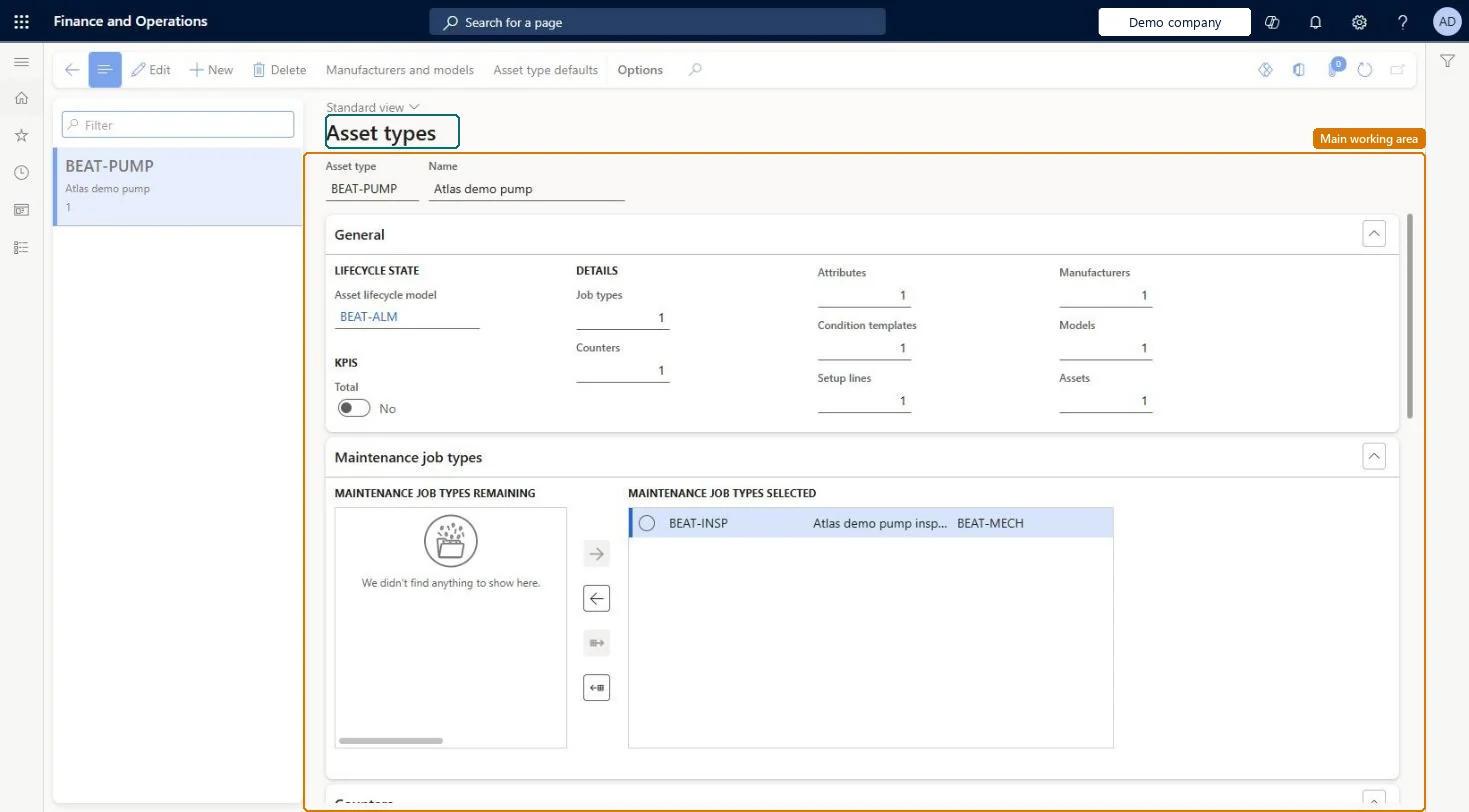
The page in Dynamics 365. page title tab to open what to set or check
About the examples: Examples and screenshots in this guide use BEAT, a demo company in a Dynamics 365 test environment. Use your own company's codes and values instead of copying them.
Setup steps on this page
Set up Asset types
Use this page to create asset types and decide which maintenance job types, lifecycle model, counters, attribute types, condition assessment templates, and asset models can be used for assets of each type.
Steps from Microsoft
Go to Asset management > Setup > Asset types > Asset types.
Select New.
In the Asset type field, enter an ID, and enter a name in the Name field.
In the Asset lifecycle model field, select an asset lifecycle model.
Select Save.
On the Maintenance job types FastTab, move the job types you need to the selected section.
On the Counters, Attribute types, and Condition assessments FastTabs, select the items for the asset type.
One asset type per general equipment category (for example CNC machines, measuring equipment, truck engines), listing every maintenance job type that may be used on manual work ordersLearn describes asset types as general categories for assets that decide which job types, lifecycle states, counters, attributes and condition templates an asset can use.
Leaving job types off the Maintenance job types FastTab. Manually created (corrective) work orders can only use job types selected on the asset type, even though preventive work orders can use all job types.
Solution architect
5Design impact
Can it be undone
Reversible: Job types, counters, attribute types and condition templates on an asset type can be changed. Attribute types you add are pushed to existing assets automatically, so plan attribute changes before go-live. Microsoft Learn
If you change it later
Adding attribute types to an asset type updates existing assets of that type automatically. Microsoft Learn
Technical architect
6Technical
Menu item
EntAssetObjectTypeChecked in Dynamics 365
Form
EntAssetObjectTypeChecked in Dynamics 365
Table
EntAssetObjectTypeShown as “ASSET TYPES” in Record infoKey field: ObjectTypeIDChecked in Dynamics 365
Data entities
EntAssetMaintenanceAssetTypeEntityAsset management asset types Checked in Dynamics 365
To set it up or change itMaintenance manager EntAssetMaintenanceManagerTo use itMaintenance clerk EntAssetMaintenanceClerkGive people one of these roles. On this system, 2 roles can open this page.Checked in Dynamics 365
Actions on the page
(Action Pane without tabs): Manufacturers and models, Asset type defaultsChecked in Dynamics 365
Developer
7Developer
Open it by URL
https://<your-environment>/?mi=EntAssetObjectType
Integrate with
EntAssetMaintenanceAssetTypeEntity data entity Checked in Dynamics 365