Accounts payable manager, Auditor, Budget manager and 7 more roles
Business process
Manage active assets
Menu item
EntAssetObjectTableAll
Main table
EntAssetObjectTable
Data entity
EntAssetMaintenanceAssetV3Entity
Show what matters for
PAGE GUIDEWhat the page does and how to use it8 sections. Choose a role to highlight what matters to you.
Everyone
1What it is and why
What it is
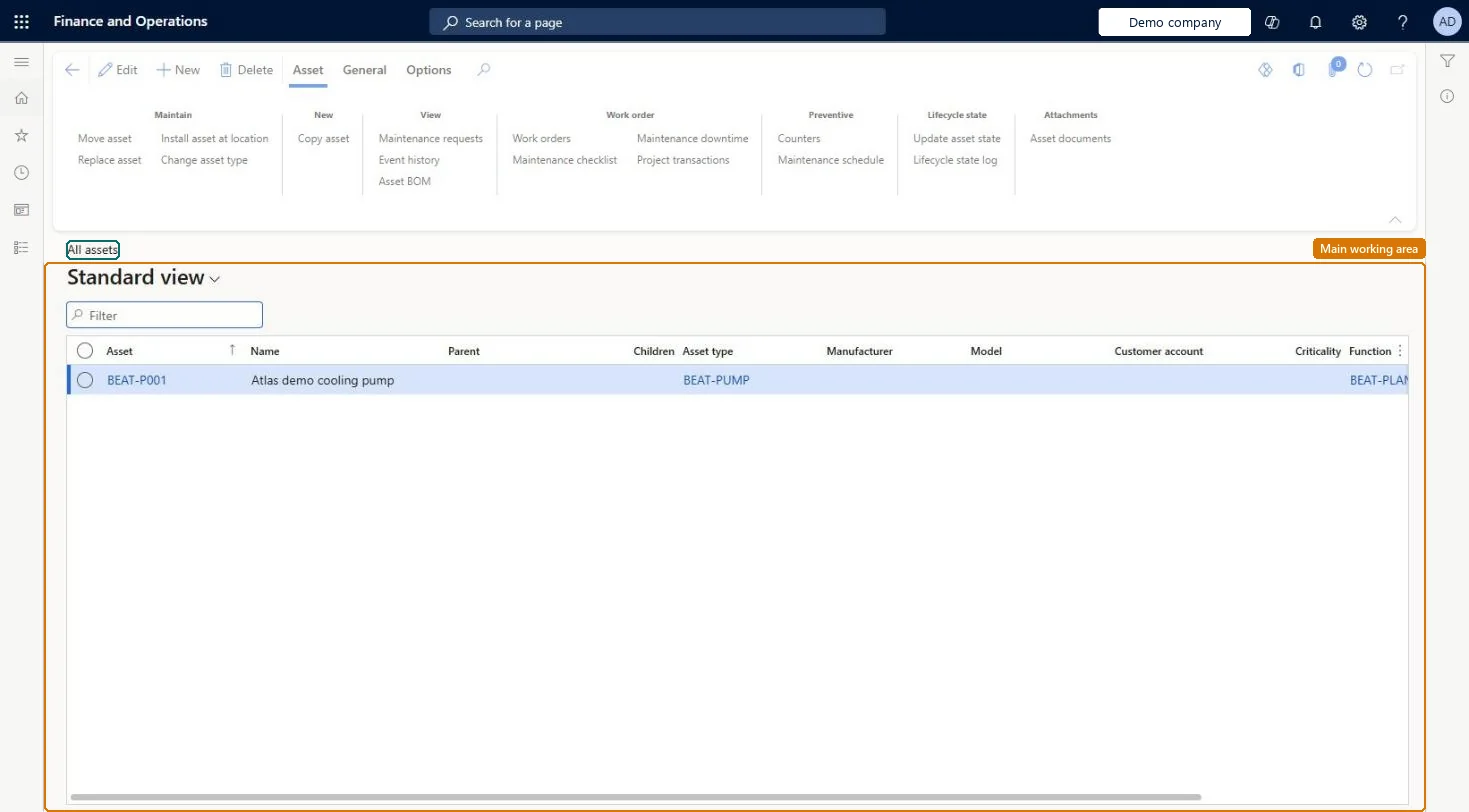
A list page that shows every asset, meaning any piece of equipment, such as a machine or machine part, that needs maintenance, service, or repair.
What you do here
Use this page to create, view, and edit assets, and to open related information for an asset such as its maintenance requests, work orders, faults, spare parts, and cost and hour control.
Example
For example, a maintenance planner selects several assets on the list and updates their asset lifecycle state in one step.
The page in Dynamics 365. page title tab to open what to set or check
About the examples: Examples and screenshots in this guide use BEAT, a demo company in a Dynamics 365 test environment. Use your own company's codes and values instead of copying them.
Steps from Microsoft
Go to Asset management > Assets > All assets.
Select New.
In the Create assets dialog, enter the asset ID and name, and select the Effective date and time.
In the Asset type field, select the asset type, and if necessary select Asset manufacturer and Asset model.
Check the suggested functional location and select another one if necessary.
Select OK.
Select the asset in the list and select Edit to add further information.
Hard to reverse: Asset type is mandatory when you create the asset and drives which job types, counters and maintenance plans apply. A new asset always starts in the first state of its lifecycle model. Setting an asset to an inactive state stops new work orders and preventive maintenance for it. Deleting a maintenance plan line or round on the asset also deletes all its maintenance schedules with status Created. Microsoft Learn
If you change it later
When an asset is set to an inactive lifecycle state, you can no longer create work orders or schedule preventive maintenance jobs for it. Microsoft Learn
Technical architect
6Technical
Menu item
EntAssetObjectTableAllChecked in Dynamics 365
Form
EntAssetObjectTableChecked in Dynamics 365
Table
EntAssetObjectTableShown as “ASSETS” in Record infoKey field: ObjectIDChecked in Dynamics 365
Data entities
EntAssetMaintenanceAssetV3EntityAssets entity view V3 Checked in Dynamics 365
Who can open it
PrivilegesMaintain integration from Fixed assets to Asset management EntAssetFixedAssetIntegrationMaintainView Asset management data from Fixed assets. EntAssetFixedAssetIntegrationViewMaintain asset table EntAssetObjectTableMaintainView asset table EntAssetObjectTableViewDutiesInquire into fixed assets AssetFixedAssetsInquireMaintain fixed assets AssetFixedAssetsMaintainInquire into asset master EntAssetObjectMasterInquireMaintain asset master EntAssetObjectMasterMaintain10 security rolesAuditor AuditPolicyManagerBudget manager BudgetBudgetManagerChief financial officer CompanyChiefFinancialOfficerMaintenance clerk EntAssetMaintenanceClerkMaintenance manager EntAssetMaintenanceManagerMaintenance worker EntAssetMaintenanceWorkerAccountant LedgerAccountantAccounting manager LedgerAccountingManagerAccounting supervisor LedgerAccountingSupervisorAccounts payable manager VendInvoiceAccountsPayableManagerChecked in Dynamics 365
Roles to set it up and use it
To set it up or change itMaintenance manager EntAssetMaintenanceManagerMaintenance clerk EntAssetMaintenanceClerkTo use itMaintenance worker EntAssetMaintenanceWorkerBudget manager BudgetBudgetManagerAuditor AuditPolicyManagerChief financial officer CompanyChiefFinancialOfficerAccounts payable manager VendInvoiceAccountsPayableManagerGive people one of these roles. On this system, 10 roles can open this page.Checked in Dynamics 365
Actions on the page
AssetGeneral: Asset details, Related information, Reports(Action Pane without tabs): New, DeleteChecked in Dynamics 365