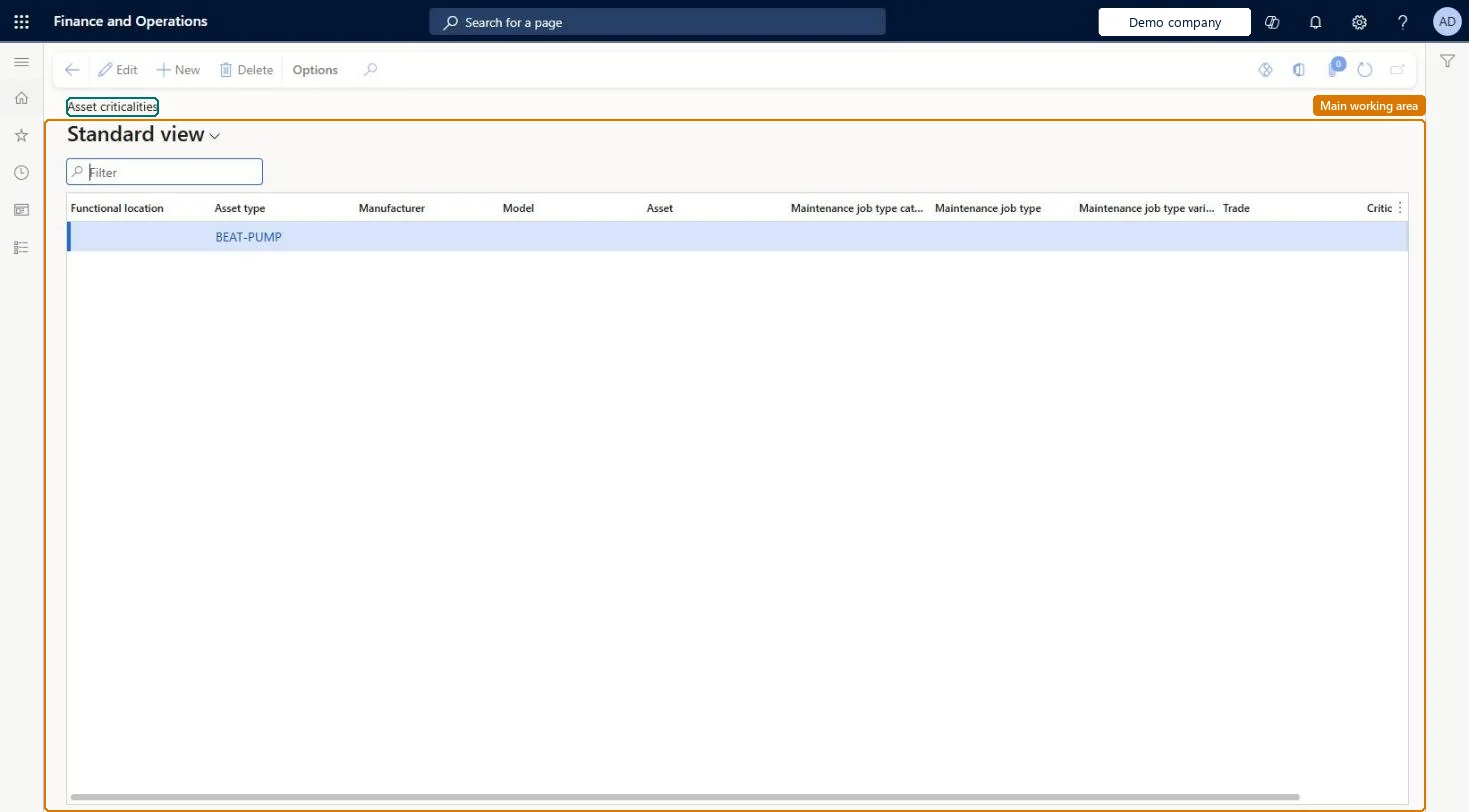
Setup step on the Asset criticalities page · Asset management
Set up Asset criticalities
Use this page to set how much a maintenance job on an asset affects production; the criticality is used to calculate work order criticality during work order scheduling.
Accounts payable manager, Auditor, Budget manager and 7 more roles
Business process
Develop maintenance strategy
Menu item
EntAssetObjectCriticality
Main table
EntAssetObjectCriticalit
Data entity
EntAssetMaintenanceAssetCriticalityEntity
Setup steps
1 on this page
Show what matters for
SETUP GUIDEHow to set it up8 sections. Choose a role to highlight what matters to you.
Everyone
1What it is and why
What it is
A setup page where you give a criticality value to combinations of functional location, asset type, manufacturer, model, asset, and maintenance job details.
What you do here
Use this page to set how much a maintenance job on an asset affects production; the criticality is used to calculate work order criticality during work order scheduling.
Example
For example, you create one default record with no selections and more specific records for critical assets; the most specific match is used.
The page in Dynamics 365. page title tab to open what to set or check
About the examples: Examples and screenshots in this guide use BEAT, a demo company in a Dynamics 365 test environment. Use your own company's codes and values instead of copying them.
Setup steps on this page
Set up Asset criticalities
Use this page to set how much a maintenance job on an asset affects production; the criticality is used to calculate work order criticality during work order scheduling.
Steps from Microsoft
Go to Asset management > Setup > Asset criticalities.
Select New.
Make selections in the Functional location, Asset type, Manufacturer, Model, Asset, and job fields for the level of detail you need.
In the Criticality field, select a criticality value.
One default record with no selections, plus more specific records only where criticality really differsThe system checks the most specific combination first and falls back to the default record with no selections when nothing else matches, so the default record makes sure every work order gets a criticality.
Changing a criticality here and expecting existing work orders to follow. Work orders that already used it keep their criticality, and criticality can't be changed on a work order.Test: Most specific criticality record wins
Solution architect
5Design impact
Can it be undone
Reversible: Can be changed any time, but only affects work orders created or recalculated afterwards (a work order recalculates when a line is added or deleted).
If you change it later
Changing a criticality here doesn't update the criticality on work orders that already use it. Microsoft Learn
Technical architect
6Technical
Menu item
EntAssetObjectCriticalityChecked in Dynamics 365
Form
EntAssetObjectCriticalityChecked in Dynamics 365
Table
EntAssetObjectCriticalitShown as “ASSET CRITICALITIES” in Record infoKey field: ObjectType_ObjectTypeID, Product_ProductID, Model_ModelID, Object_ObjectID, JobGroup_JobGroupID, JobType_JobTypeID, JobVariant_JobVariantID, JobTrade_JobTradeID, FunctionalLocation_FunctionalLocationIdChecked in Dynamics 365
Data entities
EntAssetMaintenanceAssetCriticalityEntityAsset management asset criticalities Checked in Dynamics 365
Who can open it
PrivilegesMaintain integration from Fixed assets to Asset management EntAssetFixedAssetIntegrationMaintainView Asset management data from Fixed assets. EntAssetFixedAssetIntegrationViewMaintain asset table EntAssetObjectTableMaintainView asset table EntAssetObjectTableViewDutiesInquire into fixed assets AssetFixedAssetsInquireMaintain fixed assets AssetFixedAssetsMaintainInquire into asset master EntAssetObjectMasterInquireMaintain asset master EntAssetObjectMasterMaintain10 security rolesAuditor AuditPolicyManagerBudget manager BudgetBudgetManagerChief financial officer CompanyChiefFinancialOfficerMaintenance clerk EntAssetMaintenanceClerkMaintenance manager EntAssetMaintenanceManagerMaintenance worker EntAssetMaintenanceWorkerAccountant LedgerAccountantAccounting manager LedgerAccountingManagerAccounting supervisor LedgerAccountingSupervisorAccounts payable manager VendInvoiceAccountsPayableManagerChecked in Dynamics 365
Roles to set it up and use it
To set it up or change itMaintenance manager EntAssetMaintenanceManagerMaintenance clerk EntAssetMaintenanceClerkTo use itMaintenance worker EntAssetMaintenanceWorkerBudget manager BudgetBudgetManagerAuditor AuditPolicyManagerChief financial officer CompanyChiefFinancialOfficerAccounts payable manager VendInvoiceAccountsPayableManagerGive people one of these roles. On this system, 10 roles can open this page.Checked in Dynamics 365