PAGE GUIDEWhat the page does and how to use it8 sections. Choose a role to highlight what matters to you.
Everyone
1What it is and why
What it is
A setup page with the general parameters for Asset Management that relate to assets, work orders, and work order scheduling.
What you do here
Use this page to set defaults such as the default functional location, maintenance request type, and work order types, the scores used in work order scheduling, the document types printed with work order reports, and number sequences.
Example
For example, you set Real time update to No when many assets or functional locations are set up on maintenance plans or maintenance rounds.
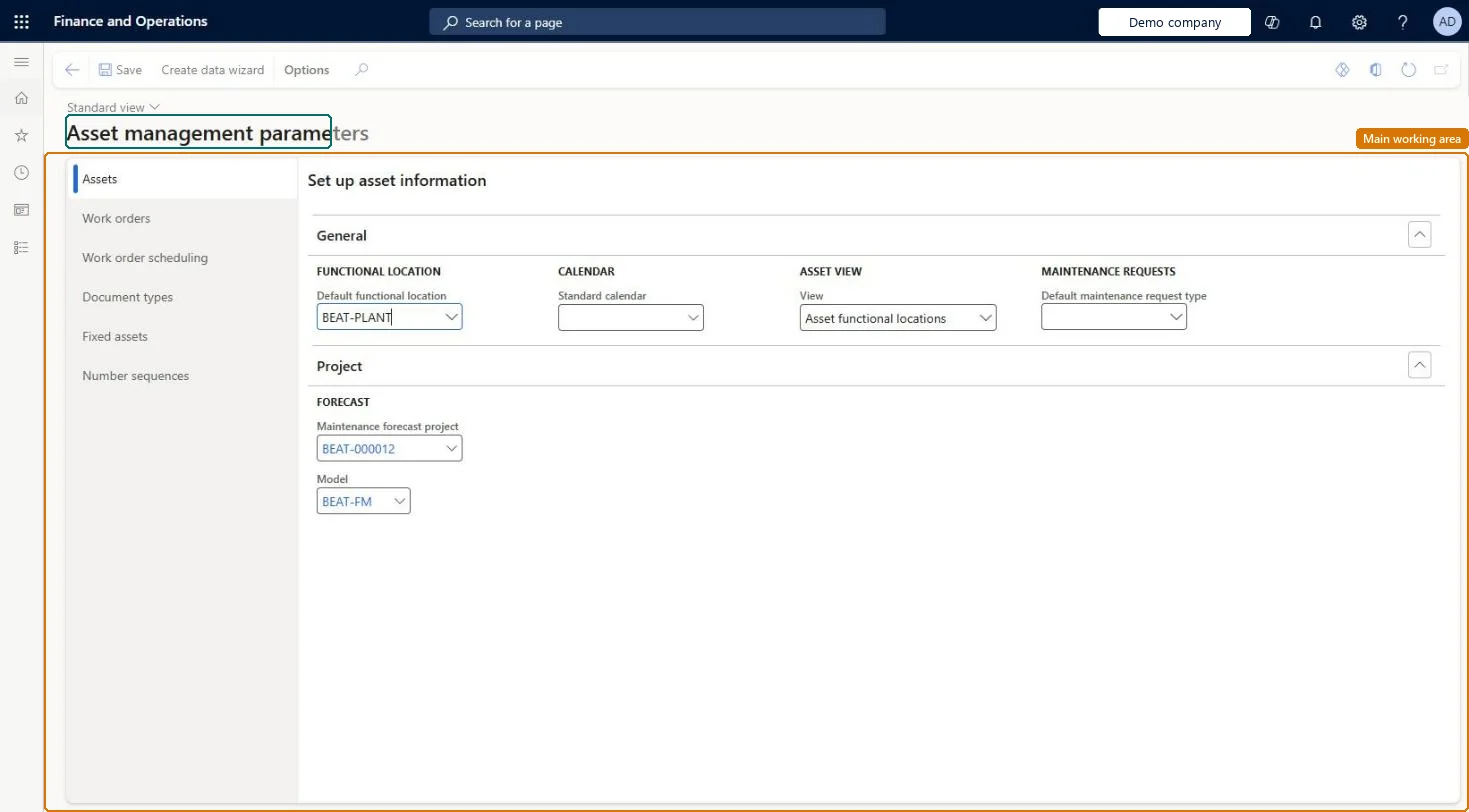
The page in Dynamics 365. page title tab to open what to set or check
About the examples: Examples and screenshots in this guide use BEAT, a demo company in a Dynamics 365 test environment. Use your own company's codes and values instead of copying them.
Setup steps on this page
Set up Asset management parameters
Use this page to set defaults such as the default functional location, maintenance request type, and work order types, the scores used in work order scheduling, the document types printed with work order reports, and number sequences.
Steps from Microsoft
Go to Asset management > Setup > Asset management parameters.
On the Assets tab, select the Default functional location and the Default request type.
On the Work orders tab, select the Default work order type and the Preventive work order type.
On the Work order scheduling tab, enter the rating scores used in work order scheduling.
On the Document types tab, select the document types to print with work order reports.
On the Number sequences tab, select the required number sequences.
Set Default work order type and Preventive work order type, score worker location by functional location rather than asset location, and set Real time update = No only when many assets or functional locations sit on maintenance plans or roundsLearn says Preventive work order type is used for work orders from maintenance plans (falling back to the default type), calls asset location not recommended, and advises Real time update = No for large data volumes.
Setting Real time update = No and then changing job type defaults or maintenance plans: the changes aren't updated automatically and a warning might not be shown, so plans and rounds keep old references until the update job runs.Test: Work order scheduling rating score
Number sequences
Reference
Shared or per company
Note
Asset
Per company
BEAT uses number sequence Asse_3. Checked in Dynamics 365
Automatically created asset
Per company
BEAT uses number sequence Asse_7. Checked in Dynamics 365
Maintenance request
Per company
BEAT uses number sequence Asse_11. Checked in Dynamics 365
Work order
Per company
BEAT uses number sequence Asse_15. Checked in Dynamics 365
Condition assessment
Per company
BEAT uses number sequence Asse_19. Checked in Dynamics 365
Loan
Per company
BEAT uses number sequence Asse_23. Checked in Dynamics 365
Fault
Per company
BEAT uses number sequence Asse_27. Checked in Dynamics 365
Maintenance Checklist template
Per company
BEAT uses number sequence Asse_31. Checked in Dynamics 365
Solution architect
5Design impact
Can it be undone
Reversible: Defaults and scheduling scores can be changed at any time. They apply to new assets, requests and work orders and to the next scheduling run; existing records keep their values. Microsoft Learn
If you change it later
With Real time update set to No, changes to job type defaults, maintenance plans, and maintenance rounds are not updated automatically. Microsoft Learn
Technical architect
6Technical
Menu item
EntAssetParametersChecked in Dynamics 365
Form
EntAssetParametersChecked in Dynamics 365
Table
EntAssetParametersShown as “ASSET MANAGEMENT PARAMETERS” in Record infoChecked in Dynamics 365
Data entities
EntAssetMaintenanceParametersEntityAsset management parameters Checked in Dynamics 365EntAssetMaintenanceWorkOrderScheduleParametersEntityAsset management work order schedule parameters Checked in Dynamics 365AssetParametersEntityFixed asset parameters Microsoft data model
To set it up or change itMaintenance manager EntAssetMaintenanceManagerTo use itMaintenance clerk EntAssetMaintenanceClerkGive people one of these roles. On this system, 2 roles can open this page.Checked in Dynamics 365
Actions on the page
(Action Pane without tabs): Create data wizardChecked in Dynamics 365
Developer
7Developer
Open it by URL
https://<your-environment>/?mi=EntAssetParameters
Integrate with
EntAssetMaintenanceParametersEntity data entity Checked in Dynamics 365