BeyondERP.Newsletter
Menu

Setup page · Warehouse management

Wave label templates

A setup page where you define wave label templates that tell the system which label layout and printer to use when labels are printed during wave execution.

Used by
Process engineer, Warehouse manager
Business process
Manage warehouse operations
Menu item
WHSWaveLabelTemplate
Main table
WHSWaveLabelTemplate
Data entity
WHSWaveLabelTemplateV2Entity
Setup steps
1 on this page
Show what matters for
PAGE GUIDEWhat the page does and how to use it8 sections. Choose a role to highlight what matters to you.
Everyone

1What it is and why

What it isA setup page where you define wave label templates that tell the system which label layout and printer to use when labels are printed during wave execution.
What you do hereUse this page to set which label layout and printer print wave labels for a warehouse.
ExampleFor example, a company can print a label for each carton on a shipment to a large retailer that confirms receipts by scanning each carton.
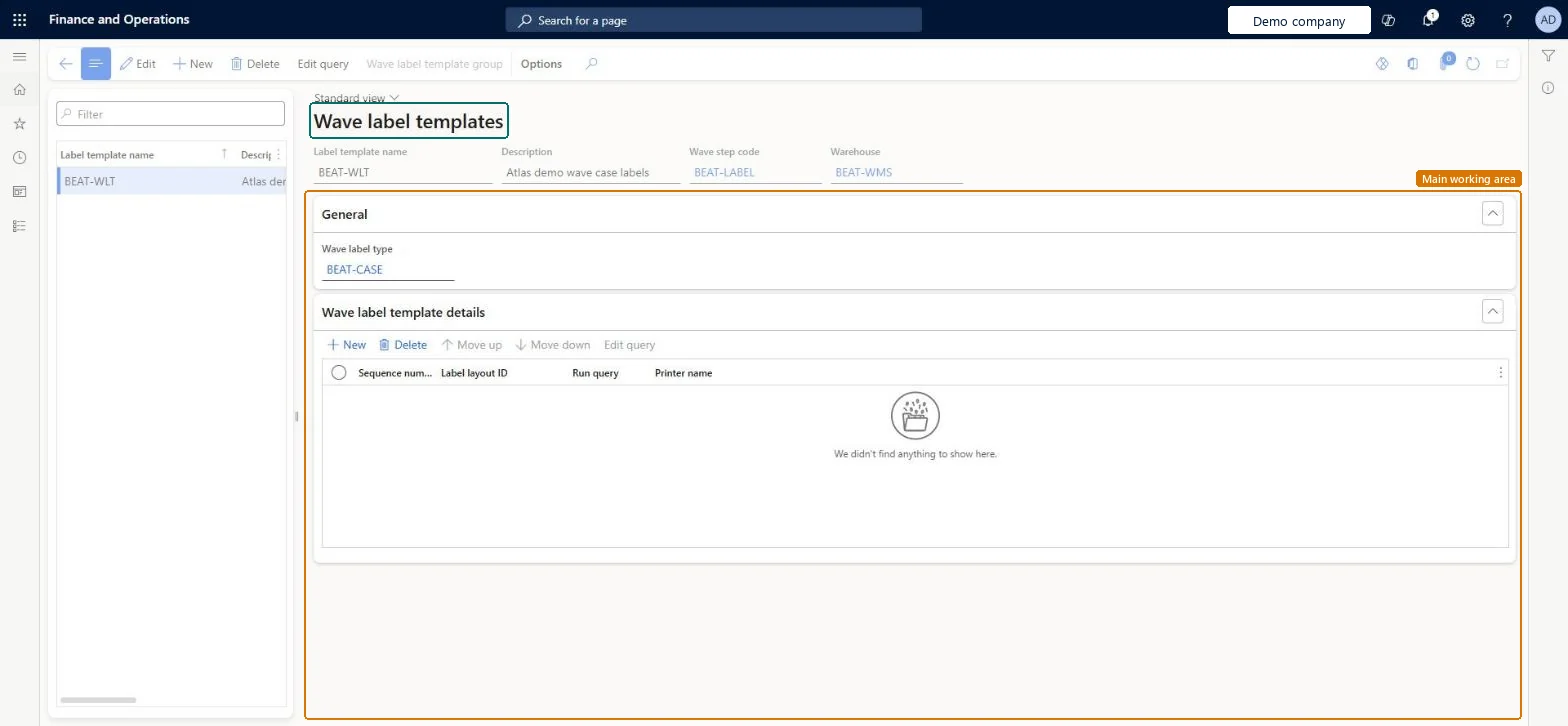
Wave label templates page in Dynamics 365
The page in Dynamics 365. page title tab to open what to set or check
Functional consultant · Solution architect

2Where it fits

Business processManage warehouse operations
Menu pathWarehouse management › Setup › Document routing › Wave label templates
Set up firstWave step codes Microsoft Learn Wave label types Microsoft Learn Wave label layouts Microsoft Learn
Used next byWave templates Microsoft Learn
Related pagesWave label history Microsoft Learn
End user · Functional consultant

3How to do it

About the examples: Examples and screenshots in this guide use BEAT, a demo company in a Dynamics 365 test environment. Use your own company's codes and values instead of copying them.

Setup steps on this page

Set up Wave label templates

Use this page to set which label layout and printer print wave labels for a warehouse.

Steps from Microsoft

  1. Go to Warehouse management > Setup > Document routing > Wave label templates.
  2. Select New to add a wave label template.
  3. In the header, set the Label template name, Description, Wave step code and Warehouse.
  4. On the General FastTab, set the Wave label type.
  5. On the Wave label template details FastTab, add a row and set the Label layout ID, the Printer name and Run query.
  6. Select Save.

Source: Microsoft Learn

Fields on the page

FieldWhat it meansTable column
Wave step codeLinks the template to the wave method in a wave template that prints labels.Microsoft Learn WaveStepCode
Wave label typeLinks the template to a unit on the unit sequence group lines.Microsoft Learn WaveLabelTypeId

Test checklist

  1. Create the template with a wave step code and warehouse.
  2. Add a detail line with layout, printer and Run query = Yes.
  3. Release a sales order and check the number of labels equals the number of cartons.
  4. Open Wave label history and reprint one label.

Source: Microsoft Learn

Functional consultant

4Setup decisions

Setup stepRecommended value and whyDecision, common mistake and test
Set up Wave label templatesOne template per warehouse and wave step code, with Run query = Yes on the template detail linesThe wave step code links the template to the Wave label printing method on the wave template, and Learn recommends Run query = Yes for optimal performance.Setting a Wave label type on a template used for containerization. For that case the type must be left blank, or wave label records are generated when they aren't wanted.Test: Carton labels print during wave processing
Solution architect

5Design impact

Shared or per companyPer company: each legal entity has its own records. Microsoft data model
Can it be undoneReversible: Template changes apply to the next wave. Labels already printed can be reprinted or voided from the wave label pages. Microsoft Learn
Technical architect

6Technical

Menu itemWHSWaveLabelTemplate Checked in Dynamics 365
FormWHSWaveLabelTemplate Checked in Dynamics 365
TableWHSWaveLabelTemplateShown as “WAVE LABEL TEMPLATES” in Record infoKey field: LabelTemplateNameChecked in Dynamics 365
Data entitiesWHSWaveLabelTemplateV2EntityWave label templates V2 Microsoft data model
Who can open itPrivilegesMaintain wave label templates WHSWaveLabelTemplateMaintainDutiesMaintain warehouse operation master WMSWarehouseOperationMasterMaintain
2 security rolesProcess engineer RouteProcessEngineerWarehouse manager WMSWarehouseManager
Checked in Dynamics 365
Roles to set it up and use itTo set it up or change itWarehouse manager WMSWarehouseManagerProcess engineer RouteProcessEngineerGive people one of these roles. On this system, 2 roles can open this page.Checked in Dynamics 365
Actions on the page(Action Pane without tabs): Edit query, Wave label template groupChecked in Dynamics 365
Developer

7Developer

Open it by URLhttps://<your-environment>/?mi=WHSWaveLabelTemplate
Integrate withWHSWaveLabelTemplateV2Entity data entity Microsoft data model
Data migrationWHSWaveLabelTemplateV2Entity (Wave label templates V2): loaded for each company.Microsoft Learn
Table definitionWHSWaveLabelTemplate columns and relations Microsoft data model
Everyone

8Sources