About the examples: Examples and screenshots in this guide use BEAT, a demo company in a Dynamics 365 test environment. Use your own company's codes and values instead of copying them.
Setup steps on this page
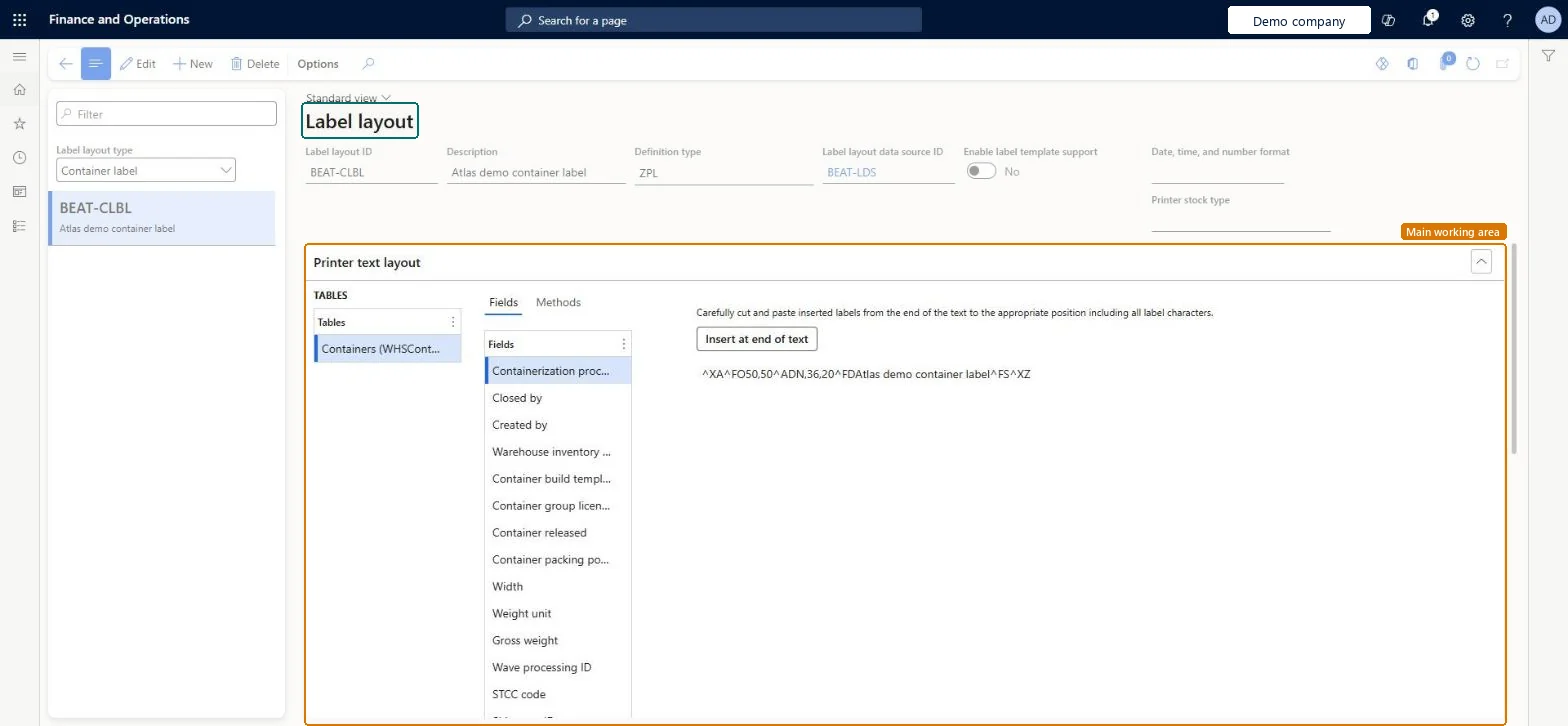
Set up Label layout
Use this page to create layouts for license plate, container and custom labels, including the printer code for each layout.
Steps from Microsoft
Go to Warehouse management > Setup > Document routing > Label layout.
At the top of the list pane, set the Label layout type, for example License Plate Label.
On the Action Pane, select New to create a label layout.
Set the Label layout ID, Description, Definition type, Label layout data source ID, Enable label template support, Date, time, and number format and Printer stock type.
In the Printer text layout section, enter the label code that suits the Definition type.
Definition type ZPL for printers driven by the Document Routing Agent, Variables or Variables (script) for an external label service; always set a Printer stock typeThe definition type must match how the label reaches the printer, and the printer stock type is what dynamic printer selection matches on.
Printing from a work template Print line while the mobile device menu item also has Print label = Yes. The label prints twice.
Solution architect
5Design impact
Can it be undone
Reversible: Layout changes apply to labels printed afterwards. Microsoft Learn
Technical architect
6Technical
Menu item
WHSLabelLayoutChecked in Dynamics 365
Form
WHSLabelLayoutChecked in Dynamics 365
Table
WHSLabelLayoutShown as “LABEL LAYOUT” in Record infoKey field: LabelLayoutIdChecked in Dynamics 365
Data entities
WHSLabelLayoutWithActiveVersionEntityLabel layouts with active versions Checked in Dynamics 365
Who can open it
PrivilegesMaintain label layouts WHSLabelLayoutMaintainView label layouts WHSLabelLayoutViewDutiesInquire into warehouse operation master WMSWarehouseOperationMasterInquireMaintain warehouse operation master WMSWarehouseOperationMasterMaintain6 security rolesField Service Integration User FieldServiceIntegrationUserProduction supervisor ProdProductionSupervisorProcess engineer RouteProcessEngineerProcess engineering manager RouteProcessEngineeringManagerWarehouse planner WHSWarehousePlannerWarehouse manager WMSWarehouseManagerChecked in Dynamics 365
Roles to set it up and use it
To set it up or change itWarehouse manager WMSWarehouseManagerProcess engineer RouteProcessEngineerTo use itWarehouse planner WHSWarehousePlannerProduction supervisor ProdProductionSupervisorProcess engineering manager RouteProcessEngineeringManagerField Service Integration User FieldServiceIntegrationUserGive people one of these roles. On this system, 6 roles can open this page.Checked in Dynamics 365
Developer
7Developer
Open it by URL
https://<your-environment>/?mi=WHSLabelLayout
Integrate with
WHSLabelLayoutWithActiveVersionEntity data entity Checked in Dynamics 365