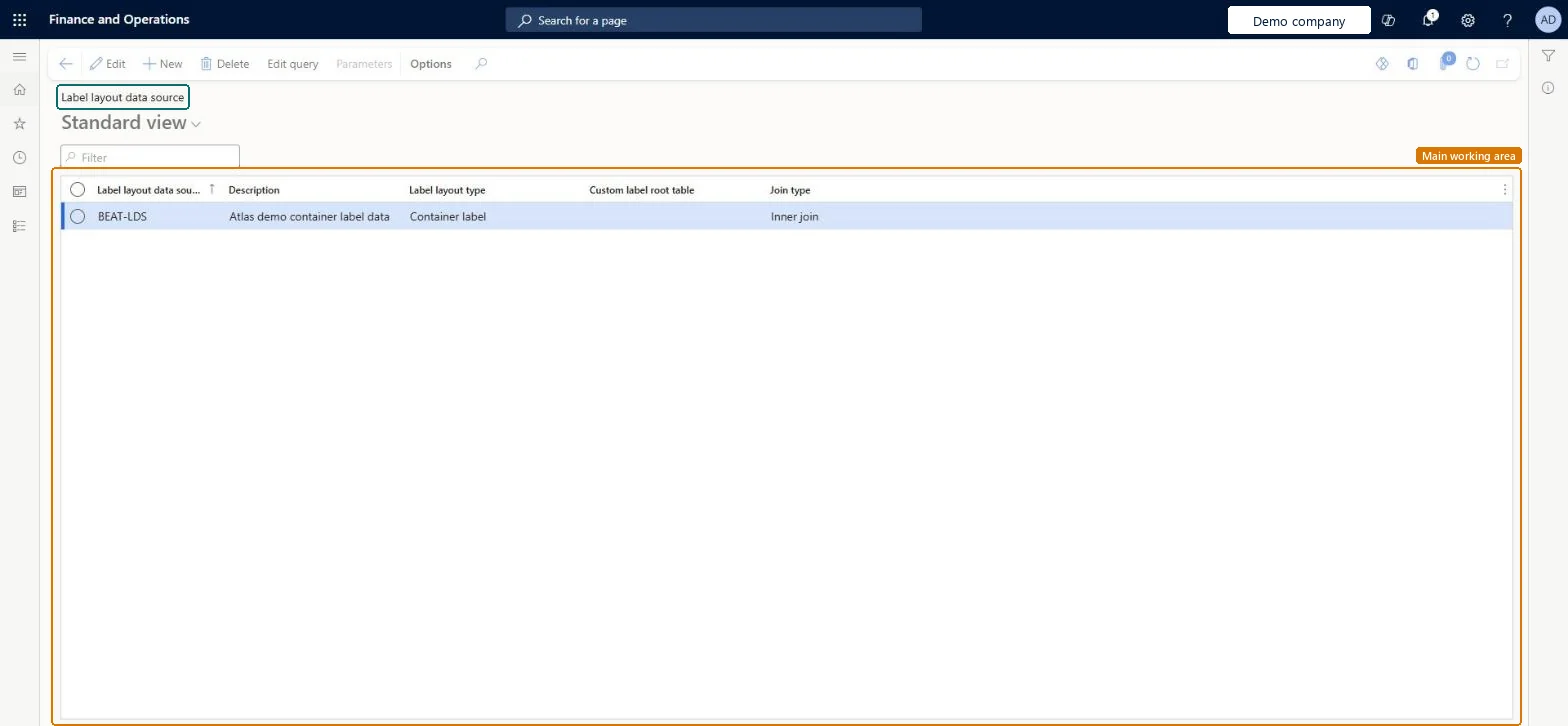
A list page where you define the data sources that give a label layout access to related tables, each with a label layout type, a join type and a query.
Field Service Integration User, Production supervisor, Process engineer and 3 more roles
Business process
Manage warehouse operations
Menu item
WHSLabelLayoutDataSource
Main table
WHSLabelLayoutDataSource
Data entity
WHSLabelLayoutDataSourceEntity
Setup steps
1 on this page
Show what matters for
PAGE GUIDEWhat the page does and how to use it8 sections. Choose a role to highlight what matters to you.
Everyone
1What it is and why
What it is
A list page where you define the data sources that give a label layout access to related tables, each with a label layout type, a join type and a query.
What you do here
Use this page to define which related tables a label layout can print data from.
Example
For example, a license plate label can show the order number that is related to a license plate.
The page in Dynamics 365. page title tab to open what to set or check
About the examples: Examples and screenshots in this guide use BEAT, a demo company in a Dynamics 365 test environment. Use your own company's codes and values instead of copying them.
Setup steps on this page
Set up Label layout data source
Use this page to define which related tables a label layout can print data from.
Steps from Microsoft
Go to Warehouse management > Setup > Document routing > Label layout data source.
On the Action Pane, select New.
Enter the Label layout data source ID, a Description, the Label layout type and the Join type.
Select Save.
Select Edit query and, on the Joins tab, add joins to the tables you need.
Go to Warehouse management > Setup > Document routing > Label layout and select the new record in the Label layout data source ID field of the label layout.
Inner join (the default) for specialised data sources; Outer join when one data source must serve both batch-tracked and non-batch itemsAn inner join to batch needs two data sources (batch and non-batch items), while an outer join returns all items and lets one data source do the job.
Removing a table from the query of a data source that is already in use. Field and method names that existing label layouts reference can disappear.
Solution architect
5Design impact
Can it be undone
Hard to reverse: Adding joins is safe, but removing a table from a data source in use can remove field and method names from existing label layouts, which then need fixing. Microsoft Learn
If you change it later
Removing a table from the query of an existing data source can remove field and method names that existing label layouts already use. Microsoft Learn
Technical architect
6Technical
Menu item
WHSLabelLayoutDataSourceChecked in Dynamics 365
Form
WHSLabelLayoutDataSourceChecked in Dynamics 365
Table
WHSLabelLayoutDataSourceShown as “LABEL LAYOUT DATA SOURCE” in Record infoChecked in Dynamics 365
Data entities
WHSLabelLayoutDataSourceEntityLabel layout data sources Checked in Dynamics 365WHSLabelLayoutDataSourceV2EntityLabel layout data sources V2 Checked in Dynamics 365
Who can open it
PrivilegesMaintain label layout data source WHSLabelLayoutDataSourceMaintainView label layout data source WHSLabelLayoutDataSourceViewDutiesInquire into warehouse operation master WMSWarehouseOperationMasterInquireMaintain warehouse operation master WMSWarehouseOperationMasterMaintain6 security rolesField Service Integration User FieldServiceIntegrationUserProduction supervisor ProdProductionSupervisorProcess engineer RouteProcessEngineerProcess engineering manager RouteProcessEngineeringManagerWarehouse planner WHSWarehousePlannerWarehouse manager WMSWarehouseManagerChecked in Dynamics 365
Roles to set it up and use it
To set it up or change itWarehouse manager WMSWarehouseManagerProcess engineer RouteProcessEngineerTo use itWarehouse planner WHSWarehousePlannerProduction supervisor ProdProductionSupervisorProcess engineering manager RouteProcessEngineeringManagerField Service Integration User FieldServiceIntegrationUserGive people one of these roles. On this system, 6 roles can open this page.Checked in Dynamics 365
Actions on the page
(Action Pane without tabs): Edit query, ParametersChecked in Dynamics 365