Manage customer deductions on payments in Dynamics 365 Finance
Menu item
TAMDeductionReason
Main table
TAMPaymDeductionReason
Data entity
TAMPaymDeductionReasonEntity
Setup steps
1 on this page
Show what matters for
PAGE GUIDEWhat the page does and how to use it8 sections. Choose a role to highlight what matters to you.
Everyone
1What it is and why
What it is
A setup page where you create the reasons users pick for each deduction, which decide how the deduction is handled when it's approved.
What you do here
Use this page to require a reason for each deduction that is entered directly on the deduction workbench, the customer settlement page or the customer page.
Example
For example, a price-based reason creates a free text credit when the claim is approved, while a quantity-based reason creates a negative sales order or a return order.
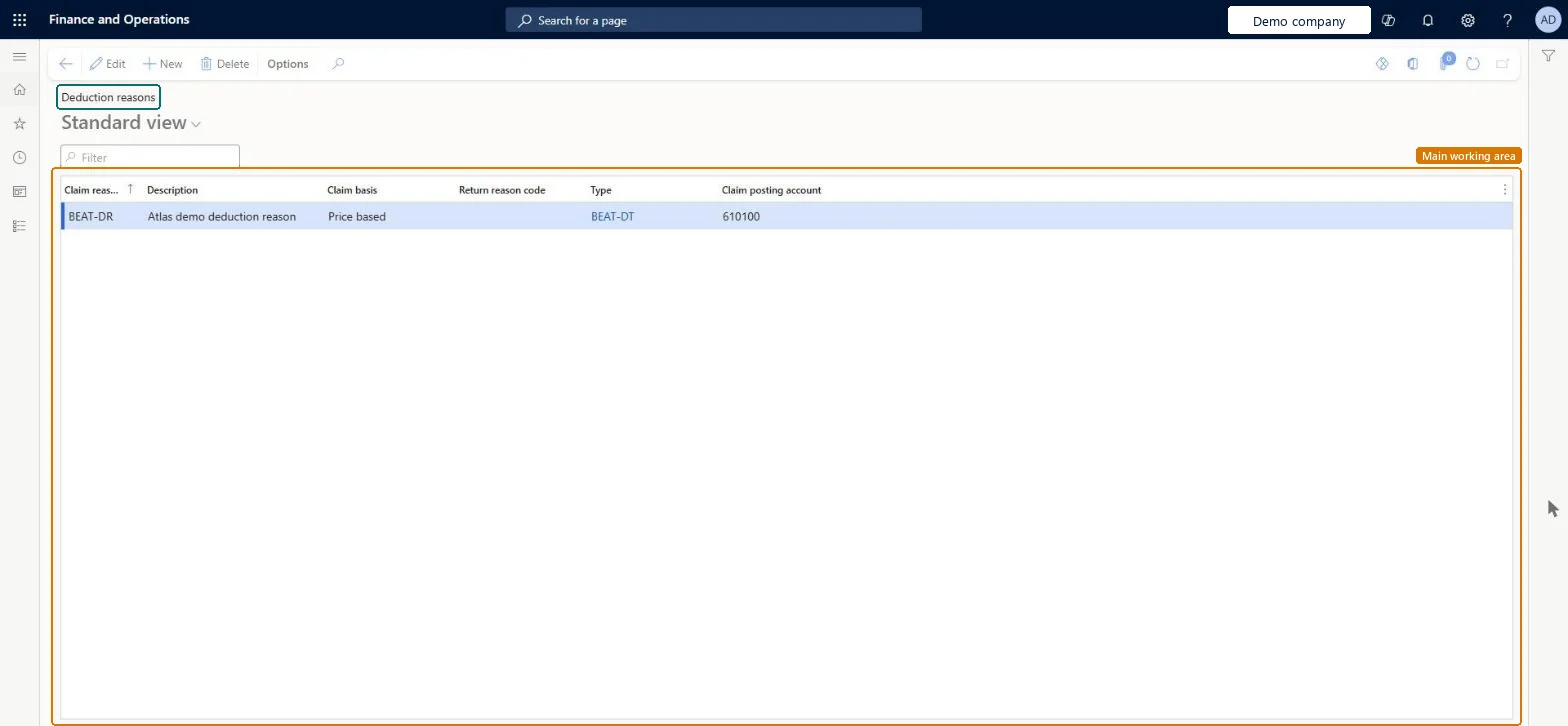
The page in Dynamics 365. page title tab to open what to set or check
About the examples: Examples and screenshots in this guide use BEAT, a demo company in a Dynamics 365 test environment. Use your own company's codes and values instead of copying them.
Step by step, with screenshots
Set up Deduction reasons1 screen
Use this page to require a reason for each deduction that is entered directly on the deduction workbench, the customer settlement page or the customer page.
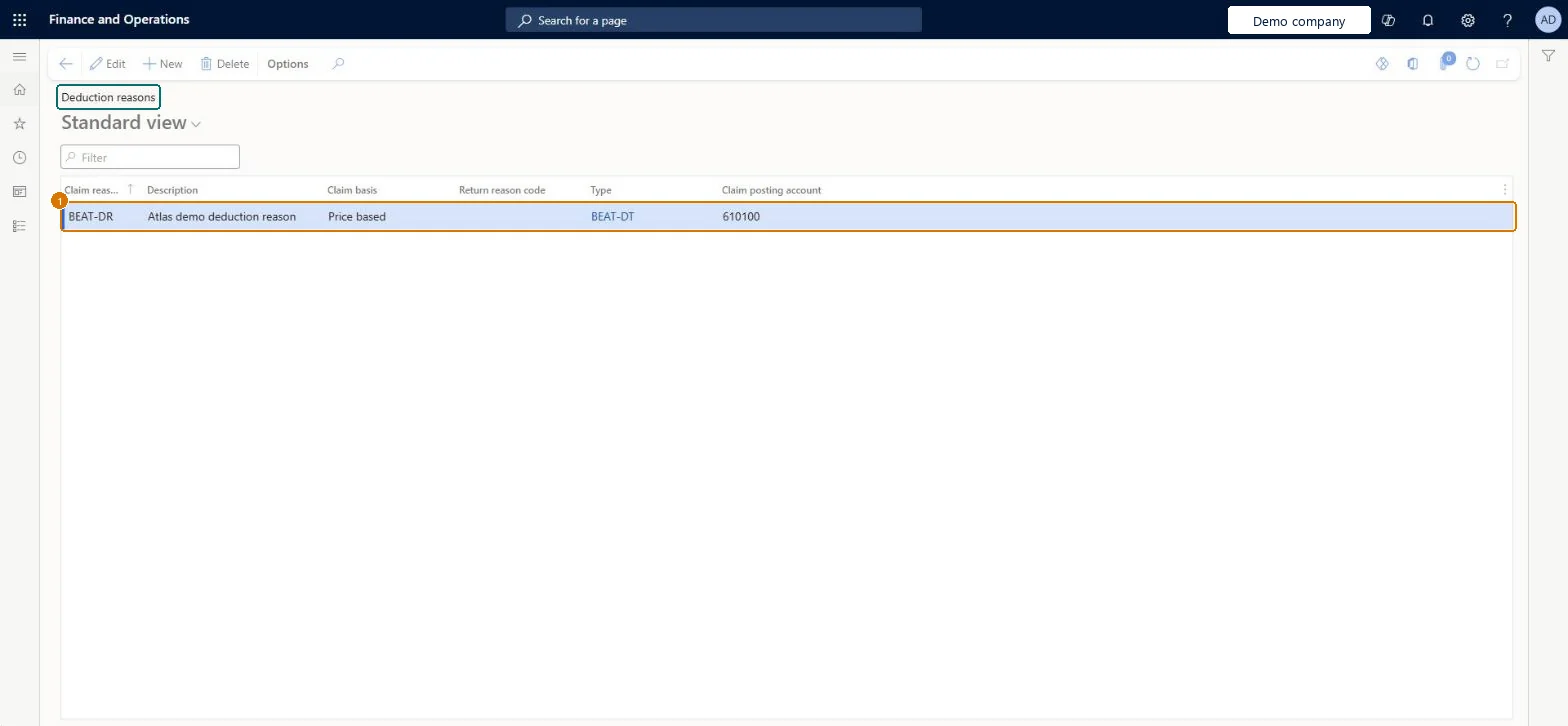
Screen 1
Create a deduction reason
Go to Sales and marketing > Trade allowances > Deductions > Deduction reasons
Make sure the deduction type exists (Sales and marketing > Trade allowances > Deductions > Deduction types)
Select New
Enter the claim reason and description
Select the claim basis and the deduction type
Select the claim posting account
Select Save
1Claim reason
BEAT-DR
Description
Deduction reason
Claim basis
Price based
Type
BEAT-DT
Claim posting account
610100
Show the full screen page title tab to open what to set or check
Steps from Microsoft
Go to Sales and marketing > Trade allowances > Deductions > Deduction reasons.
Select New to add a row.
In the Claim reason field, enter a unique name, and add a Description.
In the Claim basis field, select Price based or Quantity based.
For quantity-based reasons, select a Return reason code.
In the Type field, select a deduction type.
For price-based reasons, select a Claim posting account.
Price based creates a free text credit on approval; Quantity based creates a negative sales order or return order.Microsoft Learn
Price based
ClaimBasis
Return reason code
The return reason code that is copied to the return order.Microsoft Learn
ReturnReasonCodeId
Type
The deduction type whose offset account is used for the deduction or claim.Microsoft Learn
PRICE
DeductionType
Claim posting account
The main account used on the draft free text credit note; shown only for price-based reasons.Microsoft Learn
610100
ClaimPostingLedgerDimension
Common errors and fixes
Message
What to do
Claim is not attached to an invoice. Update has been canceled.
A Quantity based claim was approved with no invoice while Creation without attached invoice is Error on the Deductions tab of Accounts receivable parameters. Attach the invoice, or set that option to Accept or Warning. Microsoft Learn
Test checklist
Create a Price based reason with a Claim posting account and a Quantity based reason with a Return reason code.
Create a Price based deduction on the Deduction workbench with the first reason and approve it; check that the draft free text credit note has the reason's account as Main account and the Deduction ID on the header.
Create a Quantity based deduction with the second reason and approve it; in Copy orders pick the invoice lines and check that the return order has the reason's Return reason code.
Separate reasons per Claim basis: Price based reasons with a Claim posting account, Quantity based reasons with a Return reason code, each linked to a deduction type.The reason decides what happens on approval: a Price based reason creates a free text credit and its Claim posting account becomes the Main account, a Quantity based reason creates a return or negative sales order with the reason's Return reason code.
Leaving the Claim posting account empty or wrong on a Price based reason means the draft free text credit note created on approval gets no or the wrong Main account. Also, reasons can't be used until a Claim journal name is set in Accounts receivable parameters.Test: Price based deduction reason posts to the claim posting account
Feature management and licence
Licence or add-in
On the live system, Collections manager (maintain) and Sales manager (view) use this page.
Checked in Dynamics 365
Solution architect
5Design impact
Can it be undone
Reversible: You can edit a reason at any time. Its Claim posting account and Return reason code are copied onto the credit note or return order when a deduction is approved, so credits already created aren't changed. Microsoft Learn
If you change it later
The reason decides what happens when a deduction is approved: a Price based reason creates a draft free text credit note with the reason's Claim posting account as Main account, a Quantity based reason a return order or negative sales order with the reason's Return reason code. Credits already created keep their values. Microsoft Learn
Technical architect
6Technical
Menu item
TAMDeductionReasonChecked in Dynamics 365
Form
TAMDeductionReasonChecked in Dynamics 365
Table
TAMPaymDeductionReasonShown as “Deduction reasons” in Record infoKey field: ClaimReasonIdChecked in Dynamics 365
Data entities
TAMPaymDeductionReasonEntityDeduction reasons Checked in Dynamics 365
To set it up or change itCollections manager CollectionLetterCollectionsManagerTo use itSales manager TradeSalesManagerGive people one of these roles. On this system, 2 roles can open this page.Checked in Dynamics 365
Actions on the page
Options: Personalize, Page options, ShareChecked in Dynamics 365
Developer
7Developer
Open it by URL
https://<your-environment>/?mi=TAMDeductionReason
Integrate with
TAMPaymDeductionReasonEntity data entity Checked in Dynamics 365
Data migration
TAMPaymDeductionReasonEntity The entity offered by the page's Open in Excel list.Load order: Load the deduction reasons after the deduction types, return reason codes and main accounts they refer to.Load first: Deduction types, Return reason codes, Main accountsChecked in Dynamics 365
Checked in a working Dynamics 365 system, version 10.0.49: the menu item, form, table and security, the page, the demo records and the values in the screenshots.