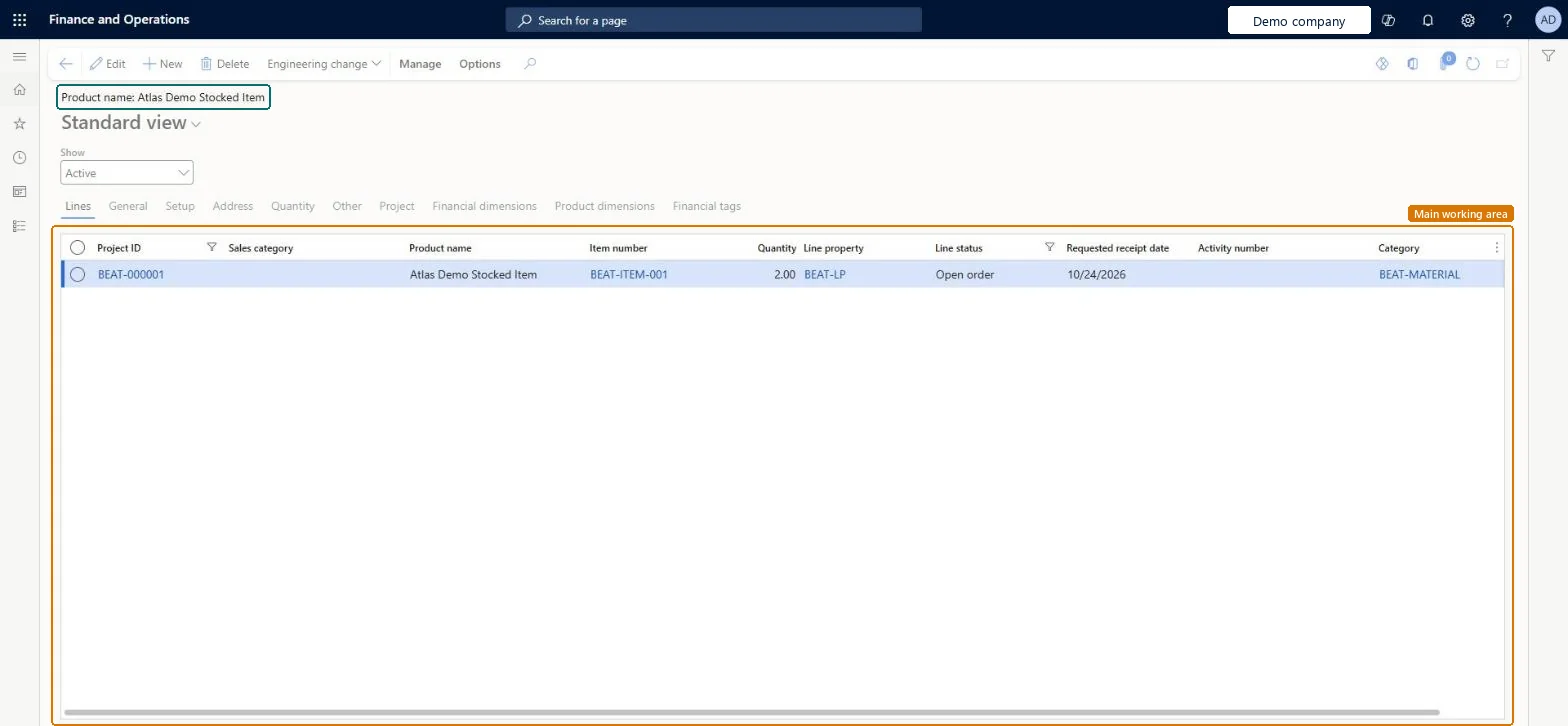
The list of project item requirements: sales order lines of order type Item requirements that plan the items a project will consume and post their cost when the packing slip is posted.
PAGE GUIDEWhat the page does and how to use it8 sections. Choose a role to highlight what matters to you.
Everyone
1What it is and why
What it is
The list of project item requirements: sales order lines of order type Item requirements that plan the items a project will consume and post their cost when the packing slip is posted.
What you do here
Use it to create an item requirement for a project, deliver it from stock or through a purchase or production order, and post the packing slip that charges the cost to the project.
Example
For example, BEAT creates an item requirement on PRJ-0042 for 12.00 pieces of item CAB-200 at a cost of 45.00 each; posting the packing slip on 10/12/2026 charges 540.00 to the project.
The page in Dynamics 365. page title tab to open what to set or check
About the examples: Examples and screenshots in this guide use BEAT, a demo company in a Dynamics 365 test environment. Use your own company's codes and values instead of copying them.
Setup steps on this page
Create item requirements for project materials
Plan and consume project items through item requirements.
Steps from Microsoft
Go to Project management and accounting > Item tasks > Item requirements.
Select New and select the project the items are for.
Select the item number and enter the quantity, then fill in the other required fields and select Save.
If the item isn't in stock, select Manage > Functions > Create purchase order, select the vendor and select OK.
When the items are delivered, select Post packing slip to post the project cost.
For nonchargeable stocked lines, turn on Uninvoiced stocked items and run Finalize delivered quantity.
Filter that shows the requirements that can't be invoiced and need Finalize delivered quantity.Microsoft Learn
On
Common errors and fixes
Message
What to do
The packing slip of an item requirement can't be canceled.
Cancellation works only with Enable packing slip cancellation for item requirements on, and only until the line is invoiced, or invoiced and then credited. Microsoft Learn
Test checklist
Create an item requirement for a stocked item on a Time and material project.
Check the Order type field shows Item requirements, not Sales order.
Post the packing slip and check the project cost posts and the line status is Delivered.
Cancel the packing slip from the Packing slip journal and check the reversal shows in Posted project transactions with the same packing slip ID.
Post again, invoice the project, and check the packing slip can no longer be canceled.
Create item requirements for stocked items the project will use, and turn on Create item requirements in the parameters so project purchase orders create them too.The packing slip of the item requirement is what posts the project cost; a purchase order linked to it posts the cost on receipt.
On the live system, Project accountant, Project assistant, Service delivery manager and Customer service representative use this page. Learn describes two optional features for this page: Enable packing slip cancellation for item requirements and Finalize uninvoiced stocked items.
One-way: Warning: with Enable packing slip cancellation for item requirements on, a packing slip can be canceled only until the line is invoiced, or invoiced and then credited. After you run Finalize delivered quantity on uninvoiced stocked items, those packing slips can no longer be canceled. Microsoft Learn
If you change it later
Once an item requirement has been invoiced, or invoiced and then credited, its packing slip can no longer be canceled. Microsoft Learn
Technical architect
6Technical
Menu item
ProjSalesItemReqChecked in Dynamics 365
Form
ProjSalesItemReqChecked in Dynamics 365
Table
SalesLineShown as “Order lines” in Record infoKey field: SalesId, LineNumChecked in Dynamics 365
To set it up or change itProject accountant ProjProjectAccountantProject assistant ProjProjectClerkService delivery manager SMAServiceDeliveryManagerCustomer service representative TradeCustomerServiceRepresentativeService dispatcher SMADispatcherTo use itProject manager ProjProjectManagerProject supervisor ProjProjectSupervisorField Service Integration User FieldServiceIntegrationUserSales representative TradeSalesRepresentativeSales manager TradeSalesManagerGive people one of these roles. On this system, 25 roles can open this page.Checked in Dynamics 365
Actions on the page
ManageOptions: Personalize, Page options, ShareChecked in Dynamics 365
ProjSalesItemRequirementEntity (Project item requirements): loaded for each company.Load order: Load projects, project contracts and released products first, then the open item requirements.Load first: Projects (ProjProjectV2Entity), Released productsMicrosoft Learn