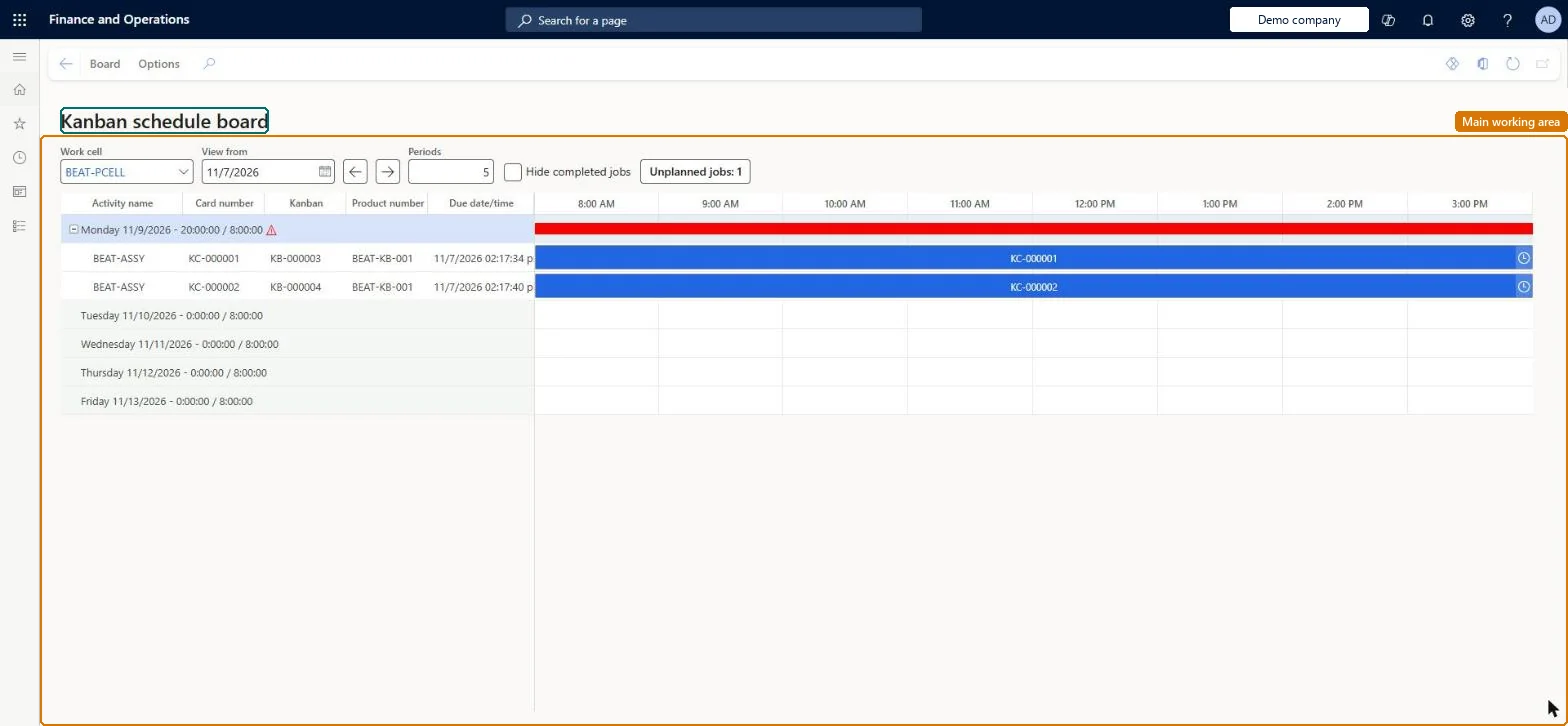
An interactive board that shows the kanban process jobs planned for one work cell by planning period, with capacity per period, a cycle-time performance indicator and a kanban quantity overview.
Chief executive officer, Materials manager, Shop supervisor and 3 more roles
Business process
Schedule production jobs
Menu item
KanbanBoard
Show what matters for
PAGE GUIDEWhat the page does and how to use it7 sections. Choose a role to highlight what matters to you.
Everyone
1What it is and why
What it is
An interactive board that shows the kanban process jobs planned for one work cell by planning period, with capacity per period, a cycle-time performance indicator and a kanban quantity overview.
What you do here
Use this page to plan and reschedule kanban jobs for a work cell by moving them between periods, and to see when a period is overloaded.
Example
For example, a planner drags unplanned kanban jobs into next week's period and watches the capacity bar turn red when the cell is overloaded.
The page in Dynamics 365. page title tab to open what to set or check
About the examples: Examples and screenshots in this guide use BEAT, a demo company in a Dynamics 365 test environment. Use your own company's codes and values instead of copying them.
How to use it
Go to Production control > Kanban > Kanban schedule board.
Select the work cell whose kanban jobs you want to plan.
Use View and Settings on the Board tab of the Action Pane to choose what the board shows.
Select a kanban job and use Move or Plan on the Board tab to put it in another planning period.
Use Production on the Board tab to work with the production job behind a kanban.
Source: Checked in Dynamics 365
Fields on the page
Field
What it means
Work cell
The work cell whose schedule the board shows; chosen when the board opens.Microsoft Learn
Planning period columns
Each day or week period in the work cell's planning time fence.Microsoft Learn
Performance indicator
Compares the actual cycle time of the cell with the takt-based minimum and maximum.Microsoft Learn
Kanban quantity overview
Shows all active kanbans and jobs of the cell grouped by kanban rule.Microsoft Learn
Schedule from date
Moves selected jobs to a future date with an optional override of the capacity shortage reaction.Microsoft Learn
Solution architect
4Design impact
If you change it later
Cancelling a job resets it to Not planned and unassigns its handling unit, even if the job was already prepared, in progress or completed. Microsoft Learn
Technical architect
5Technical
Menu item
KanbanBoardChecked in Dynamics 365
Form
KanbanBoardChecked in Dynamics 365
Who can open it
PrivilegesMaintain kanban schedules KanbanBoardScheduleMaintainView kanban schedules KanbanBoardScheduleViewDutiesEnable kanban execution process KanbanExecutionProcessEnableMaintain kanban schedule KanbanScheduleMaintainReview kanban scheduling process performance KanbanScheduleProcessPerformanceReviewInquire into kanban schedule status KanbanScheduleStatusInquire6 security rolesChief executive officer CompanyChiefExecutiveOfficerMaterials manager InventMaterialsManagerShop supervisor JmgShopSupervisorProduction supervisor ProdProductionSupervisorProduction planner ReqProductionPlannerSales manager TradeSalesManagerChecked in Dynamics 365
Roles to set it up and use it
To set it up or change itProduction planner ReqProductionPlannerTo use itProduction supervisor ProdProductionSupervisorShop supervisor JmgShopSupervisorChief executive officer CompanyChiefExecutiveOfficerMaterials manager InventMaterialsManagerSales manager TradeSalesManagerGive people one of these roles. On this system, 6 roles can open this page.Checked in Dynamics 365
Actions on the page
Board: View, Settings, Move, Plan, ProductionChecked in Dynamics 365