Chief executive officer, Materials manager, Shop supervisor and 4 more roles
Business process
Schedule production jobs
Menu item
KanbanJobSchedulingListPage
Main table
Kanban
Show what matters for
PAGE GUIDEWhat the page does and how to use it7 sections. Choose a role to highlight what matters to you.
Everyone
1What it is and why
What it is
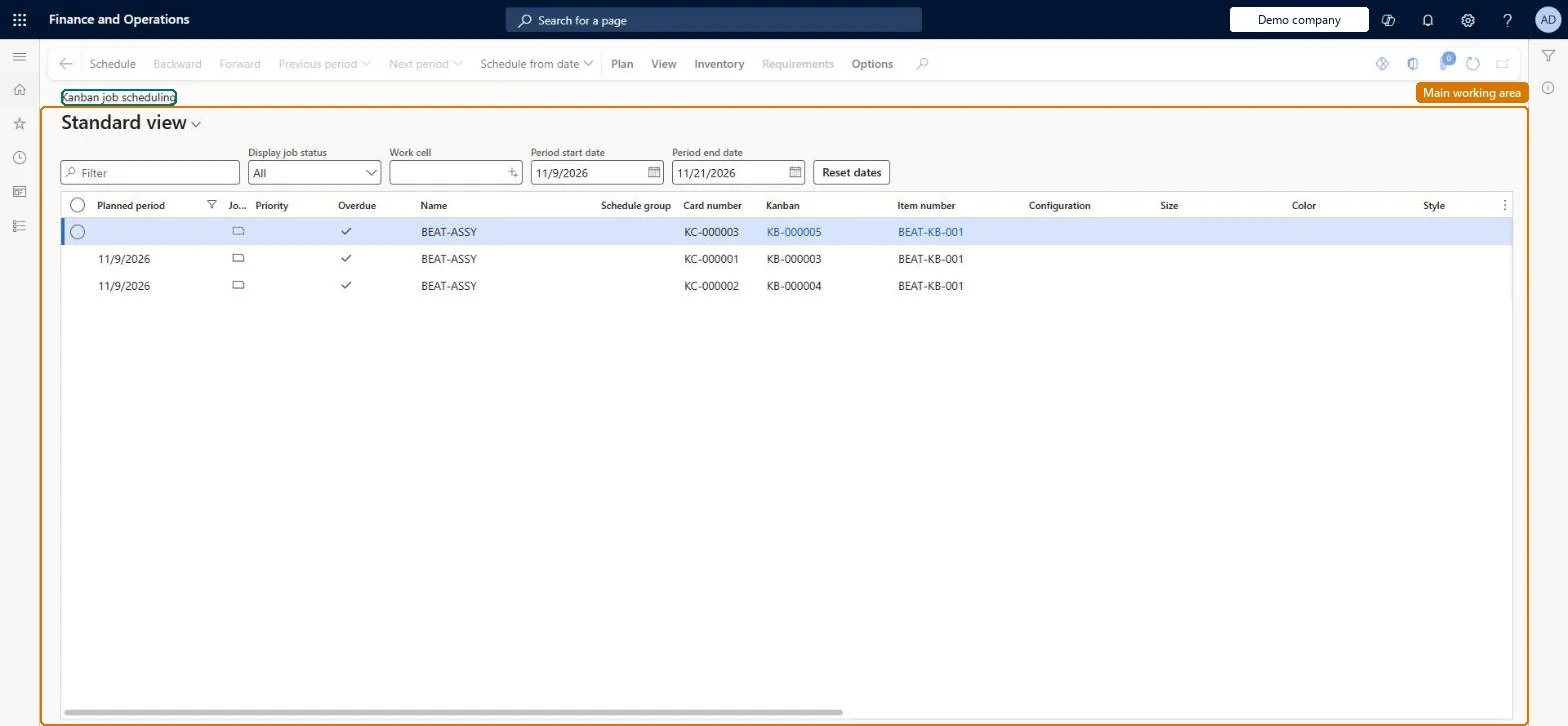
A list page that shows kanban jobs and their status for one or more work cells by planning period, with the capacity consumed in each period.
What you do here
Use this page to schedule unplanned kanban jobs into the first free period or a chosen date, change job status and reschedule jobs across periods while watching the load on each work cell.
Example
For example, a planner filters the list to one work cell, selects two unplanned jobs and schedules them for a specific day, overriding the capacity shortage reaction.
The page in Dynamics 365. page title tab to open what to set or check
About the examples: Examples and screenshots in this guide use BEAT, a demo company in a Dynamics 365 test environment. Use your own company's codes and values instead of copying them.
Steps from Microsoft
Go to Production control > Kanban > Kanban job scheduling.
In the Work cell field, select the work cell to filter the list.
Select a job with the Not planned status.
Select Schedule to place it in the first available period.
To pick a date, select the jobs, select Schedule from date, set the Capacity shortage reaction and select Schedule.
Check the Period capacity section for overloaded periods.
Scheduling into a full period moves the job to the next free period unless you choose to add it to the requested period regardless of overload. Microsoft Learn
Technical architect
5Technical
Menu item
KanbanJobSchedulingListPageChecked in Dynamics 365
Form
KanbanJobSchedulingListPageChecked in Dynamics 365
Table
KanbanShown as “KANBANS” in Record infoKey field: KanbanIdChecked in Dynamics 365
Who can open it
PrivilegesMaintain kanban schedules KanbanBoardScheduleMaintainView kanban schedules KanbanBoardScheduleViewCreate kanban event KanbanEventCreatePlan kanban jobs KanbanJobPlanCancel selected kanban jobs KanbanJobResetCreatedProcessMaintain kanbans KanbanMaintainPlan upstream pegging tree LeanPeggingTreePlanDutiesEnable kanban execution process KanbanExecutionProcessEnableMaintain sales events kanban execution KanbanExecutionSalesEventsMaintainMaintain kanban schedule KanbanScheduleMaintainReview kanban scheduling process performance KanbanScheduleProcessPerformanceReviewInquire into kanban schedule status KanbanScheduleStatusInquire8 security rolesChief executive officer CompanyChiefExecutiveOfficerMaterials manager InventMaterialsManagerShop supervisor JmgShopSupervisorMCRTestUserRoleProduction supervisor ProdProductionSupervisorProduction planner ReqProductionPlannerSales clerk TradeSalesClerkSales manager TradeSalesManagerChecked in Dynamics 365
Roles to set it up and use it
To set it up or change itProduction supervisor ProdProductionSupervisorShop supervisor JmgShopSupervisorProduction planner ReqProductionPlannerSales clerk TradeSalesClerkMaterials manager InventMaterialsManagerTo use itChief executive officer CompanyChiefExecutiveOfficerSales manager TradeSalesManagerGive people one of these roles. On this system, 7 roles can open this page.Checked in Dynamics 365
Actions on the page
PlanView: View, Kanban quantity overviewInventory: ViewRequirements(Action Pane without tabs): Schedule, Backward, Forward, Previous period, Next period, Schedule from dateChecked in Dynamics 365