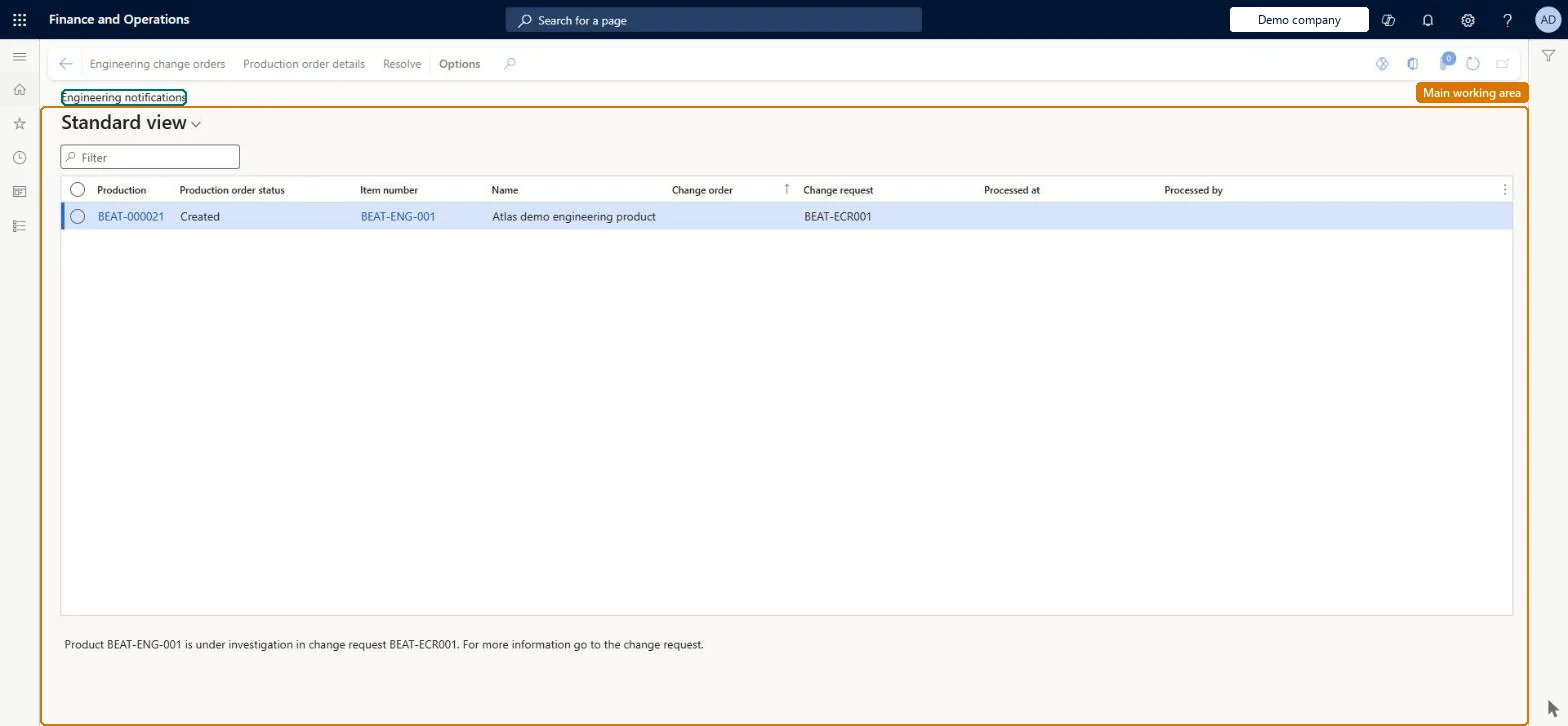
An inquiry page that lists the production orders for which an engineering change notification has been sent, so that supervisors and planners can review changed products that affect their production.
Production controlInquiries and reportsEngineering change management
EngChgEcmProductionDependencyNotifications
Used by
Production supervisor
Business process
Modify production plan
Menu item
EngChgEcmProductionDependencyNotifications
Main table
EngChgEcmProductionDepen
Show what matters for
PAGE GUIDEWhat the page does and how to use it7 sections. Choose a role to highlight what matters to you.
Everyone
1What it is and why
What it is
An inquiry page that lists the production orders for which an engineering change notification has been sent, so that supervisors and planners can review changed products that affect their production.
What you do here
Use this page to review each production order affected by an engineering change request, follow links to the change order or production order, and mark the notification as resolved once the order has been cancelled or modified as needed.
Example
For example, when a component is replaced by a new version, the planner opens Engineering notifications, adjusts the open production orders that still use the old part, and then selects Resolve.
The page in Dynamics 365. page title tab to open what to set or check
About the examples: Examples and screenshots in this guide use BEAT, a demo company in a Dynamics 365 test environment. Use your own company's codes and values instead of copying them.
Steps from Microsoft
Go to Production control > Inquiries and reports > Engineering change management > Engineering notifications.
Review the production orders listed and open the related change order or production order from the column links or the Action Pane.
Cancel or modify the affected production orders as required.
Select the notification and then select Resolve on the Action Pane.
Resolving a notification removes it for every user, so do it only after the affected production orders have been checked and adjusted. Microsoft Learn
Technical architect
5Technical
Menu item
EngChgEcmProductionDependencyNotificationsChecked in Dynamics 365
Form
EngChgEcmProductionDependencyNotificationsChecked in Dynamics 365
Table
EngChgEcmProductionDepenShown as “PRODUCTION DEPENDENCIES” in Record infoKey field: EngineeringChangeOrderId, EngineeringChangeOrderCompanyId, ProdId, ProdCompanyIdChecked in Dynamics 365
Who can open it
PrivilegesMaintain production order dependencies EngChgEcmProductionDependencyMaintainDutiesMaintain production orders ProdProductionOrderMaintain1 security roleProduction supervisor ProdProductionSupervisorChecked in Dynamics 365
Roles to set it up and use it
To set it up or change itProduction supervisor ProdProductionSupervisorGive people one of these roles. On this system, 1 role can open this page.Checked in Dynamics 365
Actions on the page
(Action Pane without tabs): Engineering change orders, Production order details, ResolveChecked in Dynamics 365