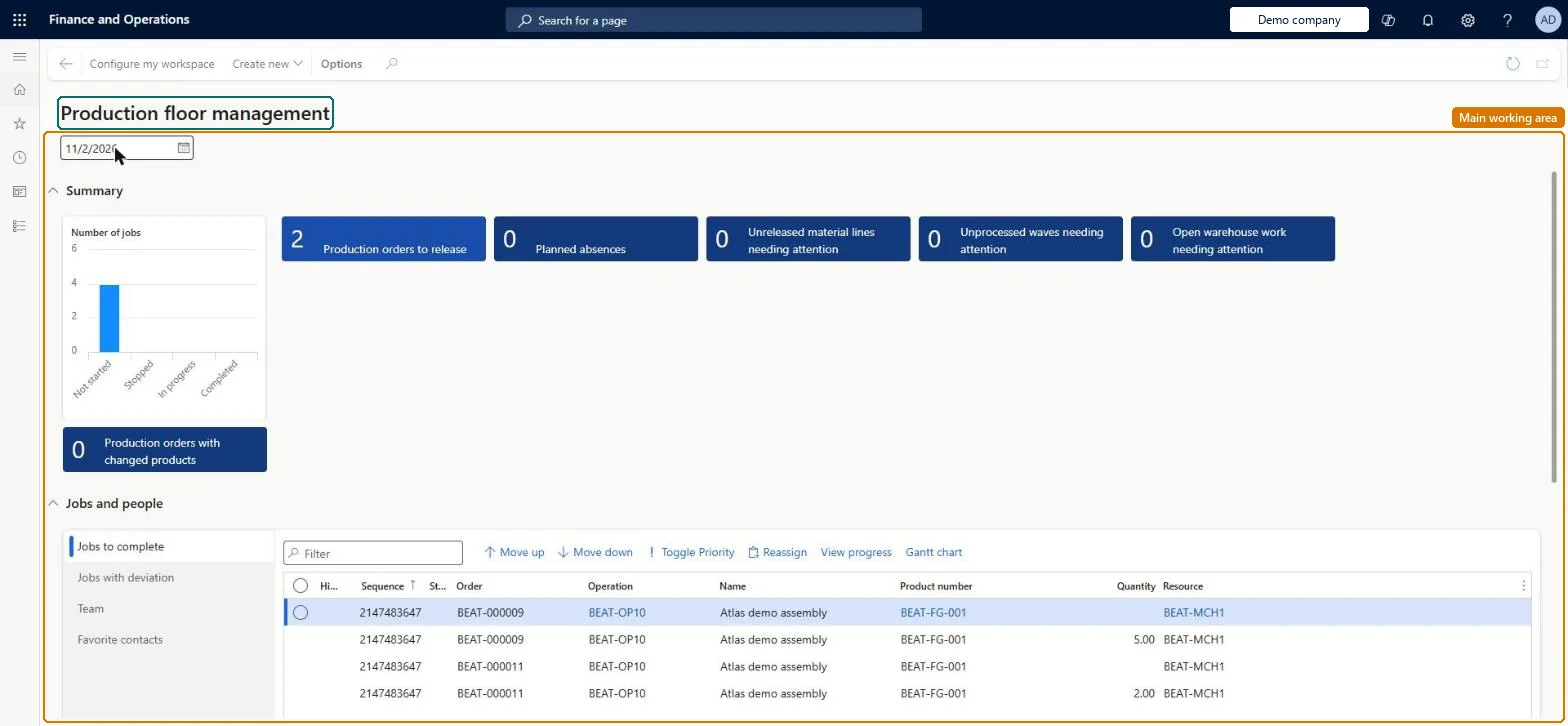
A workspace for the production supervisor that gathers tiles and lists about production orders, batch orders and their raw materials in one place, filtered by production unit, resource group and resource.
PAGE GUIDEWhat the page does and how to use it6 sections. Choose a role to highlight what matters to you.
Everyone
1What it is and why
What it is
A workspace for the production supervisor that gathers tiles and lists about production orders, batch orders and their raw materials in one place, filtered by production unit, resource group and resource.
What you do here
Use this page to see which production and batch orders need attention on the shop floor, such as orders to release and raw material lines, waves and warehouse work that are late against the workspace date.
Example
For example, a supervisor opens the workspace each morning to find bill of materials lines whose raw material date has passed but that have not yet been released to the warehouse.
The page in Dynamics 365. page title tab to open what to set or check
About the examples: Examples and screenshots in this guide use BEAT, a demo company in a Dynamics 365 test environment. Use your own company's codes and values instead of copying them.
How to use it
Go to Production control > Workspaces > Production floor management.
Set the date at the top of the page to the day you want to review.
Read the Summary tiles: Production orders to release, Planned absences, Unreleased material lines needing attention, Unprocessed waves needing attention, Open warehouse work needing attention and Production orders with changed products, and the Number of jobs chart by job status.
In the Jobs and people section, open the Jobs to complete, Jobs with deviation, Team or Favorite contacts list and use the Filter field to find a job.
Select a job and use Move up, Move down, Toggle Priority, Reassign, View progress or Gantt chart above the list.
Select Configure my workspace on the Action Pane to choose the production unit, resource group and resources the workspace shows, or Create new to open a related page.
Source: Checked in Dynamics 365
Fields on the page
Field
What it means
Unreleased material lines needing attention
Counts BOM and formula lines that are not yet, or only partly, released to the warehouse and whose raw material date has been reached.Microsoft Learn
Unprocessed waves needing attention
Counts released material lines that sit on production waves that have not been processed yet.Microsoft Learn
Open warehouse work needing attention
Counts released material lines whose picking work in the warehouse is still open.Microsoft Learn
Workspace date
The reference date the tiles compare raw material dates against; it defaults to today but can be changed.Microsoft Learn
To set it up or change itShop supervisor JmgShopSupervisorManufacturing execution workload shop supervisor JmgManufacturingExecutionWorkloadSupervisorGive people one of these roles. On this system, 2 roles can open this page.Checked in Dynamics 365
Actions on the page
(Action Pane without tabs): Configure my workspace, Create newChecked in Dynamics 365