BeyondERP.Newsletter
Menu

Setup page · Procurement and sourcing

Vendor evaluation criteria

A setup page where you define the criteria used to rate vendor performance.

Used by
Purchasing agent, Purchasing Agent - Public Sector, Chief financial officer and 7 more roles
Business process
Evaluate suppliers with Dynamics 365 Finance
Menu item
VendReviewCriterion
Main table
VendReviewCriterion
Data entity
VendorEvaluationCriterionEntity
Setup steps
1 on this page
Show what matters for
PAGE GUIDEWhat the page does and how to use it8 sections. Choose a role to highlight what matters to you.
Everyone

1What it is and why

What it isA setup page where you define the criteria used to rate vendor performance.
What you do hereUse this page to see how a vendor is rated, either overall or on a specific criterion.
ExampleFor example, you can add on-time delivery as a criterion for rating vendors.
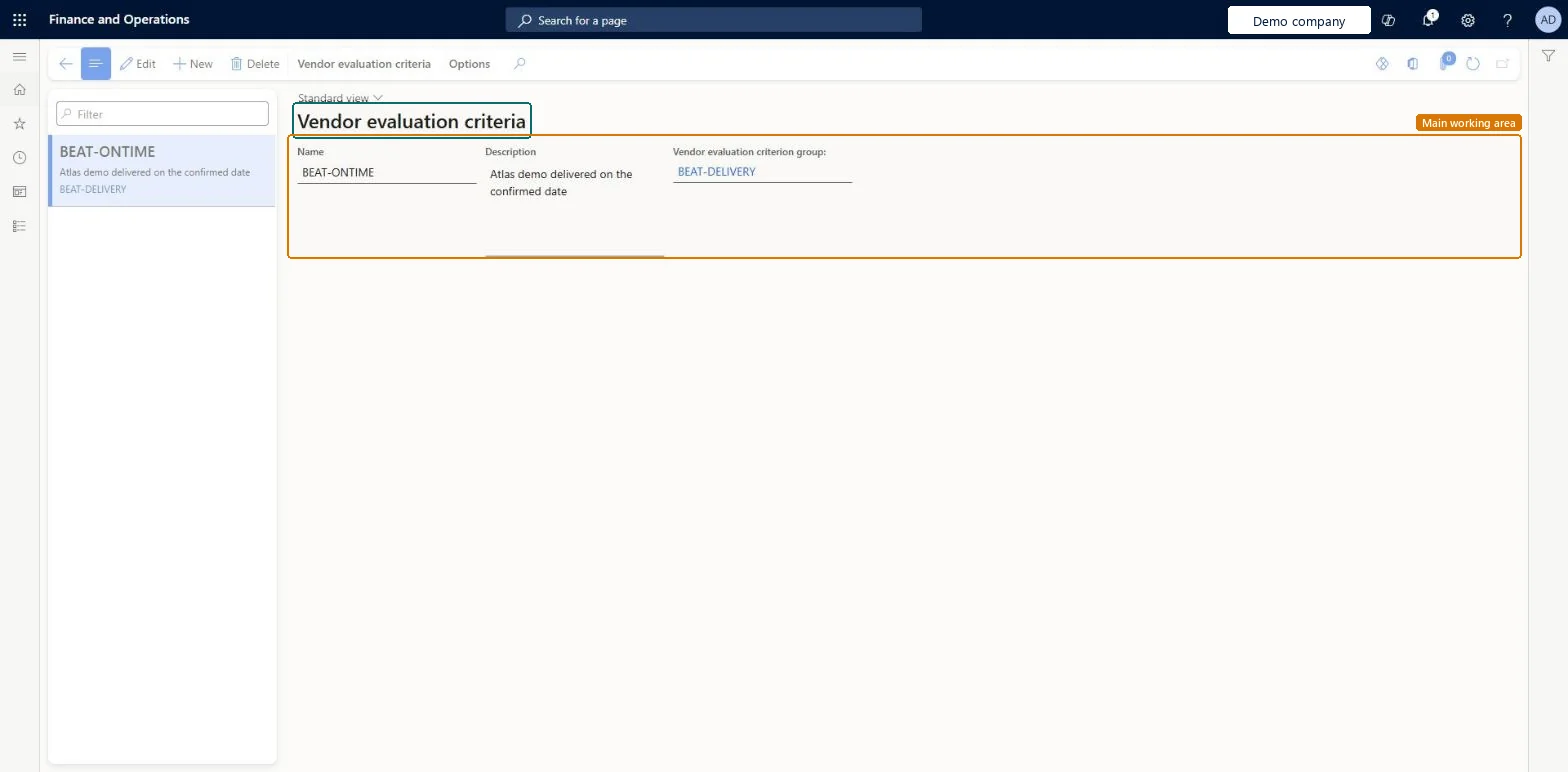
Vendor evaluation criteria page in Dynamics 365
The page in Dynamics 365. page title tab to open what to set or check
Functional consultant · Solution architect

2Where it fits

End user · Functional consultant

3How to do it

About the examples: Examples and screenshots in this guide use BEAT, a demo company in a Dynamics 365 test environment. Use your own company's codes and values instead of copying them.

Step by step, with screenshots

Set up Vendor evaluation criteria1 screen

Use this page to see how a vendor is rated, either overall or on a specific criterion.

  1. Screen 1

    Create the evaluation criterion

    Go to Procurement and sourcing > Setup > Vendors > Vendor evaluation criteria

    1. Select New
    2. Enter the name and description
    3. Choose the criterion group
    4. Select Save
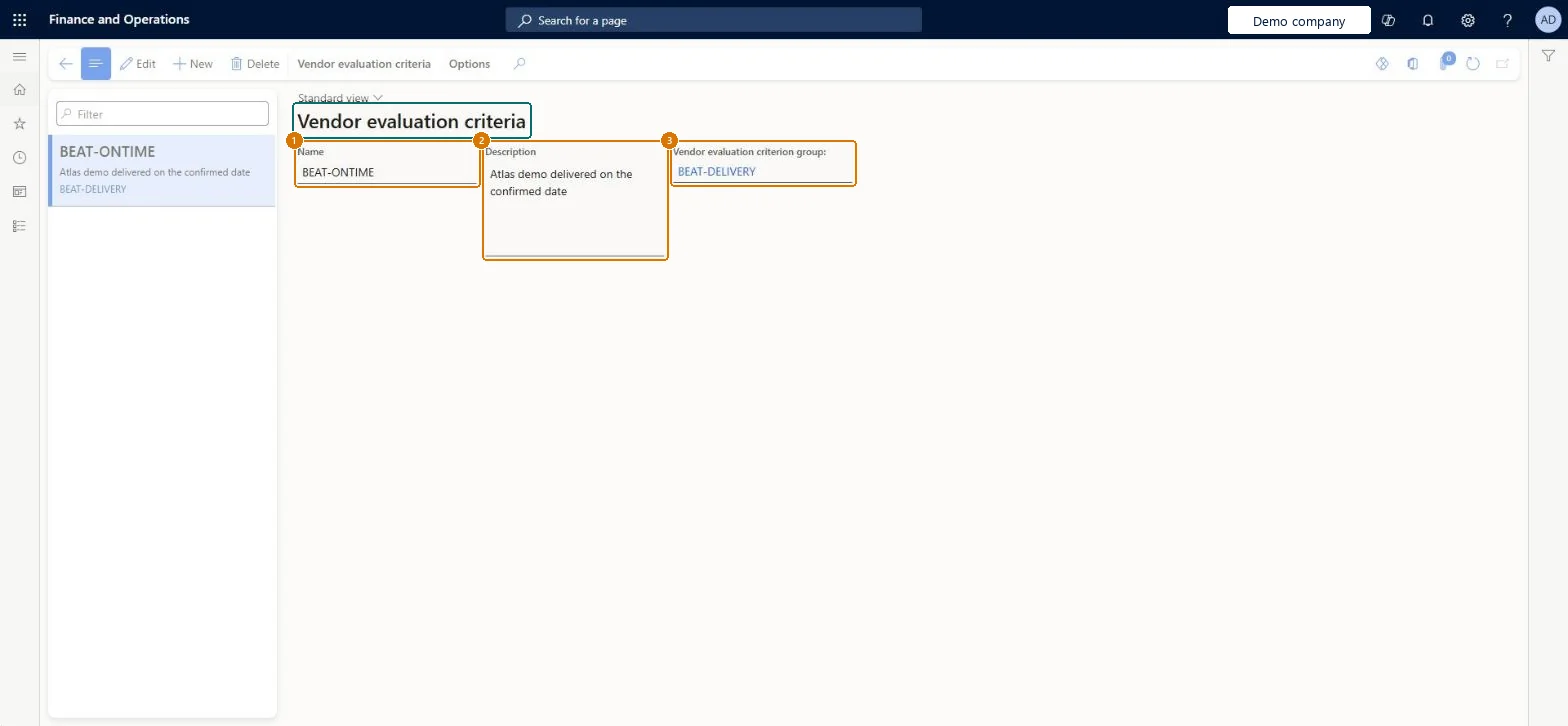
    1NameBEAT-ONTIME
    2DescriptionDelivered on the confirmed date
    3Vendor evaluation criterion groupBEAT-DELIVERY
    Create the evaluation criterion (zoomed on the outlined fields)
    Show the full screenCreate the evaluation criterion
    page title tab to open what to set or check

Steps from Microsoft

  1. Go to Procurement and sourcing > Setup > Vendors > Vendor evaluation criteria.
  2. Select New and enter a unique name for the criterion.
  3. Optionally, enter a description and translate it into other languages.
  4. Select the vendor evaluation criterion group that the criterion belongs to.
  5. Save the criterion.

Source: Microsoft Learn

Fields on the page

FieldWhat it meansExampleTable column
Vendor evaluation criterion groupThe group that the criterion belongs to; every criterion needs a group.Microsoft Learn Delivery
NameThe name of the vendor evaluation criterion.Microsoft Learn OnTimeName
DescriptionA short description of the criterion.Microsoft Learn Delivered on the confirmed dateDescription

Test checklist

  1. Create two criteria in the same Vendor evaluation criterion group.
  2. Assign the group to a procurement category on the Vendor evaluation criterion groups tab.
  3. On the category's Vendors tab select a vendor, select Evaluation and rate both criteria.
  4. Check the Average rating updates.

Source: Microsoft Learn

Functional consultant

4Setup decisions

Setup stepRecommended value and whyDecision, common mistake and test
Set up Vendor evaluation criteriaEach criterion linked to a Vendor evaluation criterion group that covers related rating areasCriteria are rated per vendor and category through the groups assigned to a procurement category, and the Average rating updates as each rating is entered.Creating criteria without assigning their group to a procurement category. Vendors can only be evaluated once groups are assigned to the category they supply.
Solution architect

5Design impact

Shared or per companyShared: the same records are used by every legal entity. Microsoft data model
Can it be undoneReversible: Criteria and their ratings can be changed; the Average rating recalculates as ratings change. Microsoft Learn
Technical architect

6Technical

Menu itemVendReviewCriterion Checked in Dynamics 365
FormVendReviewCriterion Checked in Dynamics 365
TableVendReviewCriterionShown as “Vendor evaluation criteria” in Record infoKey field: Name, CriterionGroup, CriterionGroup_NameChecked in Dynamics 365
Data entitiesVendorEvaluationCriterionEntityVendor evaluation criteria Microsoft data model
Who can open itPrivilegesMaintain vendor review criteria VendReviewCriterionMaintainView vendor review criteria VendReviewCriterionViewDutiesView derived financial hierarchy filters LedgerDerivedFinancialHierarchyInquireMaintain derived financial hierarchy filters LedgerDerivedFinancialHierarchyMaintainInquire into procurement category hierarchy ProcCategoryMasterInquireMaintain procurement category hierarchy ProcCategoryMasterMaintain
10 security rolesChief financial officer CompanyChiefFinancialOfficerAccountant LedgerAccountantAccounting manager LedgerAccountingManagerFinancial controller LedgerFinancialControllerRetail catalog manager RetailCatalogManagerRetail merchandising manager RetailMerchandisingManagerRetail service RetailServicePurchasing manager TradePurchasingManagerPurchasing agent VendPurchasingAgentPurchasing Agent - Public Sector VendPurchasingAgent_PSN
Checked in Dynamics 365
Roles to set it up and use itTo set it up or change itPurchasing manager TradePurchasingManagerPurchasing agent VendPurchasingAgentPurchasing Agent - Public Sector VendPurchasingAgent_PSNRetail service RetailServiceAccounting manager LedgerAccountingManagerTo use itAccountant LedgerAccountantChief financial officer CompanyChiefFinancialOfficerGive people one of these roles. On this system, 10 roles can open this page.Checked in Dynamics 365
Actions on the pageVendor evaluation criteriaOptions: Personalize, Page options, ShareChecked in Dynamics 365
Developer

7Developer

Open it by URLhttps://<your-environment>/?mi=VendReviewCriterion
Integrate withVendorEvaluationCriterionEntity data entity Microsoft data model
Data migrationVendorEvaluationCriterionEntity (Vendor evaluation criteria): shared by all companies, in Microsoft's default template 320 - Procurement and sourcing.Load order: Microsoft's default template 320 - Procurement and sourcing loads Vendor evaluation criteria at execution unit 1, level 40, sequence 10. Lower levels load first, and entities at the same level load in sequence order.Load first: the default templates at lower levels (System setup to dependency bands 30 to 90)Microsoft Learn
Table definitionVendReviewCriterion columns and relations Microsoft data model
Everyone

8Sources