BeyondERP.Newsletter
Menu

Report page · Payroll

Form W-2

An annual payroll report that prints the Form W-2s to issue to workers for a tax year.

Business process
Pay employees
Menu item
PayrollW2Report
Show what matters for
PAGE GUIDEWhat the page does and how to use it7 sections. Choose a role to highlight what matters to you.
Everyone

1What it is and why

What it isAn annual payroll report that prints the Form W-2s to issue to workers for a tax year.
What you do hereUse this page to create the Form W-2s for a tax year, for all or selected workers, after the W-2 amounts have been reconciled.
ExampleFor example, after the W-2 reconciliation balances, run Form W-2 for the tax year to print the forms for all workers.
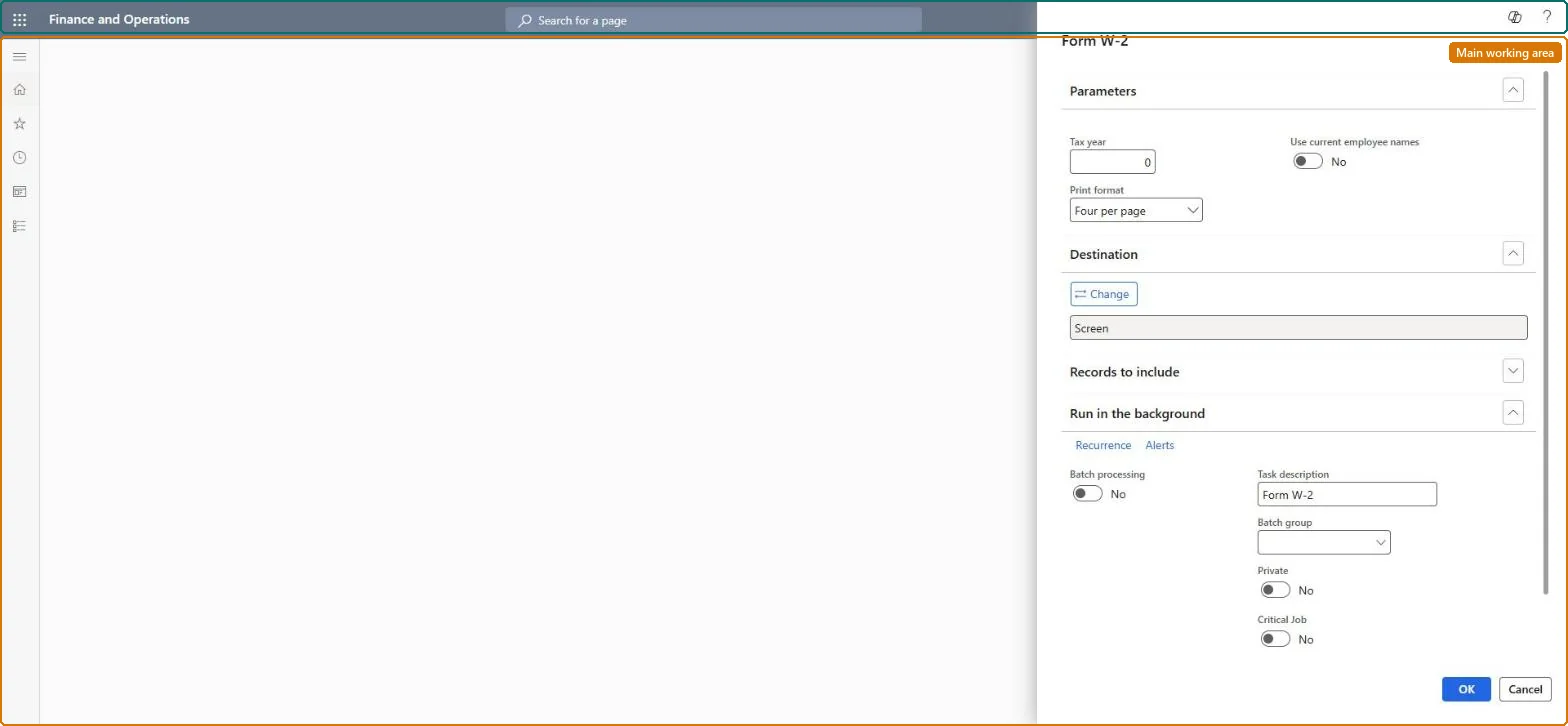
Form W-2 page in Dynamics 365
The page in Dynamics 365. page title tab to open what to set or check
Functional consultant · Solution architect

2Where it fits

End user · Functional consultant

3How to do it

About the examples: Examples and screenshots in this guide use BEAT, a demo company in a Dynamics 365 test environment. Use your own company's codes and values instead of copying them.

When to run it

When to run itAt year end, after Form W-2 reconciliation balances, when you issue W-2s to workers; again when a worker needs a reprint.
How oftenAnnually, and as required for reprints.
What the output showsForm W-2s for the tax year, one per worker, ready to issue. A form whose amounts differ from the reconciliation usually means pay statements were changed after the reconciliation was run.

Source: Microsoft Learn

Steps from Microsoft

  1. Go to Payroll > Tax processing > Annual reports > Form W-2.
  2. In Parameters, enter the Tax year and select the Print format of the forms.
  3. Set Use current employee names if the forms should show workers' current names instead of the names used during the year.
  4. Under Records to include, filter on Worker to print or reprint forms for selected workers only.
  5. Print the forms and compare a few of them with the Form W-2 reconciliation before you issue them to workers.

Source: Microsoft Learn

Fields on the page

FieldWhat it means
Tax yearThe tax year to create Form W-2s for.Microsoft Learn
WorkerLimits the run to selected workers.Microsoft Learn
Solution architect

4Design impact

Can it be undoneNothing to undo: Printing Form W-2s only reads the year's payroll data; it changes nothing. Microsoft Learn
Technical architect

5Technical

Menu itemPayrollW2Report Checked in Dynamics 365
FormSysOperationTemplateForm Checked in Dynamics 365
Roles to set it up and use itTo use itPayroll administrator HcmPayrollAdministratorPayroll manager HcmPayrollManagerGive people one of these roles. On this system, 2 roles can run this page.Checked in Dynamics 365
Developer

6Developer

Open it by URLhttps://<your-environment>/?mi=PayrollW2Report
Everyone

7Sources

KEEP EXPLORING

More in Payroll.

Open the other pages and setup steps in this module, or go back to the Atlas Hub to search every page.