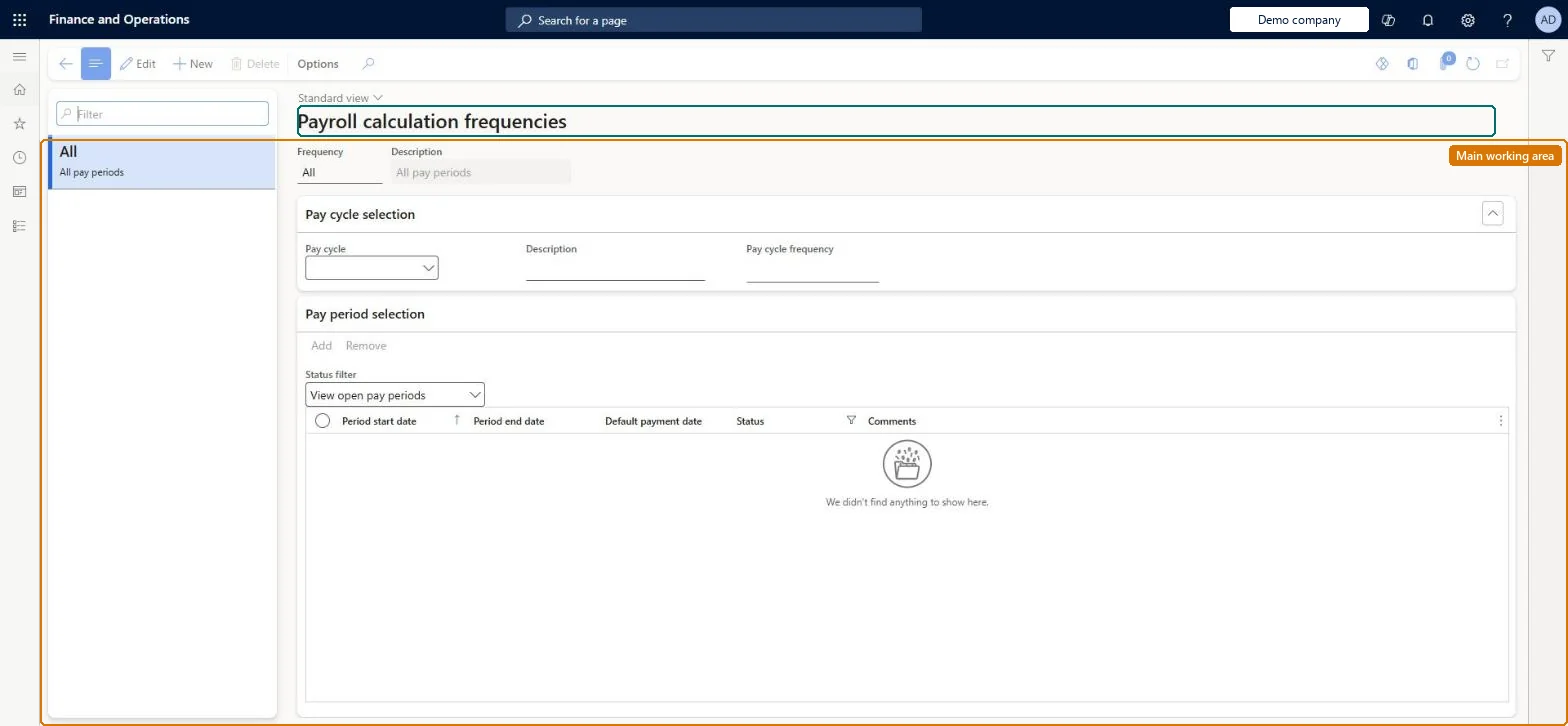
A setup page where you define payroll calculation frequencies, which control the pay periods in which particular earnings, contributions and deductions are processed.
Compensation and benefits manager, Payroll administrator, Payroll manager
Business process
Manage compensation and benefits
Menu item
PayrollCalculationFrequency
Main table
PayrollCalculationFrequency
Data entity
HcmPayrollCalculationFrequencyEntity
Setup steps
1 on this page
Show what matters for
PAGE GUIDEWhat the page does and how to use it8 sections. Choose a role to highlight what matters to you.
Everyone
1What it is and why
What it is
A setup page where you define payroll calculation frequencies, which control the pay periods in which particular earnings, contributions and deductions are processed.
What you do here
Use this page to create frequencies such as 'Monthly, first pay period' and assign the matching pay periods from each pay cycle to them.
Example
For example, a medical insurance deduction can be processed only in the first pay period of each month.
The page in Dynamics 365. page title tab to open what to set or check
About the examples: Examples and screenshots in this guide use BEAT, a demo company in a Dynamics 365 test environment. Use your own company's codes and values instead of copying them.
Setup steps on this page
Set up Payroll calculation frequencies
Use this page to create frequencies such as 'Monthly, first pay period' and assign the matching pay periods from each pay cycle to them.
Steps from Microsoft
Go to Payroll > Setup > Payroll calculation frequencies.
Select New and enter a frequency and description.
For each pay cycle that the frequency applies to, assign the pay periods in which it should occur.
Save the frequency.
Assign the frequency to benefits or worker earning codes.
Create frequencies only for earnings, benefits and deductions that must not run every pay period (for example Monthly, first pay period), and assign pay periods from every pay cycle that uses themBy default all earnings, contributions and deductions are processed in every pay period; frequencies are only needed to restrict them to specific periods.
Confusing payroll calculation frequency with pay cycle frequency, or assigning periods from only one pay cycle: Microsoft says pay periods from every pay cycle that should use the frequency must be assigned, otherwise workers on the other cycle don't get the element in the intended period.
Solution architect
5Design impact
Can it be undone
One-way: Warning: a frequency with selected pay periods, or one assigned to an earning code or benefit, can't be deleted. Microsoft Learn
If you change it later
Once pay periods are selected or the frequency is used by another payroll element, it cannot be deleted; elements with no frequency are processed in every pay period. Microsoft Learn
Technical architect
6Technical
Menu item
PayrollCalculationFrequencyChecked in Dynamics 365
Form
PayrollCalculationFrequencyChecked in Dynamics 365
Table
PayrollCalculationFrequencyShown as “CALCULATION FREQUENCY” in Record infoKey field: CalculationFrequencyIdChecked in Dynamics 365
Data entities
HcmPayrollCalculationFrequencyEntityCalculation frequency Checked in Dynamics 365PayrollPayCycleEntityPay cycle Microsoft data model PayrollPayPeriodEntityPay period Microsoft data model
Who can open it
PrivilegesMaintain payroll calculation frequencies PayrollCalculationFrequencyMaintainView payroll calculation frequencies and assigned periods PayrollCalculationFrequencyViewDutiesInquire into payroll master data PayrollMasterDataInquireSet up payroll master data PayrollMasterDataMaintain3 security rolesCompensation and benefits manager HcmCompensationAndBenefitsManagerPayroll administrator HcmPayrollAdministratorPayroll manager HcmPayrollManagerChecked in Dynamics 365
Roles to set it up and use it
To set it up or change itPayroll administrator HcmPayrollAdministratorCompensation and benefits manager HcmCompensationAndBenefitsManagerTo use itPayroll manager HcmPayrollManagerGive people one of these roles. On this system, 3 roles can open this page.Checked in Dynamics 365