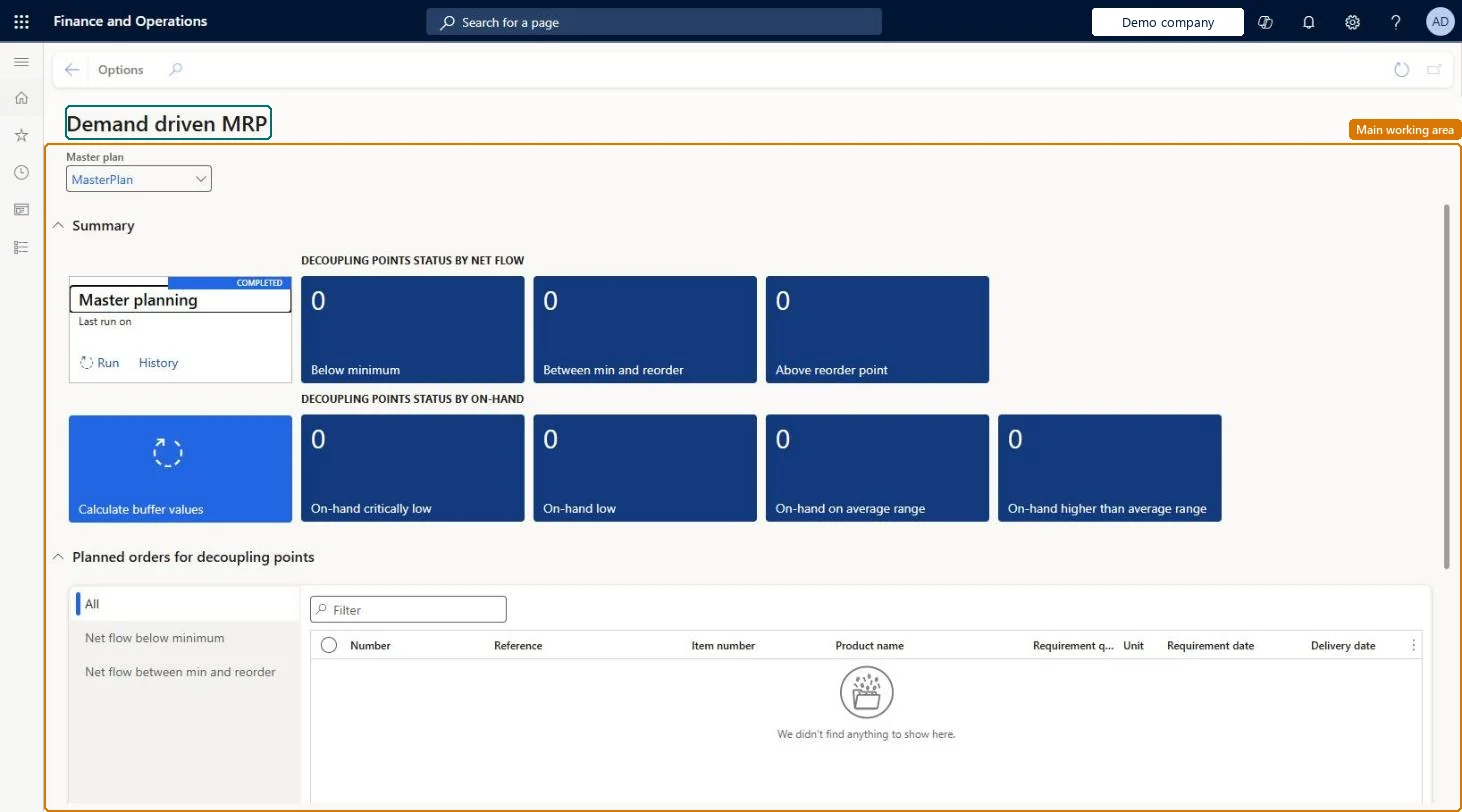
A workspace that brings together key performance indicators (KPIs) and overviews of the status of decoupling point items and their related planned orders for Demand Driven Material Requirements Planning (DDMRP).
Materials manager, Production manager, Production planner
Business process
Balance supply and demand
Menu item
ReqDDMRPWorkspace
Show what matters for
PAGE GUIDEWhat the page does and how to use it6 sections. Choose a role to highlight what matters to you.
Everyone
1What it is and why
What it is
A workspace that brings together key performance indicators (KPIs) and overviews of the status of decoupling point items and their related planned orders for Demand Driven Material Requirements Planning (DDMRP).
What you do here
Use this page to monitor your decoupling points and the planned orders that refill their buffers, as part of the visible, day-to-day execution step of DDMRP.
Example
For example, a planner reviews the workspace every day after the daily planning run to see which decoupling point items must be replenished.
The page in Dynamics 365. page title tab to open what to set or check
About the examples: Examples and screenshots in this guide use BEAT, a demo company in a Dynamics 365 test environment. Use your own company's codes and values instead of copying them.
How to use it
Go to Master planning > Workspaces > Demand driven MRP.
In Master plan, select the plan, such as MasterPlan.
Review the Master planning tile for the last run, and select Run or History from it.
Review the tiles for decoupling points by net flow and by on-hand inventory.
Select Calculate buffer values to work out the buffer levels.
Under Planned orders for decoupling points, choose All, Net flow below minimum or Net flow between min and reorder, and review the planned orders.
To use itProduction planner ReqProductionPlannerProduction manager ProdProductionManagerMaterials manager InventMaterialsManagerGive people one of these roles. On this system, 3 roles can open this page.Checked in Dynamics 365