Master planningInquiries and reportsIntercompany master planning
ReqOutboundIntercompanyDemand
Used by
Materials manager, Production manager, Production supervisor and 2 more roles
Business process
Plan intercompany trade in Dynamics 365 Supply Chain Management
Menu item
ReqOutboundIntercompanyDemand
Main table
ReqIntercompanyOutboundD
Show what matters for
PAGE GUIDEWhat the page does and how to use it6 sections. Choose a role to highlight what matters to you.
Everyone
1What it is and why
What it is
An inquiry page that gives an overview of all planned demand that will be fulfilled by a vendor inside your own organization (an intercompany vendor).
What you do here
Use this page to see the planned orders that another company in your organization will supply, and how that demand will be fulfilled.
Example
For example, a sales order in one company is covered by a planned purchase from a sister company; after master planning runs in both companies, the planner sees here how the supplying company will fulfil it.
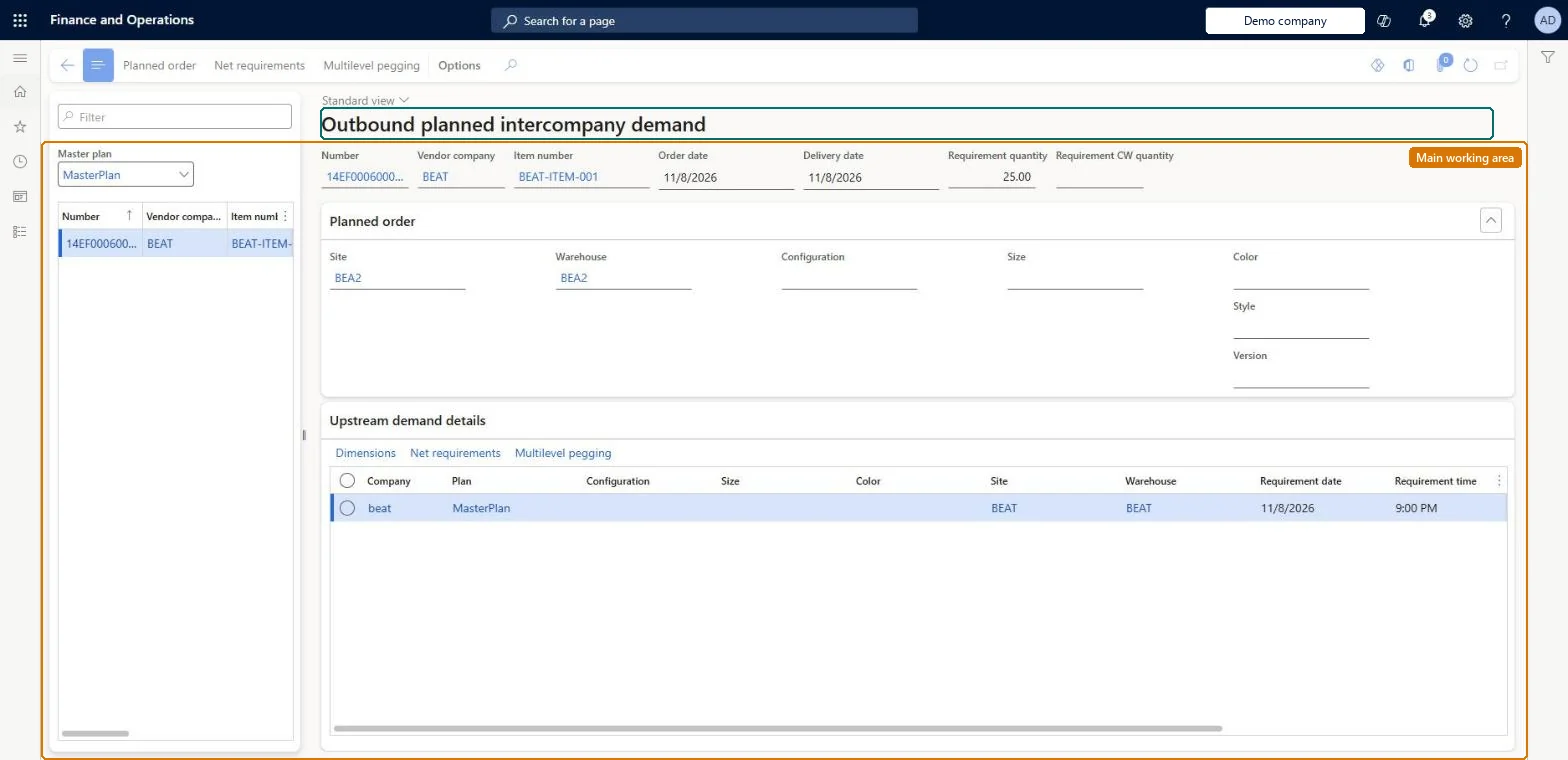
The page in Dynamics 365. page title tab to open what to set or check
About the examples: Examples and screenshots in this guide use BEAT, a demo company in a Dynamics 365 test environment. Use your own company's codes and values instead of copying them.
Steps from Microsoft
Go to Master planning > Inquiries and reports > Intercompany master planning > Outbound planned intercompany demand.
Expand the Upstream demand details section.
If no details are shown yet, wait until master planning has run in the supplying company.
ReqOutboundIntercompanyDemandChecked in Dynamics 365
Form
ReqOutboundIntercompanyDemandChecked in Dynamics 365
Table
ReqIntercompanyOutboundDShown as “OUTBOUND PLANNED INTERCOMPANY DEMAND” in Record infoChecked in Dynamics 365
Who can open it
PrivilegesView the planned intercompany demand IntercompanyPlannedDemandViewDutiesInquire into planned orders ReqPlannedOrderProgressInquireMaintain planned orders ReqPlannedOrdersMaintain5 security rolesMaterials manager InventMaterialsManagerProduction manager ProdProductionManagerProduction supervisor ProdProductionSupervisorProduction planner ReqProductionPlannerPurchasing manager TradePurchasingManagerChecked in Dynamics 365
Roles to set it up and use it
To use itProduction planner ReqProductionPlannerProduction manager ProdProductionManagerMaterials manager InventMaterialsManagerPurchasing manager TradePurchasingManagerProduction supervisor ProdProductionSupervisorGive people one of these roles. On this system, 5 roles can open this page.Checked in Dynamics 365
Actions on the page
(Action Pane without tabs): Planned order, Net requirements, Multilevel peggingChecked in Dynamics 365