BeyondERP.Newsletter
Menu

Page · Inventory management

Arrival overview

An inquiry page that lists all items expected to arrive, grouped by order type, expected receipt date and delivery destination.

Used by
Receiving clerk, Landed cost agent, Landed cost manager and 1 more role
Business process
Process inbound goods
Menu item
WMSArrivalOverview
Main table
WMSArrivalOverviewTmp
Show what matters for
PAGE GUIDEWhat the page does and how to use it7 sections. Choose a role to highlight what matters to you.
Everyone

1What it is and why

What it isAn inquiry page that lists all items expected to arrive, grouped by order type, expected receipt date and delivery destination.
What you do hereUse this page to see expected receipts and start the arrival registration, which creates item arrival journals for the goods that come in.
ExampleFor example, a receiving clerk checks what is expected to arrive today and, when a delivery reaches the dock, matches it to its receipt order.
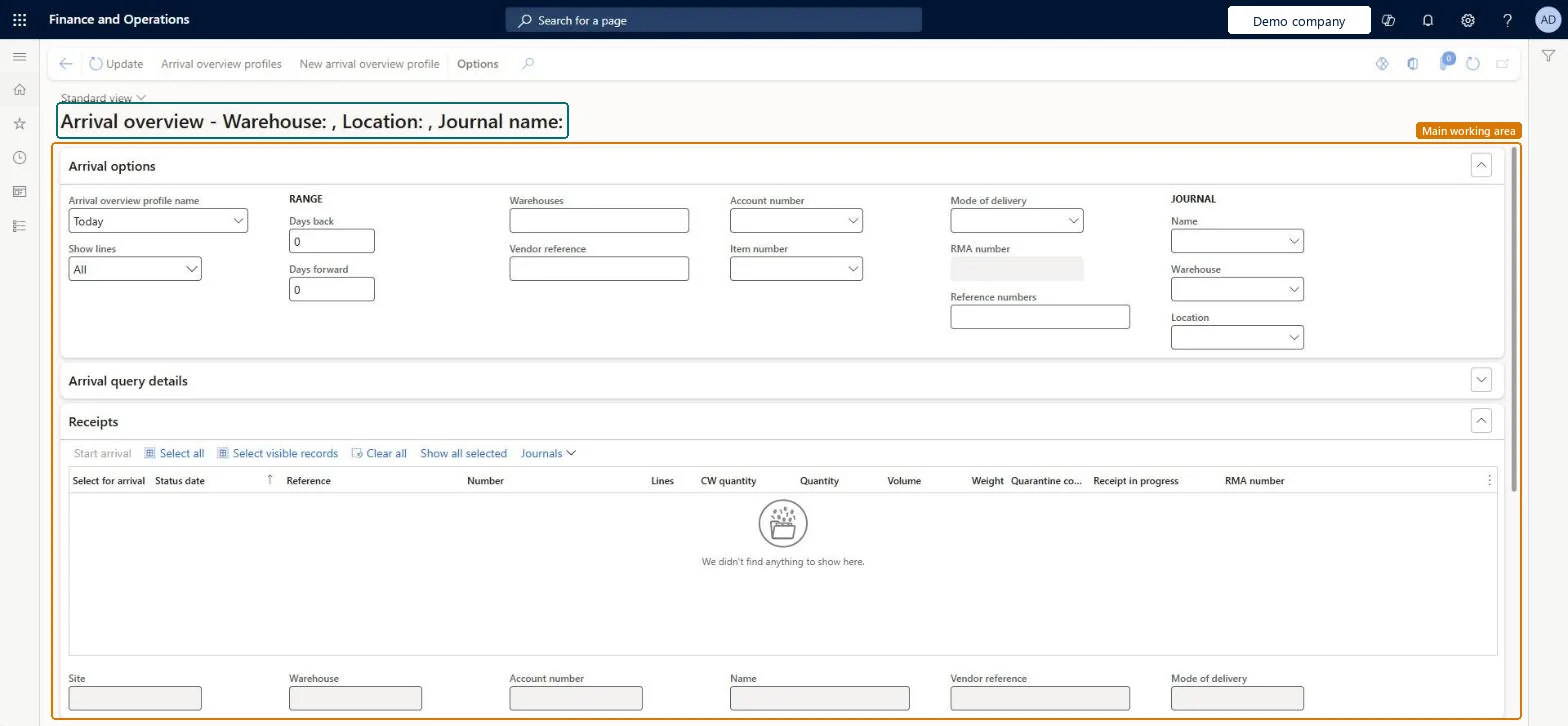
Arrival overview page in Dynamics 365
The page in Dynamics 365. page title tab to open what to set or check
Functional consultant · Solution architect

2Where it fits

Business processProcess inbound goods
Menu pathInventory management › Inbound orders › Arrival overview
Set up firstArrival overview profiles Microsoft Learn Arrival journal name in the profile Microsoft Learn
Used next byItem arrival Microsoft Learn Production input Microsoft Learn
End user · Functional consultant

3How to do it

About the examples: Examples and screenshots in this guide use BEAT, a demo company in a Dynamics 365 test environment. Use your own company's codes and values instead of copying them.

Steps from Microsoft

  1. Go to Inventory management > Inbound orders > Arrival overview.
  2. On the Arrival options FastTab, choose your arrival overview profile, the day range and the warehouses, and then select Update.
  3. On the Receipts FastTab, select one or more lines and select Start arrival to create an item arrival journal.
  4. When the goods are registered, select Journals > Product receipt ready journals.
  5. Select the journals to update, and then select Functions > Product receipt.
  6. On the Posting page, enter the product receipt number if it isn't already on the journal, and then select OK.

Source: Microsoft Learn

Fields on the page

FieldWhat it means
Arrival overview profile namePicks the saved personal settings that control which receipts the page shows.Microsoft Learn
Show linesFilters the lines; In progress shows lines that have an item arrival journal that isn't posted yet.Microsoft Learn
Vendor referenceLets you scan a vendor reference, such as a delivery note bar code, to filter the page.Microsoft Learn
Account numberTogether with Reference number, limits the page to one specific order.Microsoft Learn
Solution architect

4Design impact

If you change it laterOnce all the related journal lines are posted, the receipt no longer shows on the page. Microsoft Learn
Technical architect

5Technical

Menu itemWMSArrivalOverview Checked in Dynamics 365
FormWMSArrivalOverview Checked in Dynamics 365
TableWMSArrivalOverviewTmpShown as “Arrival overview” in Record infoChecked in Dynamics 365
Who can open itPrivilegesMaintain arrival overview WMSArrivalOverviewMaintainView arrival overview WMSArrivalOverviewViewDutiesMaintain receipt operations InventRecevingOperationMaintainInquire into receipt operation progress InventRecevingOperationProgressInquire
4 security rolesReceiving clerk InventReceivingClerkLanded cost agent ITMAgentLanded cost manager ITMManagerWarehouse manager WMSWarehouseManager
Checked in Dynamics 365
Roles to set it up and use itTo set it up or change itReceiving clerk InventReceivingClerkLanded cost agent ITMAgentTo use itWarehouse manager WMSWarehouseManagerLanded cost manager ITMManagerGive people one of these roles. On this system, 4 roles can open this page.Checked in Dynamics 365
Actions on the pageOptions: Personalize, Page options, ShareChecked in Dynamics 365
Developer

6Developer

Open it by URLhttps://<your-environment>/?mi=WMSArrivalOverview
Everyone

7Sources