PAGE GUIDEWhat the page does and how to use it8 sections. Choose a role to highlight what matters to you.
Everyone
1What it is and why
What it is
A report that prints the US VETS-4212 veterans' employment form as a PDF, using an Electronic reporting configuration.
What you do here
Use this page to produce the VETS-4212 report that federal contractors file about employing veterans.
Example
For example, BEAT imports the VETS-4212 PDF printout configuration once, then each September runs the report for BEAT-NJ with Twelve month period ending 31 August 2026 and gets the PDF with its 3 protected veterans among 48 employees.
The page in Dynamics 365. page title tab to open what to set or check
About the examples: Examples and screenshots in this guide use BEAT, a demo company in a Dynamics 365 test environment. Use your own company's codes and values instead of copying them.
Setup steps on this page
Print the VETS-4212 form (US)
Produce the yearly VETS-4212 PDF per establishment with the current form version.
Steps from Microsoft
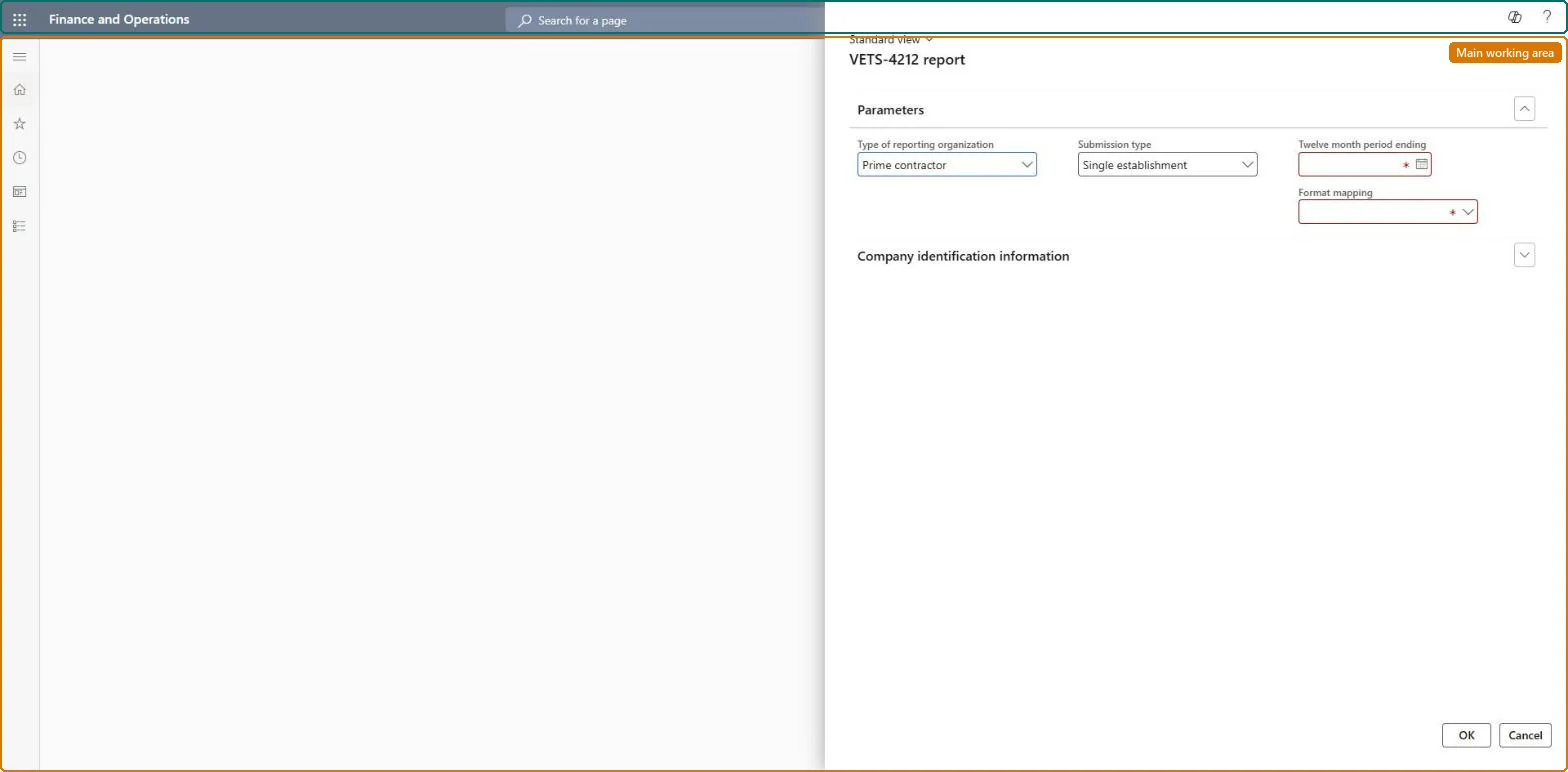
Go to Human resources > Workers > Inquiries and reports > VETS-4212 report.
Under Parameters, select the Type of reporting organization and Submission type, enter the required Twelve month period ending, and select a Format mapping.
Expand Company identification information to complete it.
The kind of reporting organization the report is filed for.Checked in Dynamics 365
Single establishment
Submission type
The kind of VETS-4212 submission the report is produced for.Checked in Dynamics 365
Regular submission
Twelve month period ending
The last day of the 12-month period the report covers.Checked in Dynamics 365
31 August 2026
Format mapping
The Electronic reporting format the PDF is printed with, imported from the HR resources repository.Microsoft Learn
VETS-4212 PDF printout
Common errors and fixes
Message
What to do
The PDF uses the 2017 form
The old configuration is still loaded. In Report configurations delete the VETS-4212 report, then in Electronic reporting > Repositories > HR resources select Open, select VETS-4212 PDF printout and Import. Microsoft Learn
Veteran counts are lower than expected
The counts come from the veteran status on the worker records. Complete it on the workers of the establishment and run the report again. Microsoft Learn
Test checklist
In Electronic reporting, Repositories, open HR resources and check VETS-4212 PDF printout is imported.
Run the VETS-4212 report for a regulatory establishment.
Check the PDF uses the current form version, not the 2017 form.
Import VETS-4212 PDF printout from the HR resources repository before the first run, check it prints the 2020 form, and run the report once a year per establishment.The form layout comes from an imported Electronic reporting configuration; an old configuration keeps printing the 2017 form until it is deleted and imported again.
Shared setup, US only: Data management lists Regulatory establishments, Regulatory establishment details, Ethnic origins, Veteran status and Worker as shared; the report is run per regulatory establishment. Checked in Dynamics 365
Can it be undone
Reversible: The form layout comes from an Electronic reporting configuration. To move to a newer form version, delete the VETS-4212 report in Report configurations and import VETS-4212 PDF printout again from the HR resources repository. Microsoft Learn
If you change it later
The report format comes from an imported Electronic reporting configuration, so a newer form version needs the configuration to be deleted and re-imported. Microsoft Learn
Technical architect
6Technical
Menu item
HcmVETSReportGenerationChecked in Dynamics 365
Form
HcmVETSReportGenerationChecked in Dynamics 365
Roles to set it up and use it
To use itHuman resource manager HcmHumanResourceManagerHuman resource assistant HcmHumanResourceAssistantCompensation and benefits manager HcmCompensationAndBenefitsManagerGive people one of these roles. On this system, 3 roles can open this page.Checked in Dynamics 365
Load order: The VETS-4212 report has no data entity in Data management, so it can't be loaded from a file or a configuration template. It reads workers, their veteran status and the regulatory establishments, and prints with an Electronic reporting configuration imported in each environment; load the data with the Worker data migration and Personnel management setup templates.Microsoft Learn