PAGE GUIDEWhat the page does and how to use it8 sections. Choose a role to highlight what matters to you.
Everyone
1What it is and why
What it is
A dialog report that compares the skill levels workers have (Actual) with the levels they are working toward (Target), measured against a target date.
What you do here
Use this page to follow up development goals: which workers have reached their target skill levels and where a gap remains.
Example
For example, BEAT set targets for 12 sales staff to reach Advanced in Negotiation by 2026-12-31; HR runs the report with that Target date and sees 8 have an Actual level of Advanced and 4 are still at Intermediate.
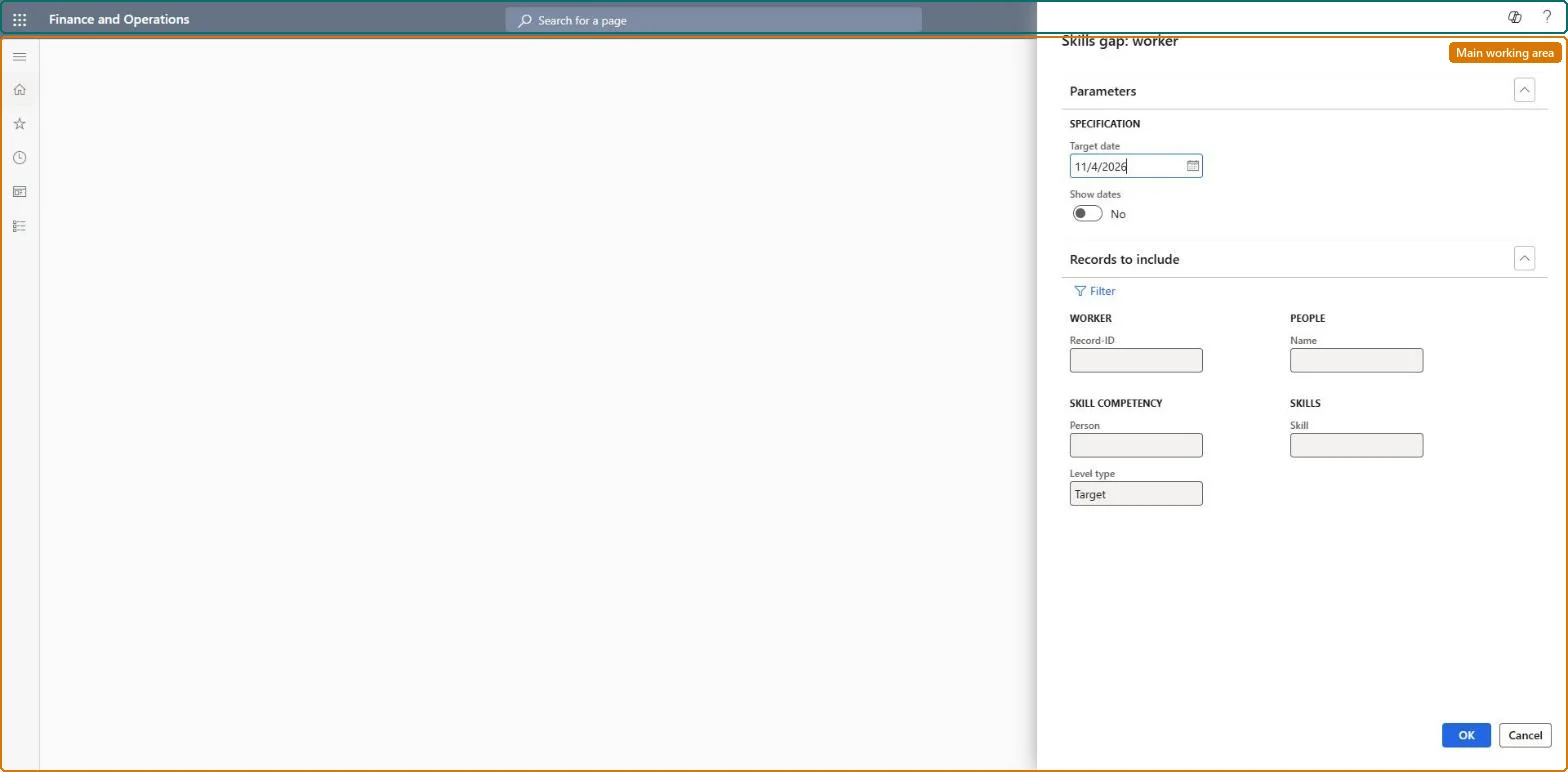
The page in Dynamics 365. page title tab to open what to set or check
About the examples: Examples and screenshots in this guide use BEAT, a demo company in a Dynamics 365 test environment. Use your own company's codes and values instead of copying them.
Setup steps on this page
Follow up target skill levels
Check whether workers reached the skill levels set as development targets.
Steps from Microsoft
Go to Human resources > Competencies > Reports > Skills gap: worker.
Use Skills gap: worker to compare the skill levels workers already have with the levels they are working toward.
Under Parameters, set the Target date that the skill levels are measured against, and set Show dates to print the level dates.
Narrow the workers by Record-ID, Name or Person and the skills by Skill; Level type is Target by default, which reports the skills a worker is working toward rather than the Actual level they have.
Print the report and, for each gap, update the worker's Skills page (Person > Skills) when a new level is reached.
The date the skill levels are measured against.Checked in Dynamics 365
2026-12-31
Level type
Target by default: reports the levels workers are working toward rather than the Actual level they have.Checked in Dynamics 365
Target
Common errors and fixes
Message
What to do
A worker who reached the level still shows a gap
Reaching a target doesn't change the Target line. Add an Actual line with the new level and Level date on the worker's Skills page. Microsoft Learn
A skill a worker entered in Employee self service doesn't show
Skills that workers enter for themselves need manager approval. Approve the work item, or have the manager enter the skill; a Worker skills workflow can auto-approve skills entered by managers. Microsoft Learn
Test checklist
Give a worker a Target level Advanced and an Actual level Intermediate in one skill.
Run the report with a Target date after both Level dates.
Check the gap shows; add an Actual Advanced line and check the gap is gone on the next run.
Run it at each target date for the team, with Level type Target, and update the worker's Skills page for each target reached.Workers' skills are entered as Actual (has now) or Target (working toward); the report shows the distance between the two.
HR and training staff run it when they plan development, training and succession for current workers. No Feature management feature is needed for this page.
Shared data: the skills, certificates and education recorded for people (the Skill competency, Certificate competency and Education competency entities) and the skills setup are shared in Data management, so the analysis reads the same data from any legal entity. Checked in Dynamics 365
Target and Actual are separate skill lines on the worker; when a target is reached a new Actual line with its Level date must be entered, otherwise the gap stays on the report. Microsoft Learn
Technical architect
6Technical
Menu item
HcmSkillGapWorkerChecked in Dynamics 365
Form
DialogChecked in Dynamics 365
Roles to set it up and use it
To use itHuman resource manager HcmHumanResourceManagerHuman resource assistant HcmHumanResourceAssistantCompensation and benefits manager HcmCompensationAndBenefitsManagerRecruiter HcmRecruiterTraining manager HcmTrainingManagerGive people one of these roles. On this system, 7 roles can run this page.Checked in Dynamics 365
Developer
7Developer
Open it by URL
https://<your-environment>/?mi=HcmSkillGapWorker
Data migration
Load order: Skills gap: worker has no data entity in Data management, so it can't be loaded from a file or a configuration template. It reads workers' Actual and Target skill lines; load them with Skill competency in the Employee development template.Microsoft Learn