Setup page · Fixed assets
Books
A setup page where you create books, each tracking an independent financial lifecycle of an asset with its own depreciation setup.
- Used by
- Accounts payable manager, Auditor, Budget clerk and 9 more roles
- Business process
- Create fixed asset books and posting policies in Dynamics 365 Finance
- Menu item
AssetBookTable- Main table
AssetBookTable- Data entity
AssetValueModelSetupEntity- Setup steps
- 1 on this page
Show what matters for
Everyone
1What it is and why
| What it is | A setup page where you create books, each tracking an independent financial lifecycle of an asset with its own depreciation setup. |
|---|---|
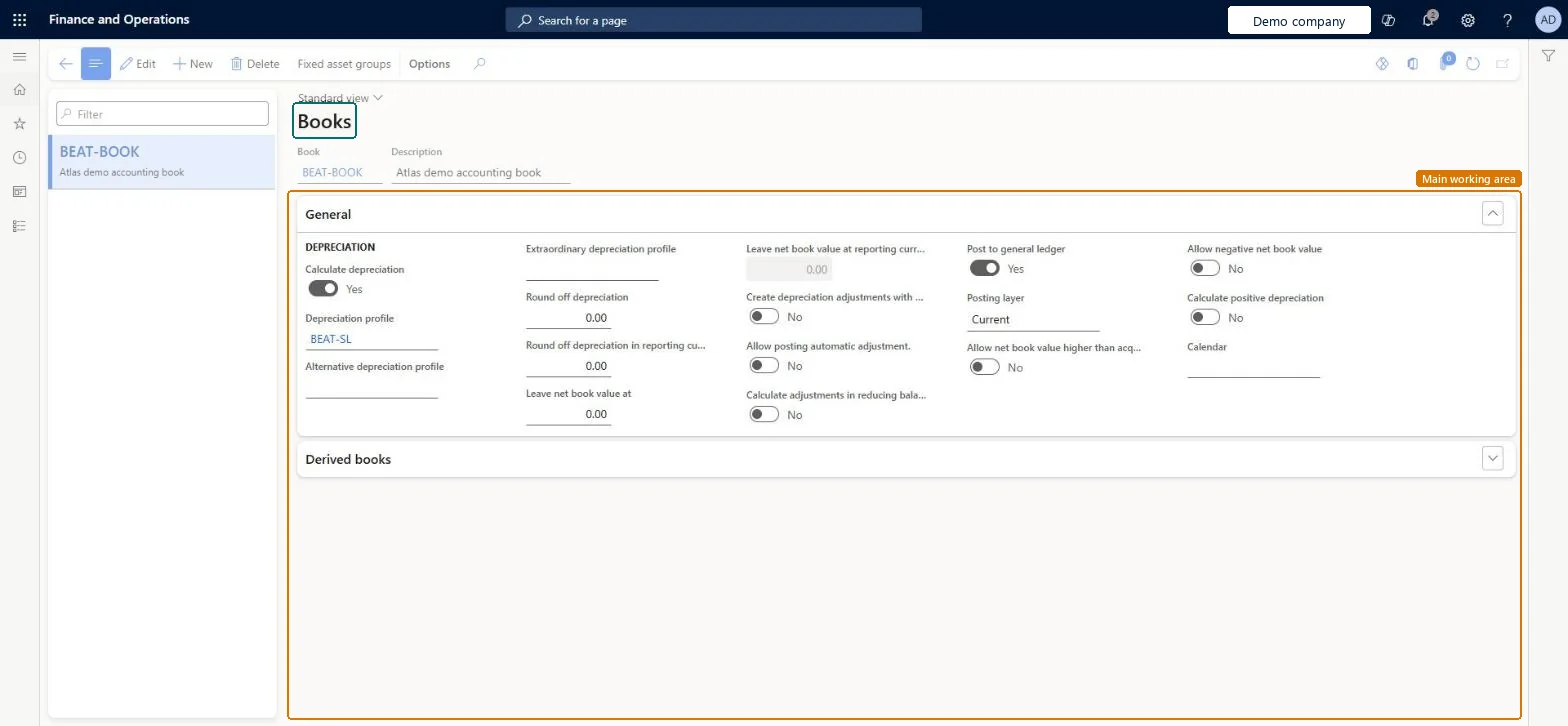
| What you do here | Used to set up the books that hold asset values, choose their depreciation profiles, posting layer and calendar, and decide whether they post to the general ledger. |
| Example | For example, an extraordinary depreciation profile on a book can record extra depreciation after a natural disaster. |
Functional consultant · Solution architect
2Where it fits
| Business process | Define asset strategy › Define asset accounting books › Create fixed asset books and posting policies in Dynamics 365 Finance |
|---|---|
| Menu path | Fixed assets › Setup › Books |
| Set up first | Depreciation profiles Microsoft Learn ↗ |
| Used next by | Fixed asset posting profiles Microsoft Learn ↗Fixed asset groups Microsoft Learn ↗ |
| Related pages | Delete transactions not posted to general ledger Microsoft Learn ↗ |
End user · Functional consultant
3How to do it
Step by step, with screenshots
Set up Books1 screen
Used to set up the books that hold asset values, choose their depreciation profiles, posting layer and calendar, and decide whether they post to the general ledger.
Screen 1
Create the book
Go to Fixed assets > Setup > Books
- Select New
- Enter the Book and Description
- Set Calculate depreciation to Yes and select the Depreciation profile
- Check Post to general ledger and Posting layer, then select Save
1Calculate depreciation Yes 2Depreciation profile BEAT-SL 3Post to general ledger Yes 4Posting layer Current 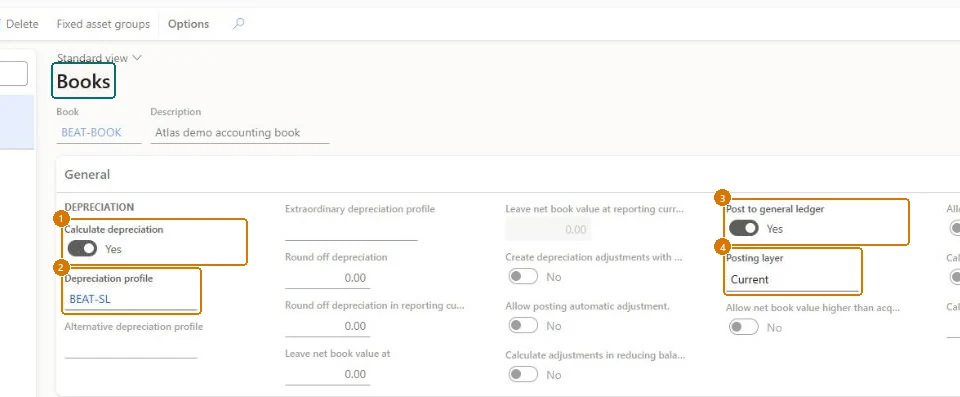
Show the full screen
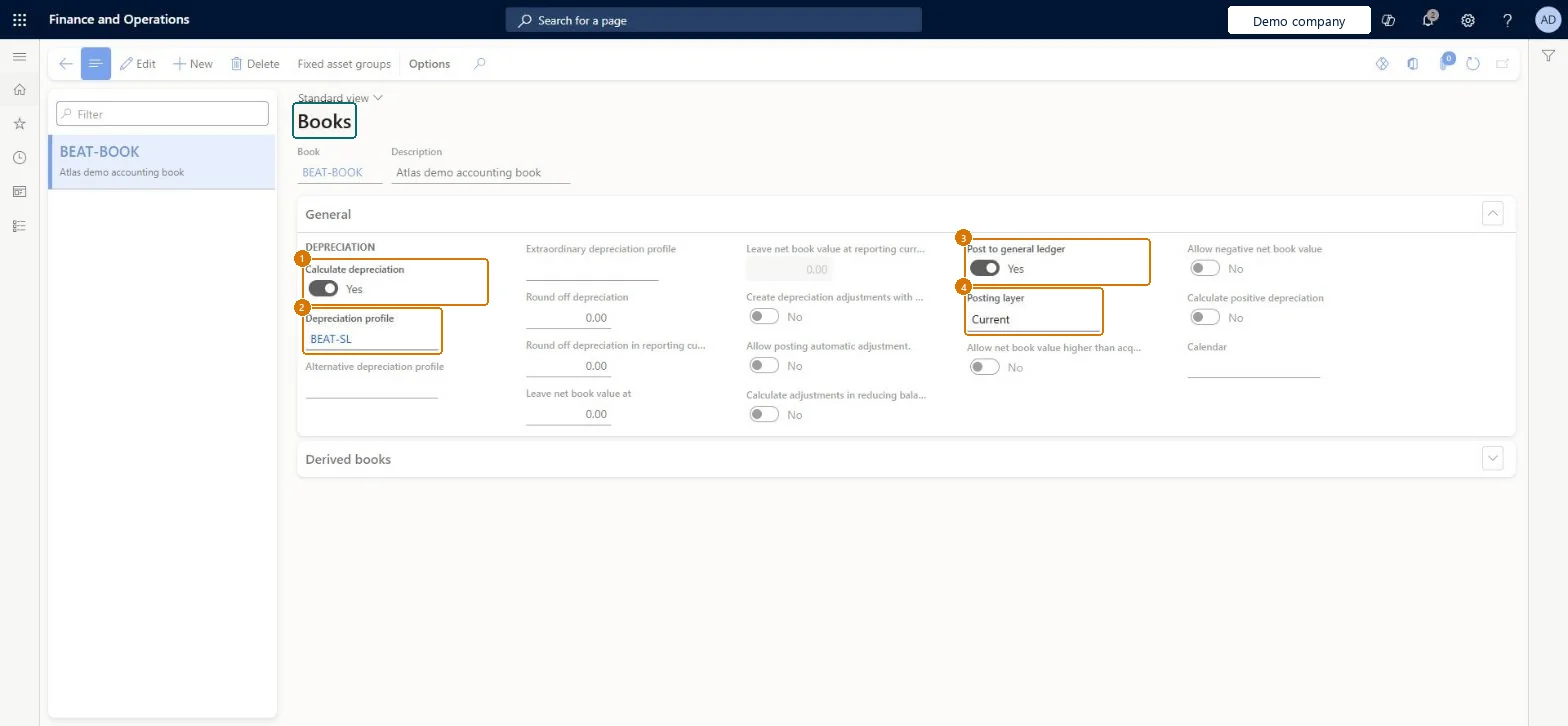
page title tab to open what to set or check
Microsoft's steps
- Go to Fixed assets > Setup > Books.
- Select New.
- In the Book field, enter a value, and enter a Description.
- Set the Calculate depreciation option to Yes.
- In the Depreciation profile field, select a profile, and add alternative or extraordinary profiles if needed.
- Set the Create depreciation adjustments with basis adjustments option.
- Set Post to general ledger and the Posting layer.
- In the Calendar field, select a calendar.
- Select Fixed asset groups to link the book to a group and enter its Service life and depreciation convention.
Source: Microsoft Learn ↗
Field guide
| Field | What it means | Worked example | Table column |
|---|---|---|---|
| Calculate depreciation | Includes the book in depreciation proposals; if No, the book isn't depreciated automatically.Microsoft Learn ↗ | Yes | — |
| Alternative depreciation profile | A switchover profile used when it gives an equal or higher depreciation amount.Microsoft Learn ↗ | — | — |
| Extraordinary depreciation profile | Used for extra depreciation in unusual circumstances.Microsoft Learn ↗ | — | — |
| Create depreciation adjustments with basis adjustments | Creates depreciation adjustments automatically when the asset value changes; otherwise only future depreciation changes.Microsoft Learn ↗ | — | — |
| Post to general ledger | If No, the book posts only to the fixed asset subledger, as is typical for tax books.Microsoft Learn ↗ | Yes | — |
| Posting layer | The posting layer for the book; Current by default when it posts to the ledger, None when it doesn't.Microsoft Learn ↗ | Current | — |
| Calculate positive depreciation | Makes depreciation debit the book, for assets acquired with a negative value.Microsoft Learn ↗ | — | — |
| Calendar | The calendar used for depreciation; a fiscal calendar is required when the profile uses a fiscal depreciation year.Microsoft Learn ↗ | — | FiscalCalendar |
| Round off depreciation in reporting currency | Rounding for depreciation amounts in the reporting currency.Microsoft Learn ↗ | — | RoundOffDepreciationReportingCurrency |
| Depreciation profile | — | BEAT-SL | DepreciationProfile |
Functional consultant
4Setup decisions
| Setup step | Recommended value and why | Decision · common mistake · test |
|---|---|---|
| Set up Books | — | — |
Solution architect
5Design impact
| Shared or per company | Per company: each legal entity has its own records. Microsoft data model ↗ |
|---|---|
| Can it be undone | — |
| Feature or country | — |
| If you change it later | — |
Technical architect
6Technical
| Menu item | AssetBookTable Checked in Dynamics 365 |
|---|---|
| Form | AssetBookTable Checked in Dynamics 365 |
| Table | AssetBookTableShown as “Fixed asset book setup” in Record infoKey field: BookIdChecked in Dynamics 365 |
| Data entities | AssetValueModelSetupEntityFixed asset book setup Microsoft data model ↗ |
| Who can open it | PrivilegesMaintain fixed assets books AssetBookTableMaintainView fixed assets books AssetBookTableViewMaintain fixed asset budget transactions AssetBudgetMaintainDutiesMaintain fixed asset budgets AssetFixedAssetBudgetsMaintainInquire into fixed asset policies AssetFixedAssetPoliciesInquireInquire into fixed assets AssetFixedAssetsInquireEnable fixed assets process AssetFixedAssetsProcessEnableReview fixed assets process performance AssetFixedAssetsProcessPerfReview12 security rolesAuditorAuditPolicyManagerBudget clerk BudgetBudgetClerkBudget manager BudgetBudgetManagerChief executive officer CompanyChiefExecutiveOfficerChief financial officer CompanyChiefFinancialOfficerAccountant LedgerAccountantAccounting manager LedgerAccountingManagerAccounting supervisor LedgerAccountingSupervisorFinancial controller LedgerFinancialControllerRental manager RentalManagerRental purchasing manager RentalPurchasingManagerAccounts payable manager VendInvoiceAccountsPayableManager |
| Actions on the page | Options: Personalize, Page options, ShareChecked in Dynamics 365 |
Developer
7Developer
| Open it directly | https://<your-environment>/?mi=AssetBookTable |
|---|---|
| Integrate with | AssetValueModelSetupEntity data entity Microsoft data model ↗ |
| Table definition | AssetBookTable columns and relations Microsoft data model ↗ |
Everyone
8Sources and checks
- learn.microsoft.com/dynamics365/finance/fixed-assets/set-up-fixed-assets
- learn.microsoft.com/dynamics365/finance/fixed-assets/tasks/set-up-value-models
- learn.microsoft.com/common-data-model/schema/core/operationscommon/tables/finance/fixedassets/main/assetbooktable
- learn.microsoft.com/training/modules/fixed-asset-deprecation-disposal-finance/depreciation
- learn.microsoft.com/dynamics365/finance/fixed-assets/fixed-asset-depreciation
- learn.microsoft.com/dynamics365/finance/general-ledger/dual-currency
- learn.microsoft.com/dynamics365/finance/fixed-assets/bonus-depreciation
- Checked in a working Dynamics 365 system, version 10.0.49: the menu item, form, table and security, the page, the demo records and the values in the screenshots.