PAGE GUIDEWhat the page does and how to use it8 sections. Choose a role to highlight what matters to you.
Everyone
1What it is and why
What it is
A periodic page that produces an export file of company balances for consolidation in another instance or system.
What you do here
Use this page to select the legal entities to export and set the file path for the output file.
Example
For example, BEAT's US subsidiary on another instance exports its October 2026 balances for main accounts 100000 to 899999 into one file for BEAT's consolidation company, and the message reports 412 records saved.
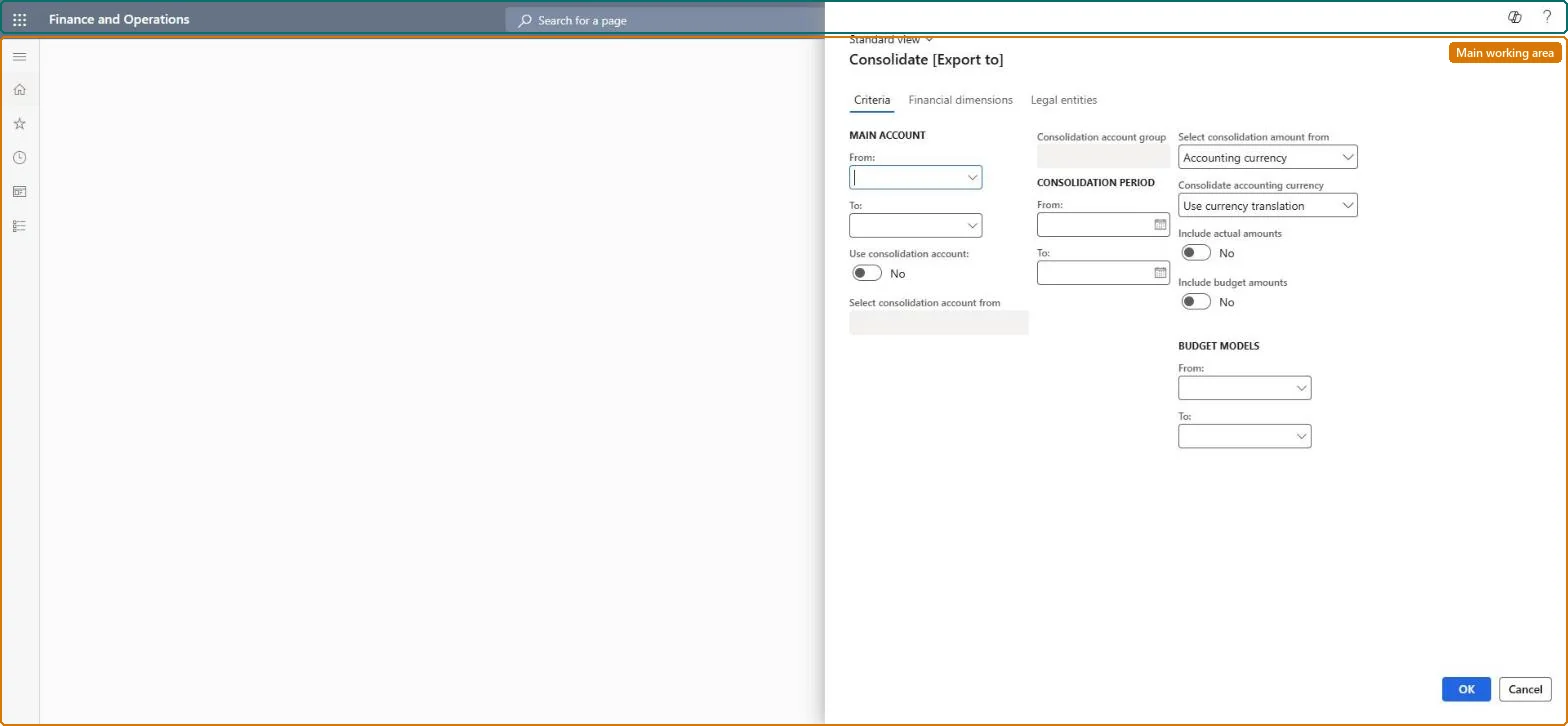
The page in Dynamics 365. page title tab to open what to set or check
About the examples: Examples and screenshots in this guide use BEAT, a demo company in a Dynamics 365 test environment. Use your own company's codes and values instead of copying them.
When to run it
When to run it
At each consolidation period end in the subsidiary instance, before the parent runs Consolidate with import.
How often
Once per consolidation period, and again whenever the subsidiary corrects its balances.
What the output shows
One export file per source legal entity with balances for the accounts, dimensions and period selected. A record count of zero or a missing account usually means the account range, period or consolidation account mapping is wrong.
Use this page to select the legal entities to export and set the file path for the output file.
Steps from Microsoft
Go to Consolidations > Export company balances.
On the Criteria tab, enter the Main account range (blank for all), and set Use consolidation account and Select consolidation account from when the parent uses another chart of accounts.
Enter the Consolidation period dates and turn on Include actual amounts or Include budget amounts with the Budget models.
On the Financial dimensions tab, choose which dimensions to transfer and how (Dimension, Group dimension, Company accounts or Account).
On the Legal entities tab, add each Source legal entity with a file name and Account type of conversion differences, select OK, and check the message for the number of records saved in each file.
Use consolidation account / Select consolidation account from
Exports to the consolidation account on the main account or from a consolidation account group, when the parent uses another chart of accounts.Microsoft Learn
Export once per period after the subsidiary's adjustments, with the consolidation account mapping the parent expects and the consolidated company included in the legal entities.The parent imports exactly what the file holds, mapped by consolidation account and dimensions.
Consolidations is part of General ledger in Dynamics 365 Finance. In this system Accountant, Accounting manager, Accounting supervisor, Chief financial officer and Financial controller hold the consolidation duties. The subsidiary's accountant exports; the parent's accountant imports. No Feature management feature is needed for this page.
The legal entities listed on the Legal entities tab, each into its own file, for import into another instance or system. Microsoft Learn
Can it be undone
Nothing to undo: The export only reads balances and writes a file; it changes nothing in the ledger. Delete the file and export again if it is wrong. Microsoft Learn
If you change it later
Reads balances and writes files; nothing in the ledger changes. Export again after any correction in the subsidiary, because the parent imports what the file holds. Microsoft Learn
Technical architect
6Technical
Menu item
LedgerConsolidateChecked in Dynamics 365
Form
LedgerConsolidateChecked in Dynamics 365
Roles to set it up and use it
To use itAccounting supervisor LedgerAccountingSupervisorAccountant LedgerAccountantAccounting manager LedgerAccountingManagerGive people one of these roles. On this system, 3 roles can run this page.Checked in Dynamics 365
Developer
7Developer
Open it by URL
https://<your-environment>/?mi=LedgerConsolidate
Data migration
Load order: Export company balances has no data entity in Data management, so it can't be loaded from a file or a configuration template. The export file is the transfer: import it with Consolidate with import in the parent.Checked in Dynamics 365