Budget clerk, Budget manager, Chief financial officer and 4 more roles
Business process
Consolidate and eliminate financials
Menu item
LedgerConsolidateHist
Main table
LedgerConsolidateHist
Setup steps
1 on this page
Show what matters for
PAGE GUIDEWhat the page does and how to use it8 sections. Choose a role to highlight what matters to you.
Everyone
1What it is and why
What it is
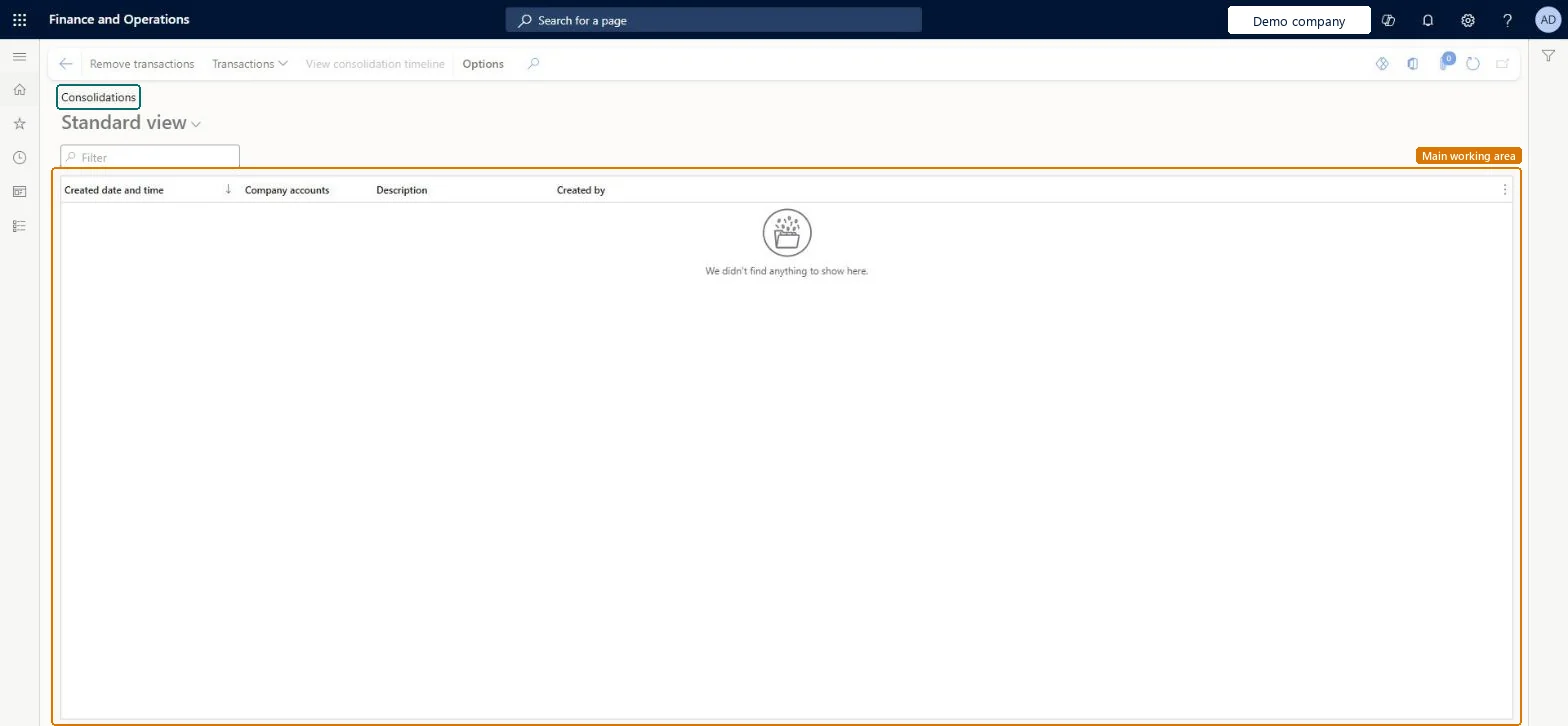
An inquiry page that lists the consolidation history records, showing when each was created, the company accounts, the description and who created it.
What you do here
Use this page to review earlier consolidation runs and to remove consolidation transactions, view their transactions or open the consolidation timeline.
Example
For example, after BEAT's consolidation company reruns its October 2026 consolidation, the accountant finds two history lines for 10/31/2026 here, opens Transactions on the older one and selects Remove transactions.
The page in Dynamics 365. page title tab to open what to set or check
About the examples: Examples and screenshots in this guide use BEAT, a demo company in a Dynamics 365 test environment. Use your own company's codes and values instead of copying them.
Setup steps on this page
Review and clean consolidation runs
Use this page to review earlier consolidation runs and to remove consolidation transactions, view their transactions or open the consolidation timeline.
Steps from Microsoft
Go to Consolidations > Consolidation transactions.
Find the consolidation by Created date and time, Company accounts and Description.
Select Transactions to see the balances it created for each source company and period.
To run the consolidation again cleanly, select Remove transactions on the old record first, then process the consolidation.
The trial balance of the consolidation company shows doubled balances after a consolidation stopped part-way
Run Consolidations > Detect and recreate missing consolidation transactions for that period, then review and remove the incomplete transactions on Consolidation transactions. Microsoft Learn
Test checklist
Run a consolidation for one month.
Find its record here and open Transactions.
Remove the transactions and check the trial balance of the consolidation company drops by that amount.
Process the consolidation again and check the record returns.
Filter on the period and source company first, then open Transactions.The list keeps every run for audit, so several records can exist for the same period.
Consolidations is part of General ledger in Dynamics 365 Finance. In this system Accountant, Accounting manager, Accounting supervisor, Chief financial officer and Financial controller hold the consolidation duties. Accountants and controllers review and remove runs. No Feature management feature is needed for this page.
Every consolidation run of the consolidation company, for every source company and period. Microsoft Learn
Can it be undone
Reversible: Viewing changes nothing; removed transactions come back when the consolidation is processed again. Microsoft Learn
If you change it later
Remove transactions takes a run's balances out of the consolidation company; reprocess the consolidation to bring them back. Microsoft Learn
Technical architect
6Technical
Menu item
LedgerConsolidateHistChecked in Dynamics 365
Form
LedgerConsolidateHistChecked in Dynamics 365
Table
LedgerConsolidateHistShown as “LEDGER CONSOLIDATION HISTORY” in Record infoChecked in Dynamics 365
Who can open it
PrivilegesView consolidations transactions information LedgerConsolidateHistViewDutiesInquire into budget register entry status BudgetBudgetTransStatusInquireInquire into closing transaction status LedgerClosingTransactionsStatusInquire7 security rolesBudget clerk BudgetBudgetClerkBudget manager BudgetBudgetManagerChief financial officer CompanyChiefFinancialOfficerAccountant LedgerAccountantAccounting manager LedgerAccountingManagerAccounting supervisor LedgerAccountingSupervisorFinancial controller LedgerFinancialControllerChecked in Dynamics 365
Roles to set it up and use it
To use itAccounting supervisor LedgerAccountingSupervisorAccountant LedgerAccountantAccounting manager LedgerAccountingManagerChief financial officer CompanyChiefFinancialOfficerFinancial controller LedgerFinancialControllerGive people one of these roles. On this system, 7 roles can open this page.Checked in Dynamics 365
Actions on the page
(Action Pane without tabs): Remove transactions, Transactions, View consolidation timelineChecked in Dynamics 365
Load order: Consolidation transactions has no data entity in Data management, so it can't be loaded from a file or a configuration template. They are results of consolidation runs; run the consolidation again in the new environment.Checked in Dynamics 365