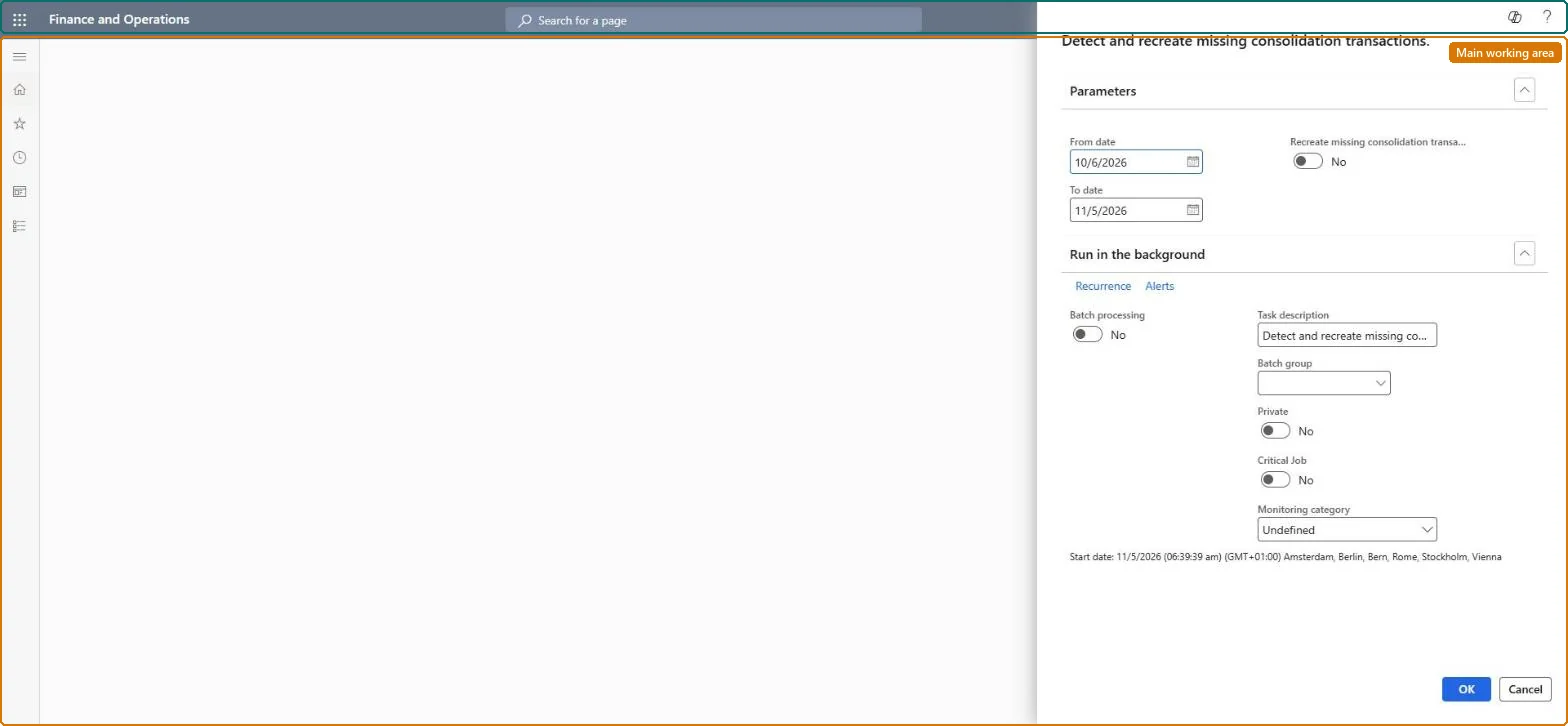
Detect and recreate missing consolidation transactions.
Consolidations
LedgerConsolidateTransRefMaintenance
Business process
Consolidate and eliminate financials
Menu item
LedgerConsolidateTransRefMaintenance
Setup steps
1 on this page
Show what matters for
PAGE GUIDEWhat the page does and how to use it8 sections. Choose a role to highlight what matters to you.
Everyone
1What it is and why
What it is
A periodic process that scans for consolidation transactions left missing or incomplete by an interrupted consolidation and can recreate them.
What you do here
Use this page after a consolidation run stopped part-way: run it first to detect affected transactions, then run it again to recreate the missing headers and lines.
Example
For example, BEAT's October 2026 consolidation batch was stopped and the trial balance of the consolidation company showed a doubled 48,000.00 cash balance; the job run for 10/1/2026 to 10/31/2026 found the incomplete records and recreated them so they could be removed.
The page in Dynamics 365. page title tab to open what to set or check
About the examples: Examples and screenshots in this guide use BEAT, a demo company in a Dynamics 365 test environment. Use your own company's codes and values instead of copying them.
Setup steps on this page
Repair an interrupted consolidation
Use this page after a consolidation run stopped part-way: run it first to detect affected transactions, then run it again to recreate the missing headers and lines.
Steps from Microsoft
Go to Consolidations > Detect and recreate missing consolidation transactions.
Enter a From date and To date that match the last consolidation period.
Run the process and review any missing consolidation transactions it finds.
Set Recreate missing consolidation transactions to Yes.
Run the process again to recreate the missing records.
Review the recreated records in Consolidations > Consolidation transactions.
The period scanned; it should match the last consolidation period but can be wider.Microsoft Learn
10/1/2026 to 10/31/2026
Recreate missing consolidation transactions
When Yes, the run recreates the missing records instead of only detecting them.Microsoft Learn
No on the first run, Yes on the second
Common errors and fixes
Message
What to do
The trial balance of the consolidation company shows doubled balances after a consolidation stopped part-way
Run Consolidations > Detect and recreate missing consolidation transactions for that period, then review and remove the incomplete transactions on Consolidation transactions. Microsoft Learn
Test checklist
After a consolidation run was stopped part-way, open this page and enter the From date and To date of that consolidation period (keep the range narrow).
Run it with Recreate missing consolidation transactions set to No and review the transactions it reports.
Run it again with Recreate missing consolidation transactions set to Yes.
Open Consolidations > Consolidation transactions and check the recreated headers and lines are listed.
Check the trial balance in the consolidation company no longer shows doubled balances for the period.
Run detection first for the dates of the interrupted run, review, then rerun with Recreate missing consolidation transactions set to Yes.Incomplete records from a stopped run can't be cleaned automatically and cause doubled balances; recreating them makes them visible so they can be removed.
Consolidations is part of General ledger in Dynamics 365 Finance. In this system Accountant, Accounting manager, Accounting supervisor, Chief financial officer and Financial controller hold the consolidation duties. Available from version 10.0.48; the accountant who runs consolidations uses it. No Feature management feature is needed for this page.
The consolidation company and the date range entered; keep it to the period of the interrupted run, because a wide range slows the job. Microsoft Learn
Can it be undone
Reversible: Detection only reports. Recreated headers and lines become visible on Consolidations > Consolidation transactions, where they can be reviewed and removed. The repair fixes data left by an interrupted run and doesn't replace a normal consolidation. Microsoft Learn
If you change it later
A wide date range slows processing, and the repair only fixes data from an interrupted run; it does not replace a normal consolidation. Microsoft Learn
Technical architect
6Technical
Menu item
LedgerConsolidateTransRefMaintenanceChecked in Dynamics 365
Form
SysOperationTemplateFormChecked in Dynamics 365
Roles to set it up and use it
To use itAccounting supervisor LedgerAccountingSupervisorAccountant LedgerAccountantAccounting manager LedgerAccountingManagerGive people one of these roles. On this system, 3 roles can run this page.Checked in Dynamics 365
Load order: Detect and recreate missing consolidation transactions has no data entity in Data management, so it can't be loaded from a file or a configuration template. It repairs consolidation data in place; there is nothing to migrate.Microsoft Learn