Workflow page · Budgeting
Budget planning configuration
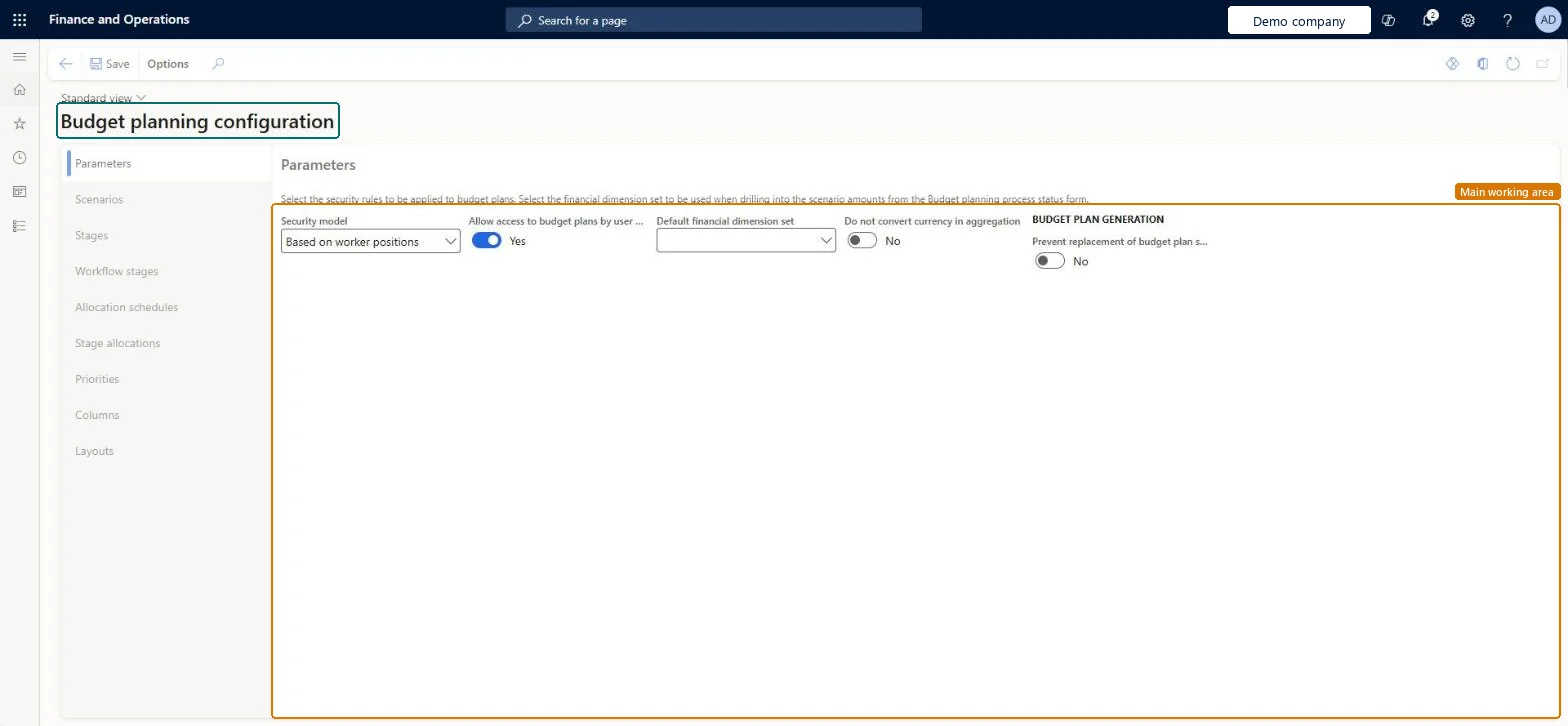
A setup page that holds most of the settings needed for budget planning.
- Used by
- Budget clerk, Budget contributor, Budget manager and 4 more roles
- Business process
- Create procurement budgets with Dynamics 365 Finance
- Menu item
BudgetPlanningConfigurationParameters- Main table
BudgetPlanningConfiguration- Data entity
BudgetPlanParameterEntity- Setup steps
- 1 on this page
Show what matters for
Everyone
1What it is and why
| What it is | A setup page that holds most of the settings needed for budget planning. |
|---|---|
| What you do here | Used to create the building blocks of budget planning, such as parameters, scenarios, stages, workflows, columns and layouts. |
| Example | For example, a company can create one column for previous-year actuals and twelve monthly columns, then build a layout where every column except the actuals can be edited. |
Functional consultant · Solution architect
2Where it fits
| Business process | Develop procurement and sourcing strategy › Develop spend strategy › Create procurement budgets with Dynamics 365 Finance |
|---|---|
| Menu path | Budgeting › Setup › Budget planning › Budget planning configuration |
| Set up first | Budgeting workflows Microsoft Learn ↗Period allocation categories Microsoft Learn ↗Budget allocation terms Microsoft Learn ↗ |
| Used next by | Budget planning process Microsoft Learn ↗ |
| Related pages | — |
End user · Functional consultant
3How to do it
Step by step, with screenshots
Set up Budget planning configuration2 screens
Used to create the building blocks of budget planning, such as parameters, scenarios, stages, workflows, columns and layouts.
Screen 1
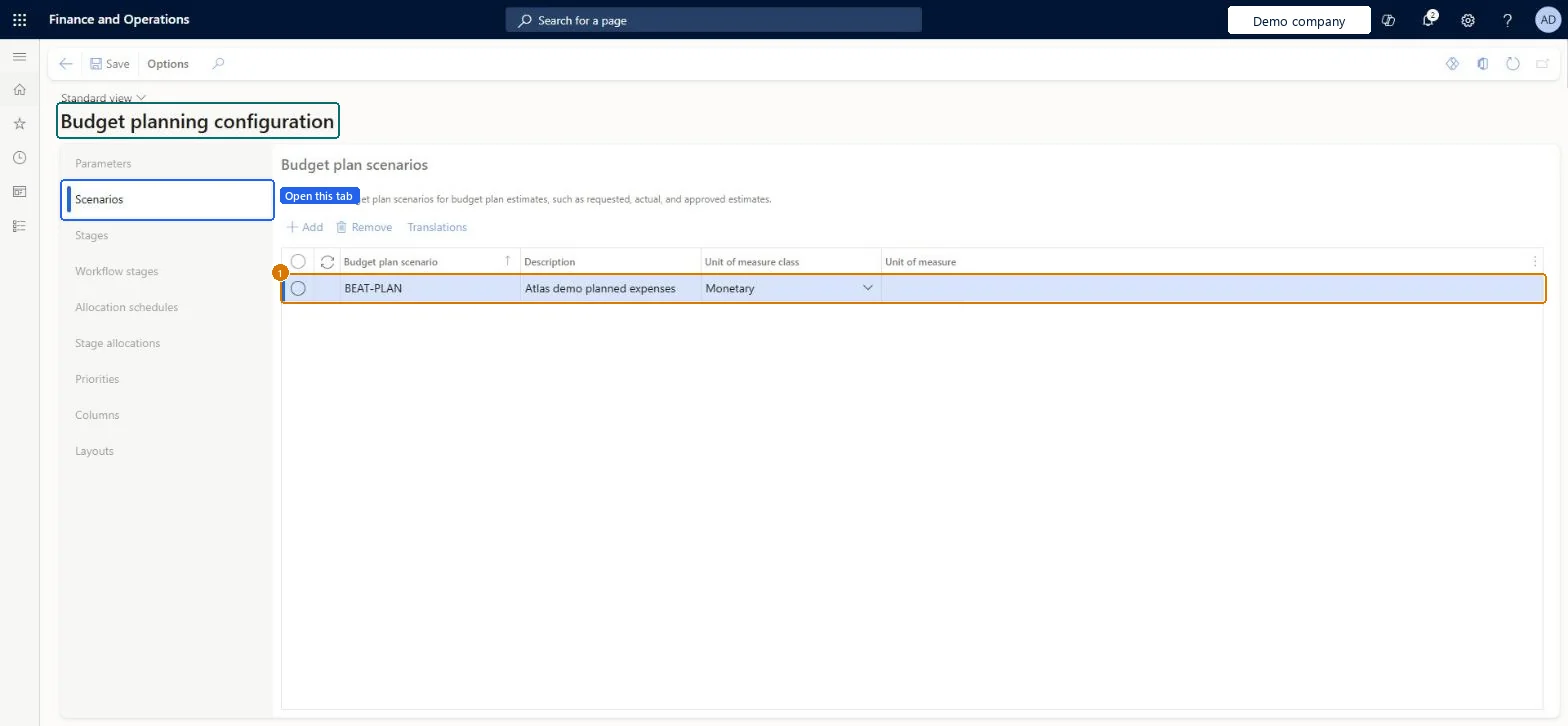
Create the budget plan scenario
Go to Budgeting > Setup > Budget planning > Budget planning configuration, Scenarios tab
- Open the Scenarios tab
- Select Add
- Enter the Budget plan scenario and Description, and set Unit of measure class to Monetary
- Select Save
1Budget plan scenario BEAT-PLAN Description Atlas demo planned expenses Unit of measure class Monetary 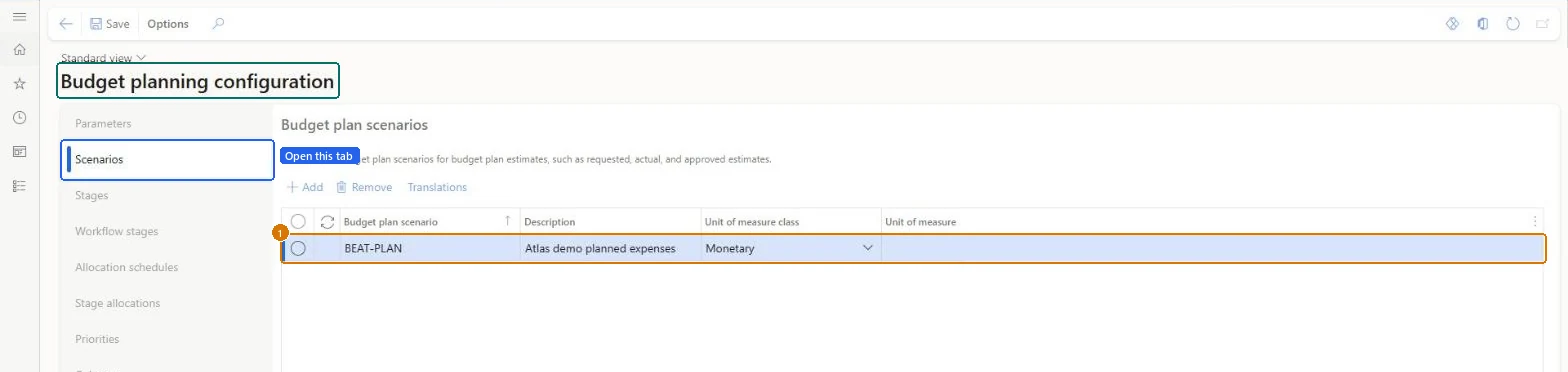
Show the full screen
page title tab to open what to set or check Screen 2
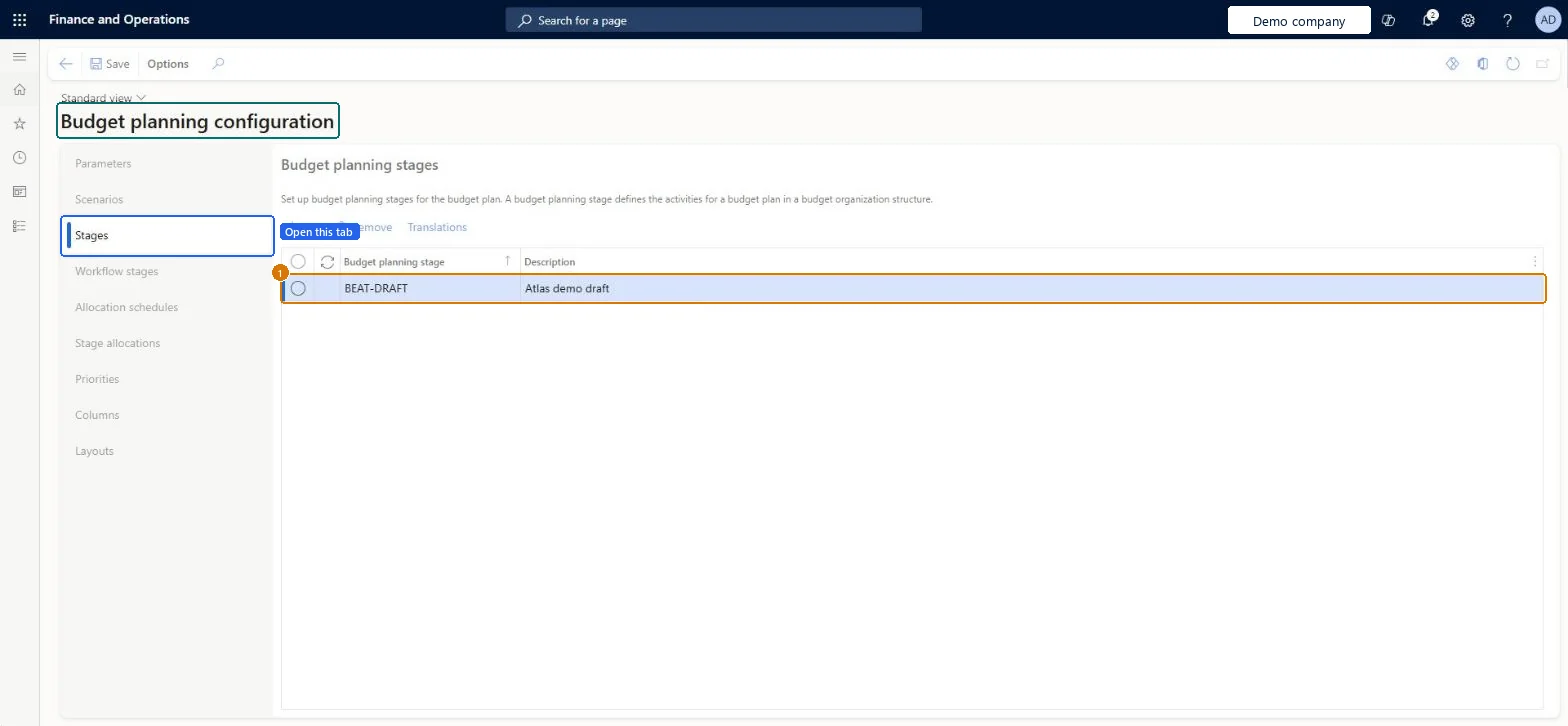
Create the budget planning stage
Go to Budgeting > Setup > Budget planning > Budget planning configuration, Stages tab
- Open the Stages tab
- Select Add
- Enter the Budget planning stage and Description
- Select Save
1Budget planning stage BEAT-DRAFT Description Atlas demo draft 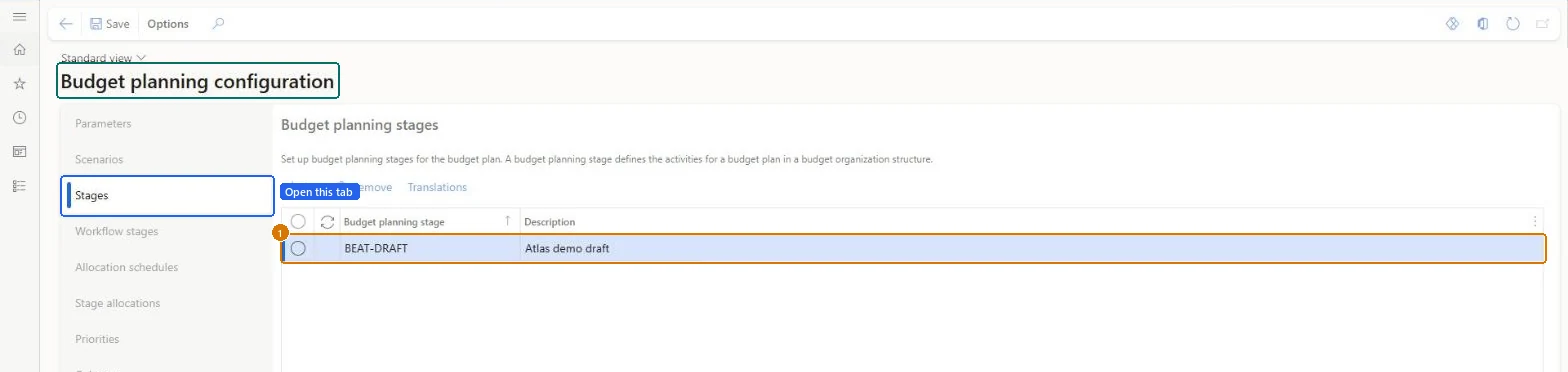
Show the full screen
page title tab to open what to set or check
Microsoft's steps
- Go to Budgeting > Setup > Budget planning > Budget planning configuration.
- On the Parameters tab, set the Security model.
- On the Scenarios tab, create or check the budget plan scenarios.
- On the Columns tab, create the columns, for example one per month.
- On the Layouts tab, create a layout, select a ledger dimension set and add the columns as elements.
- Mark which columns can be edited, and select Descriptions to choose which dimensions show names.
- Select Template > Generate to create the Excel template for the layout.
Source: Microsoft Learn ↗
Field guide
| Field | What it means | Worked example | Table column |
|---|---|---|---|
| Security model | Sets how users get access to budget plans.Microsoft Learn ↗ | — | SecurityModel |
| Parameters | Security rules for budget plans and default dimensions for drilling into scenario amounts.Microsoft Learn ↗ | — | — |
| Scenarios | Categories of budget data, in amounts or quantities.Microsoft Learn ↗ | — | — |
| Stages | The steps a budget plan follows from start to final approval.Microsoft Learn ↗ | — | — |
| Workflow stages | Where you create budget planning workflows from stages and a budgeting workflow.Microsoft Learn ↗ | — | — |
| Allocation schedules | Allocations that run automatically during workflow processing.Microsoft Learn ↗ | — | — |
| Stage allocations | Link an allocation schedule to a workflow and stage.Microsoft Learn ↗ | — | — |
| Priorities | Optional categories and objectives used to classify and rank budget plans.Microsoft Learn ↗ | — | — |
| Columns | Amount or quantity columns, each based on a budget plan scenario.Microsoft Learn ↗ | — | — |
| Layouts | Define the rows and columns a budget plan shows.Microsoft Learn ↗ | — | — |
| Budget plan scenario | — | BEAT-PLAN | — |
| Description | — | Atlas demo planned expenses | — |
| Unit of measure class | — | Monetary | — |
| Budget planning stage | — | BEAT-DRAFT | — |
Functional consultant
4Setup decisions
| Setup step | Recommended value and why | Decision · common mistake · test |
|---|---|---|
| Set up Budget planning configuration | — | — |
Solution architect
5Design impact
| Shared or per company | Per company: each legal entity has its own records. Microsoft data model ↗ |
|---|---|
| Can it be undone | — |
| Feature or country | — |
| If you change it later | Once an Excel template is generated for a layout, the layout is locked and can't be edited. Microsoft Learn ↗ |
Technical architect
6Technical
| Menu item | BudgetPlanningConfigurationParameters Checked in Dynamics 365 |
|---|---|
| Form | BudgetPlanningConfiguration Checked in Dynamics 365 |
| Table | BudgetPlanningConfigurationShown as “Budget planning configuration” in Record infoChecked in Dynamics 365 |
| Data entities | BudgetPlanParameterEntityBudget plan parameter Microsoft data model ↗ |
| Who can open it | PrivilegesMaintain budget planning configuration BudgetPlanningConfigurationMaintainView budget planning configuration BudgetPlanningConfigurationViewDutiesMaintain budget planning configuration and processes BudgetPlanningConfigProcessMaintainView budget planning configuration and processes BudgetPlanningConfigProcessView7 security rolesBudget clerkBudgetBudgetClerkBudget contributor BudgetBudgetContributorBudget manager BudgetBudgetManagerChief financial officer CompanyChiefFinancialOfficerManager HcmManagerAccounting manager LedgerAccountingManagerFinancial controller LedgerFinancialController |
| Actions on the page | Options: Personalize, Page options, Edit, ShareChecked in Dynamics 365 |
Developer
7Developer
| Open it directly | https://<your-environment>/?mi=BudgetPlanningConfigurationParameters |
|---|---|
| Integrate with | BudgetPlanParameterEntity data entity Microsoft data model ↗ |
| Table definition | BudgetPlanningConfiguration columns and relations Microsoft data model ↗ |
Everyone
8Sources and checks
- learn.microsoft.com/dynamics365/finance/budgeting/budget-planning-overview-configuration
- learn.microsoft.com/dynamics365/finance/budgeting/budget-plan
- learn.microsoft.com/common-data-model/schema/core/operationscommon/tables/finance/budget/parameter/budgetplanningconfiguration
- Checked in a working Dynamics 365 system, version 10.0.49: the menu item, form, table and security, the page, the demo records and the values in the screenshots.