Setup page · Budgeting
Budget planning process
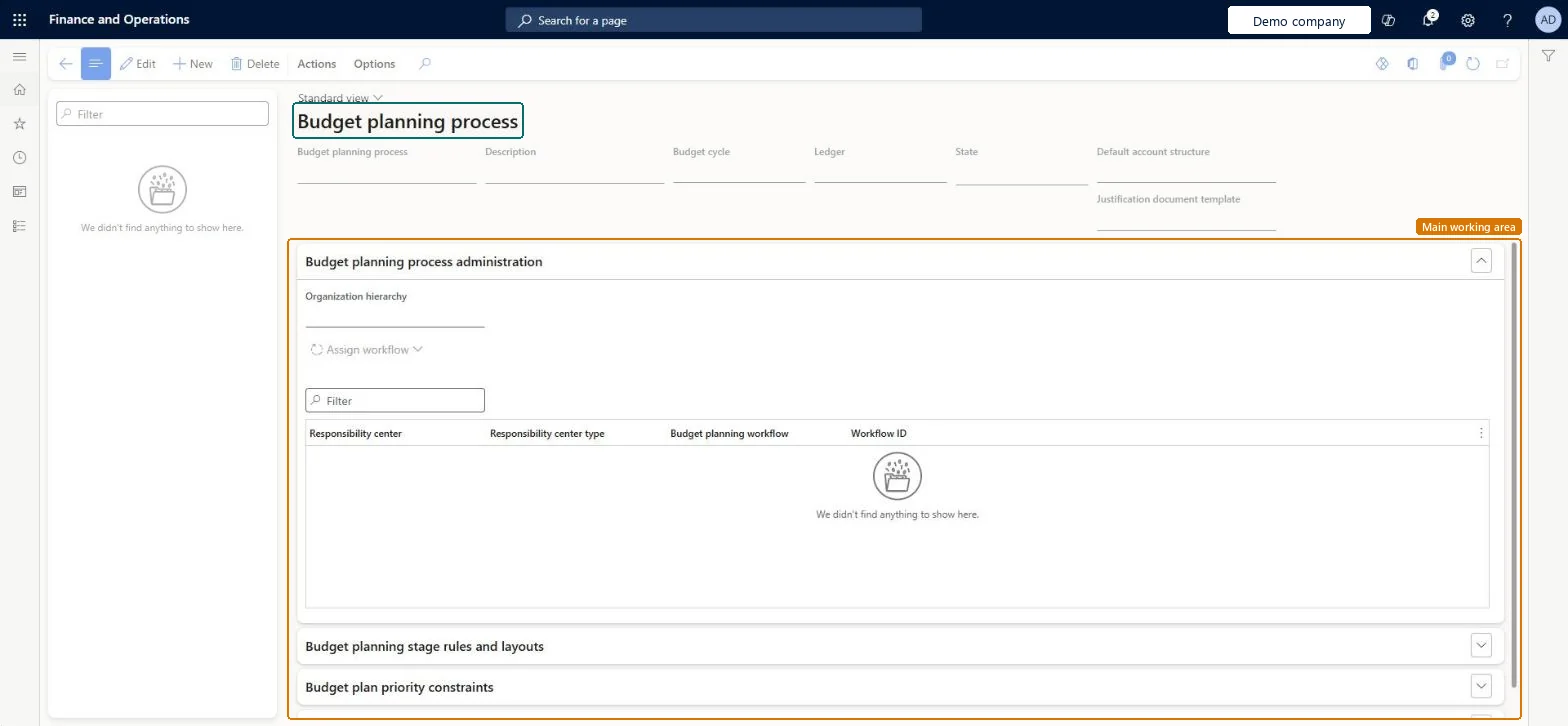
A setup page where you define budget planning processes, the rules for how budget plans are updated, routed, reviewed and approved.
- Used by
- Budget clerk, Budget contributor, Budget manager and 4 more roles
- Business process
- Review and approve planned budgets in Dynamics 365 Finance
- Menu item
BudgetPlanningProcess- Main table
BudgetPlanningProcess- Data entity
BudgetPlanProcessEntity- Setup steps
- 1 on this page
Show what matters for
Everyone
1What it is and why
| What it is | A setup page where you define budget planning processes, the rules for how budget plans are updated, routed, reviewed and approved. |
|---|---|
| What you do here | Used to decide which budgeting organizations, workflows, layouts and templates are used to create budget plans. |
| Example | For example, an Estimate stage can let a sales department change budget plan lines but not add new ones. |
Functional consultant · Solution architect
2Where it fits
| Business process | Manage budgets › Approve budgets › Review and approve planned budgets in Dynamics 365 Finance |
|---|---|
| Menu path | Budgeting › Setup › Budget planning › Budget planning process |
| Set up first | Budget planning configuration Microsoft Learn ↗Budget cycles Microsoft Learn ↗Organization hierarchy purposes Microsoft Learn ↗Justification document templates Microsoft Learn ↗ |
| Used next by | Budget plans Microsoft Learn ↗Generate budget plan from general ledger Microsoft Learn ↗ |
| Related pages | — |
End user · Functional consultant
3How to do it
Setup steps on this page
Set up Budget planning processNo screenshots yet
Used to decide which budgeting organizations, workflows, layouts and templates are used to create budget plans.
Microsoft's steps
- Go to Budgeting > Setup > Budget planning > Budget planning process and select New.
- Enter the process name, budget cycle, ledger and default account structure.
- On the Budget planning process administration FastTab, select the organization hierarchy.
- Assign a budget planning workflow to the responsibility centers.
- For each budget planning stage, choose whether lines can be added or changed, and the default layout.
- Optionally, select Alternate layouts to offer more layouts.
- Select Actions > Activate.
Source: Microsoft Learn ↗
Field guide
| Field | What it means | Worked example | Table column |
|---|---|---|---|
| Budget cycle | The single budget cycle the process belongs to.Microsoft Learn ↗ | — | BudgetCycle |
| Default account structure | The main account structure the process uses; it's required.Microsoft Learn ↗ | — | AccountStructure |
| Organization hierarchy | The budgeting hierarchy; only one per process.Microsoft Learn ↗ | — | OrganizationHierarchyType |
| Assign workflow | Assigns a budget planning workflow to similar responsibility centers at once.Microsoft Learn ↗ | — | — |
| Alternate layouts | Extra layouts users can switch to in budget plans.Microsoft Learn ↗ | — | — |
| Budget plan priority constraints | The priorities that can be selected on budget plans.Microsoft Learn ↗ | — | — |
| Justification document template | The Word template used for justification documents.Microsoft Learn ↗ | — | — |
Functional consultant
4Setup decisions
| Setup step | Recommended value and why | Decision · common mistake · test |
|---|---|---|
| Set up Budget planning process | — | — |
Solution architect
5Design impact
| Shared or per company | Shared: the same records are used by every legal entity. Microsoft data model ↗ |
|---|---|
| Can it be undone | — |
| Feature or country | — |
| If you change it later | — |
Technical architect
6Technical
| Menu item | BudgetPlanningProcess Checked in Dynamics 365 |
|---|---|
| Form | BudgetPlanningProcess Checked in Dynamics 365 |
| Table | BudgetPlanningProcessShown as “Budget planning processes” in Record infoKey field: Name, BudgetCycle, BudgetCycle_BudgetCycleTimeSpan_Name, BudgetCycle_BudgetCycleTimeSpan_FiscalCalendar_CalendarId, BudgetCycle_StartFiscalCalendarPeriod_FiscalCalendarYear_FiscalCalendar_CalendarId, BudgetCycle_StartFiscalCalendarPeriod_FiscalCalendarYear_Name, BudgetCycle_StartFiscalCalendarPeriod_Name, Ledger, Ledger_NameChecked in Dynamics 365 |
| Data entities | BudgetPlanProcessEntityBudget plan process Microsoft data model ↗ |
| Who can open it | PrivilegesMaintain budget planning processes BudgetPlanningProcessMaintainView budget planning processes BudgetPlanningProcessViewDutiesMaintain budget planning configuration and processes BudgetPlanningConfigProcessMaintainView budget planning configuration and processes BudgetPlanningConfigProcessView7 security rolesBudget clerkBudgetBudgetClerkBudget contributor BudgetBudgetContributorBudget manager BudgetBudgetManagerChief financial officer CompanyChiefFinancialOfficerManager HcmManagerAccounting manager LedgerAccountingManagerFinancial controller LedgerFinancialController |
| Actions on the page | Actions: Copy process, Process state, View budget process status, TranslationOptions: Personalize, Page options, ShareChecked in Dynamics 365 |
Developer
7Developer
| Open it directly | https://<your-environment>/?mi=BudgetPlanningProcess |
|---|---|
| Integrate with | BudgetPlanProcessEntity data entity Microsoft data model ↗ |
| Table definition | BudgetPlanningProcess columns and relations Microsoft data model ↗ |
Everyone
8Sources and checks
- learn.microsoft.com/dynamics365/finance/budgeting/budget-planning-overview-configuration
- learn.microsoft.com/dynamics365/finance/budgeting/budget-plan
- learn.microsoft.com/common-data-model/schema/core/operationscommon/tables/finance/budget/group/budgetplanningprocess
- learn.microsoft.com/dynamics365/fin-ops-core/fin-ops/migration/upgrade-budget-planning
- learn.microsoft.com/dynamics365/finance/budgeting/budget-planning-justification-docs
- learn.microsoft.com/training/modules/configure-use-budget-planning-dyn365-finance/2-configure
- learn.microsoft.com/dynamics365/finance/budgeting/budget-planning-integration-other-modules
- Checked in a working Dynamics 365 system, version 10.0.49: the menu item, form, table and security, the page.