BeyondERP.Newsletter
Menu

Setup page · Asset management

Maintenance plans

A setup page where you define maintenance plans, which set when planned preventive maintenance jobs are carried out on assets, by time interval or by counter readings.

Used by
Maintenance clerk, Maintenance manager
Business process
Perform preventative maintenance
Menu item
EntAssetMaintenancePlan
Main table
EntAssetMaintenancePlan
Data entity
EntAssetMaintenancePlanEntity
Setup steps
1 on this page
Show what matters for
PAGE GUIDEWhat the page does and how to use it8 sections. Choose a role to highlight what matters to you.
Everyone

1What it is and why

What it isA setup page where you define maintenance plans, which set when planned preventive maintenance jobs are carried out on assets, by time interval or by counter readings.
What you do hereUse this page to create maintenance plans and their lines, set the job type and interval on each line, and relate the plan to assets, asset types, functional locations, or functional location types.
ExampleFor example, you set up a 1-year, a 6-month, and a 1-month inspection line and suppress overlapping jobs so that only the 1-year inspection is planned when they fall together.
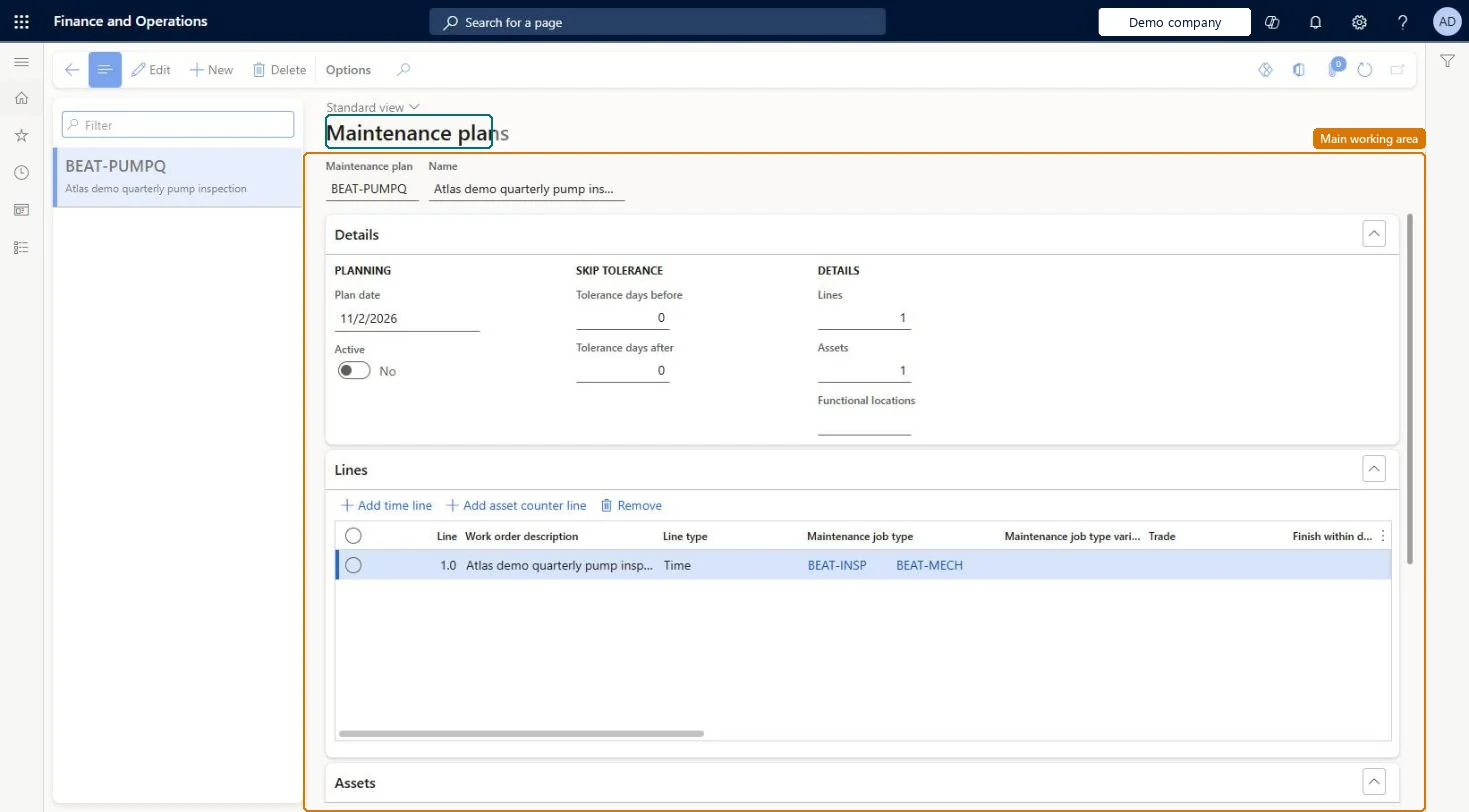
Maintenance plans page in Dynamics 365
The page in Dynamics 365. page title tab to open what to set or check
Functional consultant · Solution architect

2Where it fits

Business processPerform asset maintenance › Perform preventative maintenance
Menu pathAsset management › Setup › Preventive maintenance › Maintenance plans
Set up firstMaintenance job types Microsoft Learn Counters Microsoft Learn
Used next bySchedule maintenance plans Microsoft Learn
Related pagesFunctional location types Microsoft Learn
End user · Functional consultant

3How to do it

About the examples: Examples and screenshots in this guide use BEAT, a demo company in a Dynamics 365 test environment. Use your own company's codes and values instead of copying them.

Setup steps on this page

Set up Maintenance plans

Use this page to create maintenance plans and their lines, set the job type and interval on each line, and relate the plan to assets, asset types, functional locations, or functional location types.

Steps from Microsoft

  1. Go to Asset management > Setup > Preventive maintenance > Maintenance plans.
  2. Select New.
  3. Enter an ID in the Maintenance sequence field and a name in the Name field.
  4. Enter the Plan date, and set Active to Yes.
  5. On the Lines FastTab, select Add time line or Add asset counter line, and set the maintenance job type and interval.
  6. On the Assets, Asset types, Functional locations, and Functional location types FastTabs, select what the plan applies to.

Source: Microsoft Learn

Fields on the page

FieldWhat it meansTable column
Plan dateThe start date from which planning can be done on the plan.Microsoft Learn
ActiveTurns the maintenance plan on.Microsoft Learn MaintenancePlanActive
Maintenance job typeThe job type that a plan line creates.Microsoft Learn JobTypeID
Interval typeThe type of interval on the line, for example repeated or once.Microsoft Learn ActivityIntervalType
Suppress overlapping maintenance jobsRemoves schedule entries for smaller jobs created on the same date as a larger job.Microsoft Learn SuppressOverlappingJobs
CounterThe counter type used on a counter line.Microsoft Learn CounterTypeId
Auto createCreates a work order automatically from the line when maintenance plans are scheduled.Microsoft Learn AutoCreate
Tolerance days before and Tolerance days afterExtend the window in which overlapping jobs are suppressed.Microsoft Learn

Test checklist

  1. Create a plan with a 1-year line first and 6-month and 1-month lines below with Suppress overlapping maintenance jobs selected.
  2. Add an asset on the Assets FastTab with a start date one year back.
  3. Run Schedule maintenance plans and open Open maintenance schedule lines.
  4. Check that at the 1-year date only the 1-year job is scheduled.
  5. Set Active = No, run scheduling again and check no new lines are created.

Source: Microsoft Learn

Functional consultant

4Setup decisions

Setup stepRecommended value and whyDecision, common mistake and test
Set up Maintenance plansPut the most comprehensive, least frequent job on the first line, the more frequent jobs below it, and select Suppress overlapping maintenance jobs on the more frequent linesLearn's 1-month / 6-month / 1-year example shows this order makes scheduling create only the largest job when they fall on the same date.Which interval type should a time-based plan line use?Adding asset types or functional location types to a plan and expecting existing assets to pick it up; that change only reaches assets created afterwards.Test: Auto create work orders from a plan line

Feature management and licence

Feature to turn onCounter-based maintenance enhancements (Optional)

Microsoft Learn

Solution architect

5Design impact

Can it be undoneHard to reverse: Deactivating a plan stops new schedule lines. Removing a plan from an asset deletes its maintenance schedules with status Created, and asset type changes on the plan reach only new assets, so existing assets must be updated one by one. Microsoft Learn
If you change it laterA deactivated maintenance plan creates no new maintenance schedule lines when maintenance plans are scheduled. Microsoft Learn
Technical architect

6Technical

Menu itemEntAssetMaintenancePlan Checked in Dynamics 365
FormEntAssetMaintenancePlan Checked in Dynamics 365
TableEntAssetMaintenancePlanShown as “MAINTENANCE PLANS” in Record infoKey field: MaintenancePlanIdChecked in Dynamics 365
Data entitiesEntAssetMaintenancePlanEntityAsset management maintenance plans Checked in Dynamics 365
Who can open itPrivilegesMaintain maintenance management setup EntAssetSetupMaintainView maintenance management setup EntAssetSetupViewDutiesMaintain Asset Management setup EntAssetSetupMaintainView Enterprise Asset Management setup EntAssetSetupView
2 security rolesMaintenance clerk EntAssetMaintenanceClerkMaintenance manager EntAssetMaintenanceManager
Checked in Dynamics 365
Roles to set it up and use itTo set it up or change itMaintenance manager EntAssetMaintenanceManagerTo use itMaintenance clerk EntAssetMaintenanceClerkGive people one of these roles. On this system, 2 roles can open this page.Checked in Dynamics 365
Developer

7Developer

Open it by URLhttps://<your-environment>/?mi=EntAssetMaintenancePlan
Integrate withEntAssetMaintenancePlanEntity data entity Checked in Dynamics 365
Everyone

8Sources