BeyondERP.Newsletter
Menu

Setup page · Asset management

Fault designer

A setup page where you set up fault symptoms, fault areas, and fault types on asset types.

Used by
Maintenance clerk, Maintenance manager
Business process
Perform corrective maintenance
Menu item
EntAssetFaultDesigner
Main table
EntAssetObjectType
Data entity
EntAssetMaintenanceAssetTypeEntity
Setup steps
1 on this page
Show what matters for
PAGE GUIDEWhat the page does and how to use it8 sections. Choose a role to highlight what matters to you.
Everyone

1What it is and why

What it isA setup page where you set up fault symptoms, fault areas, and fault types on asset types.
What you do hereUse this page to decide which fault symptoms, areas, and types can be recorded for assets of each asset type.
ExampleFor example, for a generator asset type you add the symptom Short circuit, the area Electrical, and the type Faulty diode.
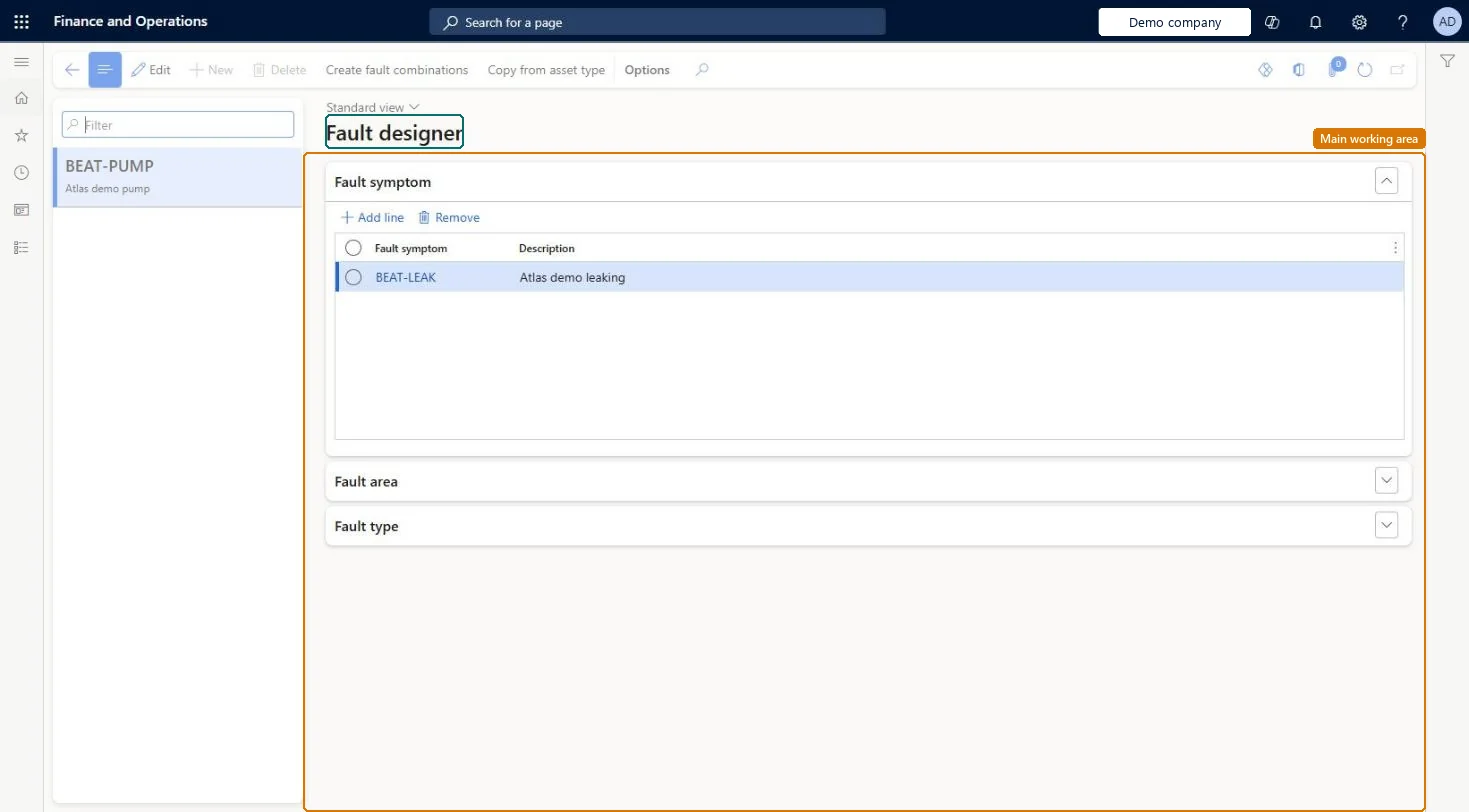
Fault designer page in Dynamics 365
The page in Dynamics 365. page title tab to open what to set or check
Functional consultant · Solution architect

2Where it fits

End user · Functional consultant

3How to do it

About the examples: Examples and screenshots in this guide use BEAT, a demo company in a Dynamics 365 test environment. Use your own company's codes and values instead of copying them.

Setup steps on this page

Set up Fault designer

Use this page to decide which fault symptoms, areas, and types can be recorded for assets of each asset type.

Steps from Microsoft

  1. Go to Asset management > Setup > Fault > Fault designer.
  2. In the left pane, select the asset type.
  3. On the Fault symptom FastTab, select Add line and select a fault symptom.
  4. On the Fault area FastTab, select Add line and select a fault area.
  5. On the Fault type FastTab, select Add line and select a fault type.
  6. Select Save.

Source: Microsoft Learn

Fields on the page

FieldWhat it meansTable column
Fault symptomA symptom that can be recorded for the asset type.Microsoft Learn FaultSymptomId
Fault areaAn area that can be recorded for the asset type.Microsoft Learn FaultArea
Fault typeA fault type that can be recorded for the asset type.Microsoft Learn FaultType

Test checklist

  1. Select an asset type and add a fault symptom, fault area and fault type.
  2. Select Create fault combinations and delete one irrelevant line.
  3. Use Copy from asset type to copy the setup to a second asset type.
  4. Add a fault to a work order for an asset of the first type and check the set-up values can be selected.

Source: Microsoft Learn

Functional consultant

4Setup decisions

Setup stepRecommended value and whyDecision, common mistake and test
Set up Fault designerUse Create fault combinations per asset type, then delete combinations that don't apply; use Copy from asset type for similar asset typesLearn says it's easier to delete combinations that aren't relevant than to create many lines by hand.Creating symptoms, areas and types but not setting them up on the asset types here. Fault data is managed per asset type in the fault designer, so asset types without lines have no fault setup.
Solution architect

5Design impact

Can it be undoneReversible: Fault lines on an asset type can be added or deleted any time; this controls what can be recorded from then on. Microsoft Learn
If you change it laterA fault can be added to a work order only if fault records are connected to the asset type of the asset on the work order. Microsoft Learn
Technical architect

6Technical

Menu itemEntAssetFaultDesigner Checked in Dynamics 365
FormEntAssetFaultDesigner Checked in Dynamics 365
TableEntAssetObjectTypeShown as “ASSET TYPES” in Record infoKey field: ObjectTypeIDChecked in Dynamics 365
Data entitiesEntAssetMaintenanceAssetTypeEntityAsset management asset types Checked in Dynamics 365
Who can open itPrivilegesMaintain maintenance management setup EntAssetSetupMaintainView maintenance management setup EntAssetSetupViewDutiesMaintain Asset Management setup EntAssetSetupMaintainView Enterprise Asset Management setup EntAssetSetupView
2 security rolesMaintenance clerk EntAssetMaintenanceClerkMaintenance manager EntAssetMaintenanceManager
Checked in Dynamics 365
Roles to set it up and use itTo set it up or change itMaintenance manager EntAssetMaintenanceManagerTo use itMaintenance clerk EntAssetMaintenanceClerkGive people one of these roles. On this system, 2 roles can open this page.Checked in Dynamics 365
Actions on the page(Action Pane without tabs): Create fault combinations, Copy from asset typeChecked in Dynamics 365
Developer

7Developer

Open it by URLhttps://<your-environment>/?mi=EntAssetFaultDesigner
Integrate withEntAssetMaintenanceAssetTypeEntity data entity Checked in Dynamics 365
Everyone

8Sources