Accounts receivable clerk, Accounts receivable manager, Auditor and 7 more roles
Business process
Generate invoices for government services in Dynamics 365 Finance
Menu item
CustCustomField
Main table
CustCustomField
Data entity
CustCustomFieldEntity
Setup steps
1 on this page
Show what matters for
PAGE GUIDEWhat the page does and how to use it8 sections. Choose a role to highlight what matters to you.
Everyone
1What it is and why
What it is
A public sector setup page for custom fields that you assign to billing codes.
What you do here
Use it to create custom fields (currency, decimal, text, integer, Boolean or date) that collect data for specific billing charges on free text invoices.
Example
A city's animal control department uses custom fields to record the type of animal and the date of its last rabies vaccination.
The page in Dynamics 365. page title tab to open what to set or check
About the examples: Examples and screenshots in this guide use BEAT, a demo company in a Dynamics 365 test environment. Use your own company's codes and values instead of copying them.
Step by step, with screenshots
Set up Billing code custom fields1 screen
Defines typed custom fields with default values that are attached to billing codes so that extra data is collected on free text invoice lines.
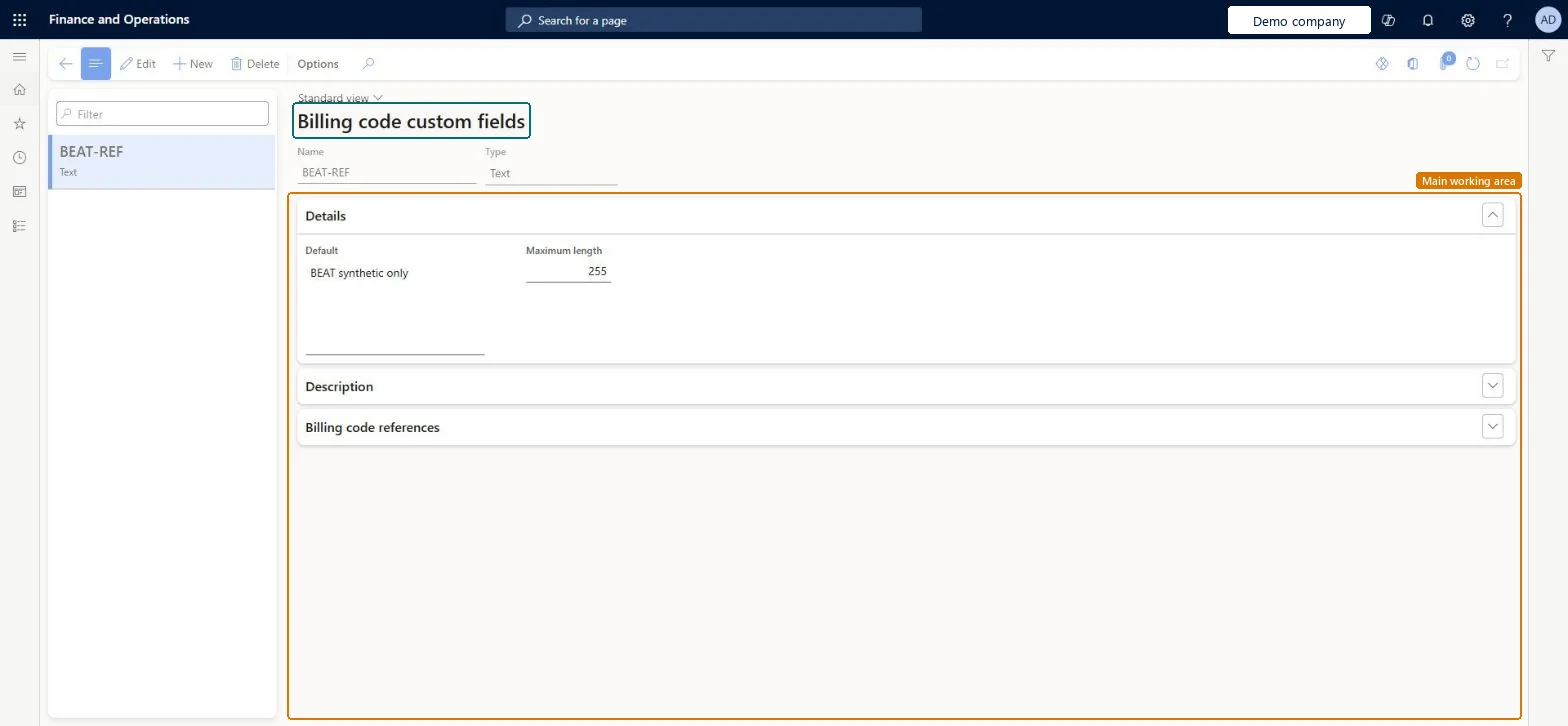
Screen 1
Create the billing code custom field
Go to Accounts receivable > Setup > Billing code custom fields
Select New and enter the name and type
On the Details FastTab, enter the default and maximum length
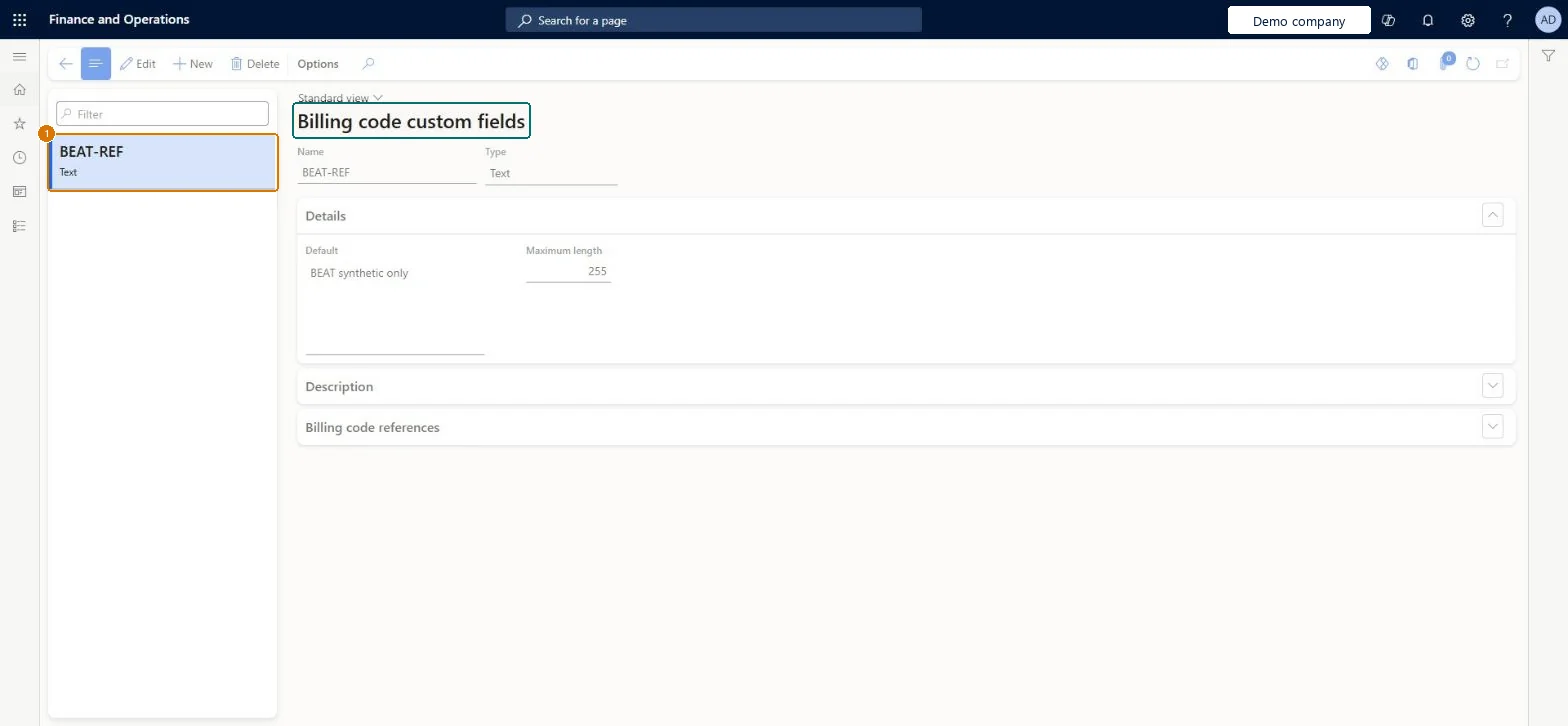
1Name
BEAT-REF
Type
Text
Default
Not specified
Maximum length
255
Show the full screen page title tab to open what to set or check
Steps from Microsoft
Go to Accounts receivable > Setup > Billing code custom fields.
Select New.
In the Name field, enter a name.
In the Type field, select the kind of field; the Description section changes to match.
In the Details section, enter the default value and any other values needed.
Optionally, in the Usage description field, describe how the field should be used.
Open the Billing code references section to see the billing codes that use the field.
Create the custom fields before the billing codes, choosing the Type that matches the data (Currency, Decimal, Text, Integer, Boolean or Date) and a Default where most invoices use the same value.Custom fields are assigned to billing codes, so they must exist first. Defaults can still be changed on the free text invoice.
Picking the wrong Type. Currency fields accept only two decimals, Decimal fields four, and Date fields only dates, so data entered on invoices is limited by the type.
Reversible: Custom field defaults can be changed and are only proposed on the free text invoice. Check Billing code references first to see which billing codes use the field. Microsoft Learn
Technical architect
6Technical
Menu item
CustCustomFieldChecked in Dynamics 365
Form
CustCustomFieldChecked in Dynamics 365
Table
CustCustomFieldShown as “Billing code custom fields” in Record infoKey field: CustomFieldChecked in Dynamics 365
PrivilegesMaintain custom fields CustCustomFieldMaintainView custom fields CustCustomFieldViewDutiesInquire into invoice and cash policies CustInvoiceInvoiceAndCashPoliciesInquirEnable invoice and cash process CustInvoiceInvoiceAndCashProcessEnable10 security rolesAuditor AuditPolicyManagerCollections manager CollectionLetterCollectionsManagerAccounts receivable clerk CustInvoiceAccountsReceivableClerkAccounts receivable manager CustInvoiceAccountsReceivableManagerAccounting manager LedgerAccountingManagerAccounting supervisor LedgerAccountingSupervisorAccounts receivable centralized payments clerk PaymAccountsReceivableCentralPaymClerkAccounts receivable payments clerk PaymAccountsReceivablePaymentsClerkRental coordinator agent RentalCoordinatorAgentRental manager RentalManagerChecked in Dynamics 365
Roles to set it up and use it
To set it up or change itRental manager RentalManagerAccounts receivable manager CustInvoiceAccountsReceivableManagerRental coordinator agent RentalCoordinatorAgentCollections manager CollectionLetterCollectionsManagerAccounting supervisor LedgerAccountingSupervisorTo use itAccounts receivable clerk CustInvoiceAccountsReceivableClerkAccounts receivable payments clerk PaymAccountsReceivablePaymentsClerkAccounts receivable centralized payments clerk PaymAccountsReceivableCentralPaymClerkAuditor AuditPolicyManagerGive people one of these roles. On this system, 10 roles can open this page.Checked in Dynamics 365
Checked in a working Dynamics 365 system, version 10.0.49: the menu item, form, table and security, the page, the demo records and the values in the screenshots.