Transaction page · Accounts receivable
All free text invoices
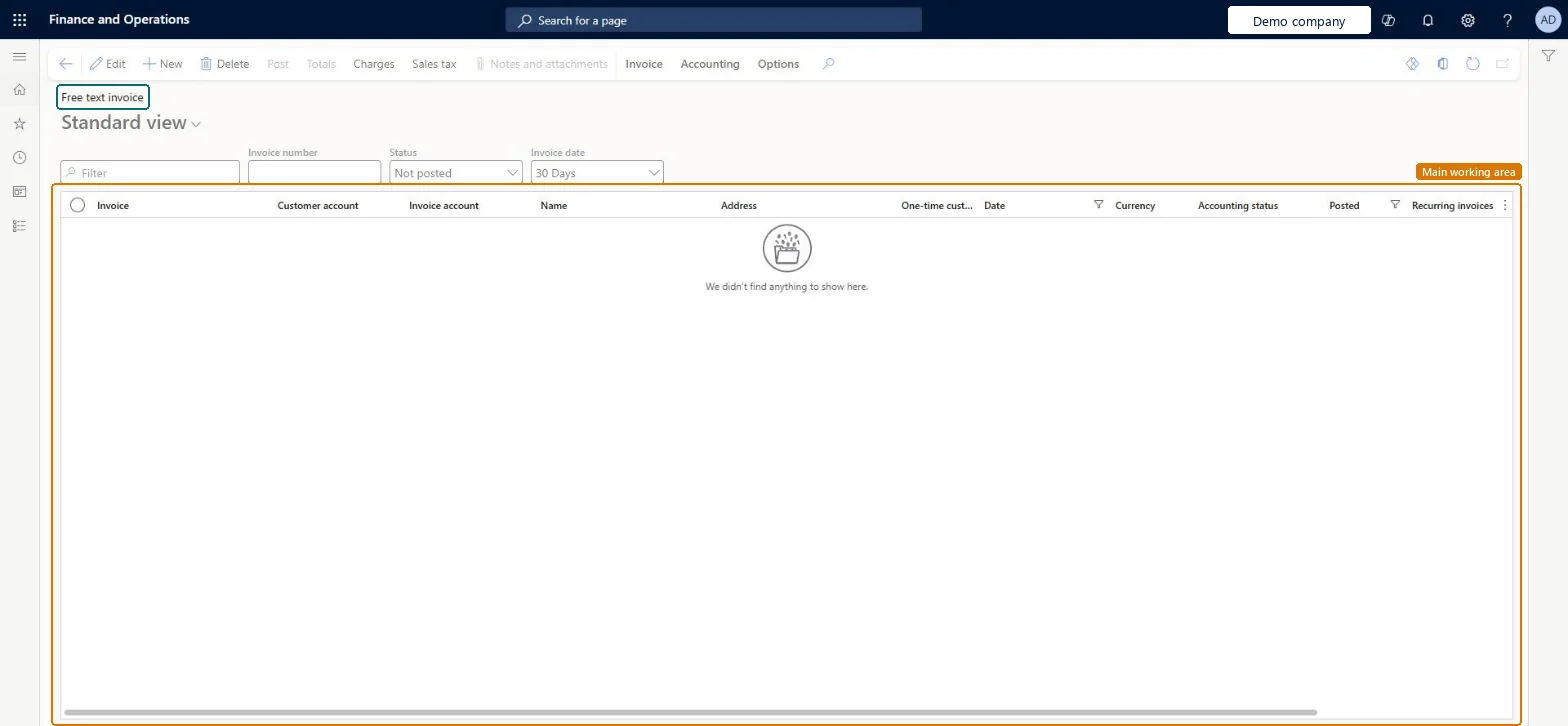
The list page of free text invoices, from which new free text invoices are created and managed.
- Used by
- Accounts receivable clerk, Accounts receivable manager, Auditor and 11 more roles
- Business process
- —
- Menu item
CustFreeInvoiceListPage- Main table
CustInvoiceTable- Data entity
FreeTextInvoiceEntity- Setup steps
- —
Show what matters for
Everyone
1What it is and why
| What it is | The list page of free text invoices, from which new free text invoices are created and managed. |
|---|---|
| What you do here | Select New to create a free text invoice for a customer, enter lines with main accounts, sales tax and charges, and post it; invoices can also be created from a template. |
| Example | Creating a free text invoice in demo company USMF: select New, choose the customer account, enter a description and main account, add a charge, review totals and post. |
Functional consultant · Solution architect
2Where it fits
| Business process | — |
|---|---|
| Menu path | Accounts receivable › Invoices › All free text invoices |
| Set up first | All customers Microsoft Learn ↗Customer posting profiles Microsoft Learn ↗ |
| Used next by | — |
| Related pages | Free text invoice templates Microsoft Learn ↗Optimized free text invoices Microsoft Learn ↗ |
End user · Functional consultant
3How to do it
Microsoft's steps
- Go to Accounts receivable > Invoices > All free text invoices.
- Select New.
- In the Customer account field, select the customer.
- On the line, enter a Description and select the Main account.
- On the Line details FastTab, open the Financial dimensions line tab to add dimensions.
- Optionally enter a Quantity and Unit price; the amount is calculated from them.
- Select Sales tax to review the calculated tax, and then select OK.
- Select Charges to add any charges, entering the Charges code and Charges value.
- Select Totals to review the invoice, and then select Close.
- Select Post, choose the print and posting options, and then select OK.
Source: Microsoft Learn ↗
Field guide
| Field | What it means | Worked example | Table column |
|---|---|---|---|
| Customer account | The customer being invoiced; by default it's also the invoice account.Microsoft Learn ↗ | — | — |
| Main account | The ledger account the invoice line is posted to.Microsoft Learn ↗ | — | — |
| Quantity | Optional number of units; multiplied by the unit price to give the amount.Microsoft Learn ↗ | — | — |
| Sales tax group | Filled in from the customer, or from the main account if the customer has none.Microsoft Learn ↗ | — | — |
| Charges code | The charge to add to the invoice, such as freight.Microsoft Learn ↗ | — | — |
| Credit limit type | How the customer's credit limit is checked before the invoice is posted.Microsoft Learn ↗ | — | — |
Functional consultant
4Setup decisions
| Setup step | Recommended value and why | Decision · common mistake · test |
|---|---|---|
| — No setup is made on this page. | ||
Solution architect
5Design impact
| Shared or per company | Per company: each legal entity has its own records. Microsoft data model ↗ |
|---|---|
| Can it be undone | — |
| Feature or country | — |
| If you change it later | The Stop posting of free text invoices on first error parameter decides whether one failing invoice stops the whole posting run or is skipped while the rest are posted. Microsoft Learn ↗ |
Technical architect
6Technical
| Menu item | CustFreeInvoiceListPage Checked in Dynamics 365 |
|---|---|
| Form | CustFreeInvoice Checked in Dynamics 365 |
| Table | CustInvoiceTableShown as “Customer free text invoice” in Record infoChecked in Dynamics 365 |
| Data entities | FreeTextInvoiceEntityCustomer free text invoice Microsoft data model ↗FreeTextInvoiceHeaderEntityCustomer free text invoice Microsoft data model ↗ |
| Who can open it | PrivilegesView customer free text invoice list page CustFreeInvoiceListPageViewMaintain free text invoices CustFreeInvoiceMaintainView customer free text invoice CustFreeInvoiceViewDutiesCash flow position details drill down CashflowPositionDetailsDrillDownReview collections process performance CollectionLetterCollectionProcPerfRevieInquire into collections status CollectionLetterCollectionsStatusInquirMaintain collections transactions CollectionLetterCollectionsTransMaintaiInquire into customer invoice status CustInvoiceCustomerInvoiceStatusInquireMaintain customer invoice transactions CustInvoiceCustomerInvoiceTransMaintainReview invoice and cash process performance CustInvoiceInvoiceAndCashProcPerfReview14 security rolesAuditorAuditPolicyManagerCollections agent CollectionLetterCollectionsAgentCollections manager CollectionLetterCollectionsManagerChief executive officer CompanyChiefExecutiveOfficerChief financial officer CompanyChiefFinancialOfficerAccounts receivable clerk CustInvoiceAccountsReceivableClerkAccounts receivable manager CustInvoiceAccountsReceivableManagerAccountant LedgerAccountantAccounting manager LedgerAccountingManagerAccounting supervisor LedgerAccountingSupervisorFinancial controller LedgerFinancialControllerAccounts receivable centralized payments clerk PaymAccountsReceivableCentralPaymClerkAccounts receivable payments clerk PaymAccountsReceivablePaymentsClerkTreasurer PaymTreasurer |
| Actions on the page | Invoice: New, Details, Related information, Document, Functions, Deductions, Print managementAccounting: AccountingButtons: Post, Totals, Charges, Sales tax, Notes and attachmentsChecked in Dynamics 365 |
Developer
7Developer
| Open it directly | https://<your-environment>/?mi=CustFreeInvoiceListPage |
|---|---|
| Integrate with | FreeTextInvoiceEntity data entity Microsoft data model ↗ |
| Table definition | CustInvoiceTable columns and relations Microsoft data model ↗ |
Everyone
8Sources and checks
- learn.microsoft.com/dynamics365/finance/accounts-receivable/create-free-text-invoice-new
- learn.microsoft.com/dynamics365/finance/accounts-receivable/create-free-text-invoice-new
- learn.microsoft.com/common-data-model/schema/core/operationscommon/tables/finance/accountsreceivable/worksheetheader/custinvoicetable
- learn.microsoft.com/dynamics365/finance/accounts-receivable/configure-customer-invoices
- learn.microsoft.com/dynamics365/finance/accounts-receivable/free-text-invoice-optimization
- Checked in a working Dynamics 365 system, version 10.0.49: the menu item, form, table and security, the page.