Master data page · Accounts receivable
All customers
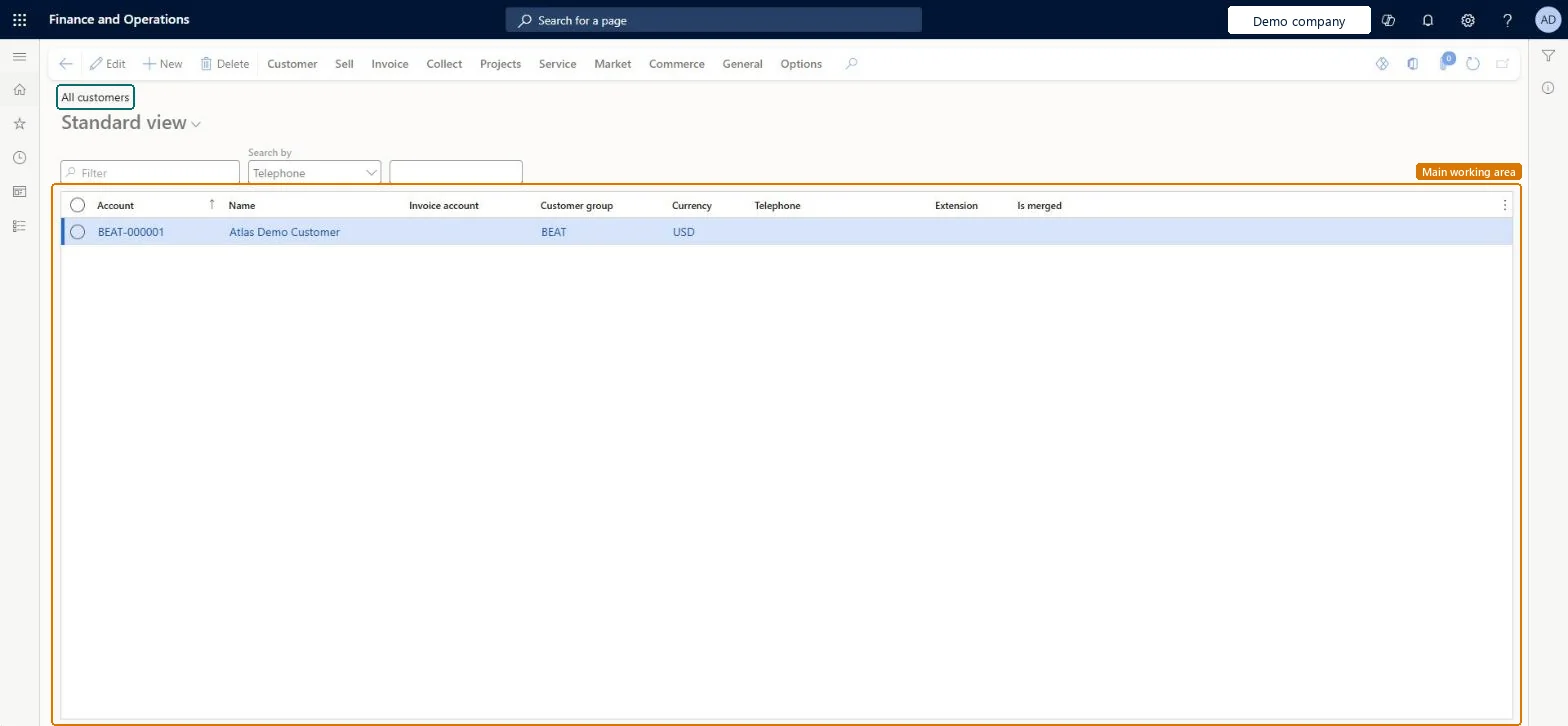
The customers page, which holds the customer accounts of the organization.
- Used by
- Accounts receivable clerk, Accounts receivable manager, and 37 more roles
- Business process
- —
- Menu item
CustTableListPage- Main table
CustTable- Data entity
CustCollectionsBICustTable- Setup steps
- —
Show what matters for
Everyone
1What it is and why
| What it is | The customers page, which holds the customer accounts of the organization. |
|---|---|
| What you do here | Used to create and manage the customer accounts for the customers the organization does business with. |
| Example | For example, from the Collect tab you can waive, reinstate, or reverse a customer's interest notes, transaction interest, or fees. |
Functional consultant · Solution architect
2Where it fits
| Business process | — |
|---|---|
| Menu path | Accounts receivable › Customers › All customers |
| Set up first | Customer groups Microsoft Learn ↗Terms of payment Microsoft Learn ↗ |
| Used next by | Invoicing, payments and reports Microsoft Learn ↗Create sales order Microsoft Learn ↗ |
| Related pages | Customer groups Microsoft Learn ↗Customer bank accounts Microsoft Learn ↗Address book Microsoft Learn ↗ |
End user · Functional consultant
3How to do it
Microsoft's steps
- Go to Accounts receivable > Customers > All customers.
- Select New.
- In the Customer account field, enter an ID for the customer.
- In the Type field, select Organization or Person.
- In the Name field, enter the customer's name.
- In the Customer group field, select a customer group, and then select Save.
- On the Credit and collections FastTab, enter a Credit limit.
- On the Invoice and delivery FastTab, select the Mode of delivery and Sales tax group.
- On the Payment defaults FastTab, select the Terms of payment and Method of payment.
- Select Save.
Source: Microsoft Learn ↗
Field guide
| Field | What it means | Worked example | Table column |
|---|---|---|---|
| Customer group | The group the customer belongs to; groups supply shared defaults such as posting accounts, and every new customer needs one.Microsoft Learn ↗ | — | — |
| Credit limit | The most credit you're willing to extend to the customer; it's checked when documents are updated.Microsoft Learn ↗ | — | — |
| Terms of payment | How due dates are calculated for the customer's invoices; the terms are used on the customer's documents.Microsoft Learn ↗ | — | — |
Functional consultant
4Setup decisions
| Setup step | Recommended value and why | Decision · common mistake · test |
|---|---|---|
| — No setup is made on this page. | ||
Solution architect
5Design impact
| Shared or per company | Per company: each legal entity has its own records. Microsoft data model ↗ |
|---|---|
| Can it be undone | — |
| Feature or country | — |
| If you change it later | When customer approvals are turned on, changes to fields enabled for approval are held as proposed changes and only applied after the workflow is approved. Microsoft Learn ↗ |
Technical architect
6Technical
| Menu item | CustTableListPage Checked in Dynamics 365 |
|---|---|
| Form | CustTable Checked in Dynamics 365 |
| Table | CustTableShown as “Customers” in Record infoKey field: AccountNumChecked in Dynamics 365 |
| Data entities | CustCollectionsBICustTableCustomers Microsoft data model ↗CustCustomerBaseEntityCustomer definitions Microsoft data model ↗CustCustomerDetailV2EntityCustomer details V2 Microsoft data model ↗CustCustomerV3EntityCustomers V3 Microsoft data model ↗DimAttributeCustTableEntityCustomers Microsoft data model ↗ |
| Who can open it | PrivilegesView sales orders of type return per customer (Enterprise Portal) CustomerRelatedInfoRetItemsViewMaintain customer records (Sales and marketing) CustomersListMaintainMaintain customer records (financials) CustTableMaintainView customer records (financials) CustTableViewDutiesInquire into customer master CustCustomerMasterInquireInquire into customer master CustCustomerMasterInquireWithoutTaxViewMaintain customer master CustCustomersMaintainInquire into customer positive payments PaymCustPositivePayInquireInquire into customer master RentalCustCustomerMasterInquireInquire into customer fleet item details RentalCustomerRentalItemDetailsInquireInquire into rental sales order progress RentalSalesOrderProgressInquireInquire into sales return order progress ReturnSalesReturnOrderProgressInquireInquire into sales order progress SalesOrderProgressInquireMaintain Customer Service Master TradeCustomerMaintain40 security rolesAuditorAuditPolicyManagerCollections agent CollectionLetterCollectionsAgentCollections manager CollectionLetterCollectionsManagerChief executive officer CompanyChiefExecutiveOfficerChief financial officer CompanyChiefFinancialOfficerCredit management clerk CredManClerkCredit management manager CredManManagerMarketing coordinator CRMMarketingCoordinatorMarketing manager CRMMarketingManagerAccounts receivable clerk CustInvoiceAccountsReceivableClerkAccounts receivable manager CustInvoiceAccountsReceivableManager CustTableCopilotSummaryInsufficientAccessTestRoleAccountant LedgerAccountantAccounting manager LedgerAccountingManagerAccounting supervisor LedgerAccountingSupervisorFinancial controller LedgerFinancialController MCRTestUserRoleAccounts receivable centralized payments clerk PaymAccountsReceivableCentralPaymClerkAccounts receivable payments clerk PaymAccountsReceivablePaymentsClerkAccounts payable positive payment clerk PaymPositivePaymentClerkTreasurer PaymTreasurerProject manager ProjProjectManagerProject supervisor ProjProjectSupervisorRental clerk RentalClerkRental coordinator agent RentalCoordinatorAgentRental manager RentalManagerRental purchasing manager RentalPurchasingManagerRental representative RentalRepresentativeRental sales manager RentalSalesManagerProduction planner ReqProductionPlannerRetail operations manager RetailOperationsManagerRetail service RetailServiceRetail store manager RetailStoreManagerService dispatcher SMADispatcherService delivery manager SMAServiceDeliveryManagerCustomer service manager TradeCustomerServiceManagerCustomer service representative TradeCustomerServiceRepresentativeSales clerk TradeSalesClerkSales manager TradeSalesManagerSales representative TradeSalesRepresentative |
| Actions on the page | Customer: Accounts, Transactions, Balance, Forecast, Set up, Attachments, Catalogs, Customer service, Registration, PropertiesSell: New, Related information, Trade agreements, Set up, Approved customerInvoice: New, Set up, Journals, Related informationCollect: New, Collection letters, Interest note adjustment, Interest, Customer balances, Settle, DeductionsProjects: New, Project control, Related informationService: New, Related informationMarket: Campaigns, Telemarketing, MailingsCommerce: Related information, Media, Attributes, LoyaltyGeneral: New, Activities, Accounts, Set up, StatisticsOptions: Personalize, Page options, ShareChecked in Dynamics 365 |
Developer
7Developer
| Open it directly | https://<your-environment>/?mi=CustTableListPage |
|---|---|
| Integrate with | CustCollectionsBICustTable data entity Microsoft data model ↗ |
| Table definition | CustTable columns and relations Microsoft data model ↗ |
Everyone
8Sources and checks
- learn.microsoft.com/dynamics365/finance/accounts-receivable/accounts-receivables-set-up-overview
- learn.microsoft.com/training/modules/configure-accounts-receivable-dyn365-finance/11-exercise-1
- learn.microsoft.com/common-data-model/schema/core/operationscommon/tables/common/customer/main/custtable
- learn.microsoft.com/training/modules/configure-accounts-receivable-dyn365-finance/8-customers
- learn.microsoft.com/dynamics365/finance/general-ledger/tasks/establish-customer-payment-terms
- learn.microsoft.com/dynamics365/supply-chain/sales-marketing/tasks/create-sales-orders
- learn.microsoft.com/dynamics365/finance/accounts-receivable/accounts-receivables-set-up-overview
- Checked in a working Dynamics 365 system, version 10.0.49: the menu item, form, table and security, the page.